
Movavi Video Editor
Create awesome videos easily

One of these editors arrives with a subscription, a corporate ecosystem, and decades of industry momentum behind it; the other arrives as a free open-source project built by a community. After spending time with Premiere® Pro and Kdenlive on similar projects, I found that the real difference is not cost but how each editor approaches complexity. Premiere® Pro surrounds users with professional color tools, advanced audio workflows, AI-powered features, and deep integration with the wider Adobe® environment, while Kdenlive focuses on flexibility, transparency, and giving editors a surprisingly capable toolkit without asking for a monthly payment. The trade-off remained visible throughout: Premiere® Pro, currently just Adobe® Premiere®, delivered a more polished and feature-rich experience, whereas Kdenlive offered remarkable freedom and value for users willing to trade some convenience for an open-source workflow.
Best for professional workflows
Premiere® Pro takes this category almost immediately. The deeper I moved into complex timelines, collaboration tools, and production-heavy projects, the more obvious it became that the software was built for environments where video editing is part of a larger process.
Best for color grading
Kdenlive handles color correction well, but Premiere® Pro offers a different level of precision. The Lumetri Color tools provide the kind of control that makes detailed grading feel like part of the workflow rather than an extra step.
Best for advanced editing
This is where the distance between the two editors becomes most visible. Multicam workflows, advanced masking, motion graphics integration, AI-powered features, and professional audio tools give Premiere® Pro a much broader range.
Best overall performance
Kdenlive remains impressively efficient for a free editor, but Premiere® Pro makes better use of modern hardware and stays more comfortable as projects become larger and more demanding.
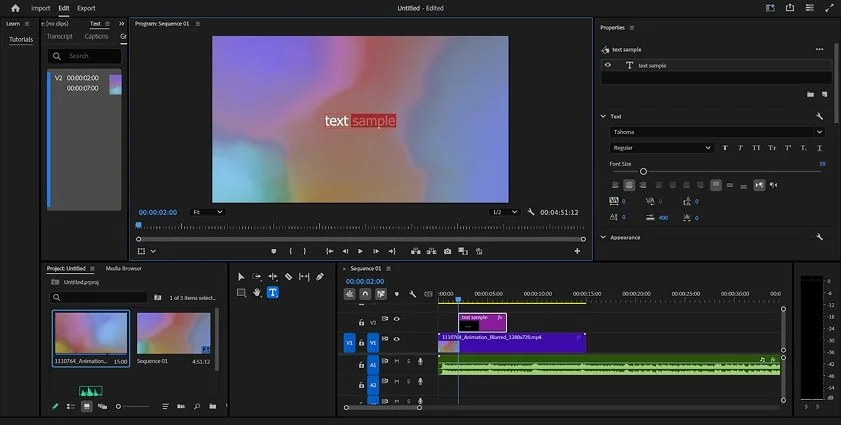
Premiere® Pro
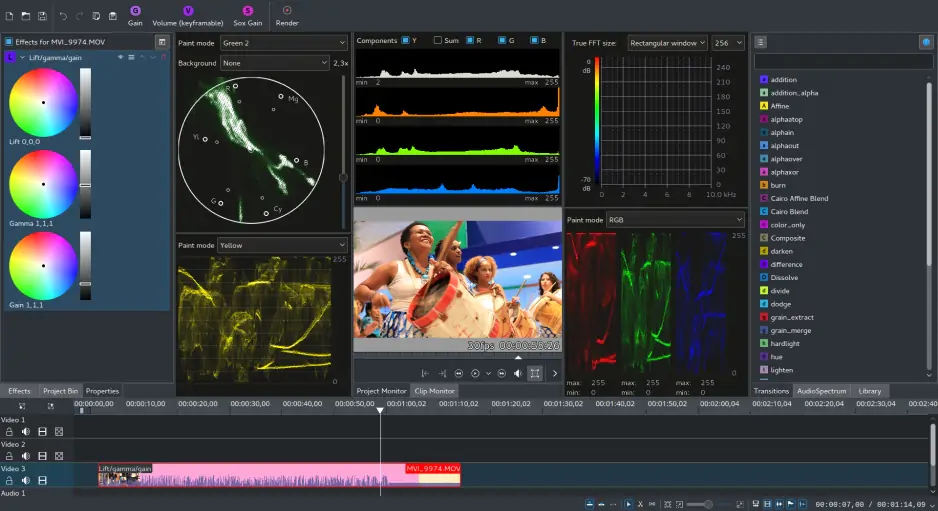
Kdenlive
What struck me first when comparing Premiere® Pro vs. Kdenlive was that neither editor seems particularly interested in making a strong first impression on beginners. Premiere® Pro presents a dense workspace filled with panels, tools, and options that reveal their value over time but can feel intimidating on day one. Kdenlive is hardly minimal either, yet its open-source roots give it a more straightforward feel, with fewer layers of ecosystem features competing for attention.
The difference emerges once the initial learning phase passes. Premiere® Pro is more polished, more consistent, and generally easier to navigate once its logic clicks into place, while Kdenlive occasionally feels like a collection of powerful tools assembled around the workflow rather than seamlessly integrated into it. Both require commitment, but one offers a smoother long-term experience.
Winner:
Premiere® Pro.
For interface polish, workflow consistency, and day-to-day usability after the learning curve, Premiere® Pro comes out ahead.
Kdenlive vs Premiere® Pro competition in this category feels a little like comparing a well-equipped workshop to a very capable workshop that simply has fewer rooms. Kdenlive covers far more ground than many people expect, with multitrack timelines, proxy editing, keyframes, broad codec support through FFmpeg, and enough flexibility to handle surprisingly ambitious projects. Premiere® Pro, however, keeps extending the ceiling with multicam editing, advanced color grading, professional audio mixing, motion graphics integration, sophisticated masking tools, and workflows designed to fit into larger production environments.
What stood out most was not that Kdenlive lacked important features, but that Premiere® Pro kept offering another layer whenever a project became more demanding. The further I pushed into complex edits, the more often Premiere® Pro had a dedicated tool waiting rather than a workaround.
Winner:
Premiere® Pro.
For multicam editing, color work, audio production, motion graphics, and advanced workflows, Premiere® Pro remains in a different class.
Testing performance of Kdenlive and Premiere® Pro turned out to be less about raw speed and more about how each editor carries its workload. Kdenlive remains surprisingly efficient, runs well on a wide range of hardware, and benefits from proxy workflows that help keep larger projects manageable. Premiere® Pro asks for a more capable machine, but in return it makes stronger use of GPU acceleration, handles demanding codecs more comfortably, and stays composed when timelines become crowded with effects, layers, and high-resolution footage.
The contrast becomes easier to spot as projects grow. Kdenlive stretches its resources impressively for a free editor, while Premiere® Pro feels engineered with the expectation that complexity is inevitable rather than occasional. One is economical with hardware, the other is built to take advantage of it.
Winner:
Premiere® Pro.
For GPU utilization, stability on large productions, and performance under heavier workloads, Premiere® Pro takes the lead.
Pricing is the point where these editors stop pretending to compete on equal terms. Premiere® Pro lives inside Adobe®’s subscription ecosystem, which means ongoing monthly costs in exchange for continuous updates, cloud integration, new AI features, and professional support. Kdenlive takes the opposite position entirely: the software is free, open source, fully functional from the start, and does not place exports behind trial restrictions or watermarks.
What makes this comparison interesting is that neither option feels incomplete. Premiere® Pro justifies its price through scale and professional capabilities, while Kdenlive proves how much modern editing software can offer without charging anything at all. The question becomes less about affordability and more about whether the extra tools are worth the recurring cost.
Winner:
Kdenlive.
For zero-cost access, no watermarks, and no subscription commitments, Kdenlive has a remarkably strong advantage.
Platform support reveals two very different philosophies. Premiere® Pro focuses on Windows and macOS, reflecting Adobe®’s long-standing position in professional desktop editing. Kdenlive covers the same territory but adds Linux, opening the door to users who prefer open-source operating systems or work across a wider mix of environments.
The practical impact becomes clearer once editing moves between different machines or workflows. Premiere® Pro assumes a fairly specific environment, while Kdenlive adapts more easily to a variety of setups without asking users to stay inside a particular software ecosystem. That flexibility may not matter to everyone, but for creators who value choice in how they build their workspace, it becomes a meaningful advantage.
The AI category highlights just how differently these editors have evolved. Premiere® Pro has become one of the main destinations for Adobe®’s AI efforts, with features such as text-based editing, automatic transcription, audio enhancement, scene detection, auto reframing, and Firefly-powered tools like Generative Extend. Many of these features do not replace editing decisions, but they remove a surprising amount of repetitive work that used to consume time on larger projects.
Kdenlive follows a much more traditional path. Its strengths come from manual control, open-source flexibility, and community-driven development rather than built-in AI assistance. That approach has its appeal, especially for users who prefer understanding every step of the workflow, but it also means many modern automation tools simply are not part of the package.
Pros & cons
Comprehensive professional editing toolkit for demanding projects
Advanced color grading with the Lumetri Color panel
Powerful AI features, including transcription, text-based editing, and Firefly-powered tools
Excellent multicam editing, masking, and motion graphics capabilities
Strong integration with Adobe® After Effects®, Adobe® Audition®, and the wider Adobe® ecosystem
Broad codec support and extensive export options
Well suited for collaborative and commercial production workflows
Subscription-only pricing model
Requires relatively powerful hardware for the best experience
Learning curve can be intimidating for new editors
Large feature set may feel excessive for simple projects
Completely free and open source
Available on Windows, macOS, and Linux
Strong multitrack editing and proxy workflow support
Broad format compatibility through FFmpeg
No watermarks, subscriptions, or feature restrictions
Active community development and frequent updates
Capable of handling surprisingly complex editing projects
Interface lacks the polish of some commercial editors
Very limited AI-powered tools and automation features
Collaboration options are relatively basic
Motion graphics and color grading tools are less advanced
Some workflows require more manual setup and adjustment
Smaller plugin ecosystem compared to major commercial platforms

After working on different kinds of projects, I found myself reaching for these editors for entirely different reasons. Kdenlive handles YouTube videos, casual editing, and independent creative work surprisingly well, especially for users who prefer open-source software and do not mind spending time shaping their workflow. Premiere® Pro starts pulling ahead when deadlines, clients, teams, or larger productions enter the conversation, because the software is built around the assumption that projects will keep growing in scale. The distinction is not really between simple and advanced editing; it is between editing as a task and editing as part of a broader production process.
By the time I reached the end of this comparison, the decision felt less like a contest and more like a question of priorities. Premiere® Pro offers a deeper toolkit, stronger AI features, and a workflow built for professional production, but it comes with a subscription and higher demands on both hardware and the user. Kdenlive takes a different path, delivering impressive editing capabilities without asking for a monthly payment or locking users into a particular ecosystem. The choice ultimately comes down to what matters more: access to one of the industry's most advanced editing environments or a capable open-source platform that keeps both costs and restrictions to a minimum.
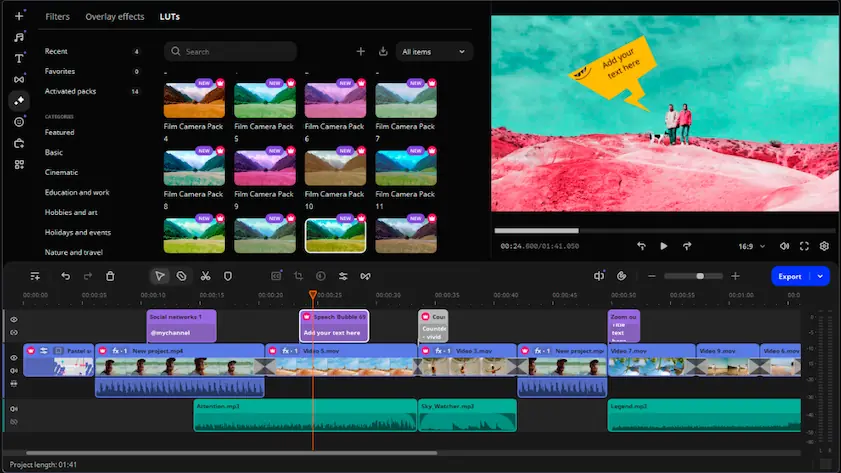
While moving between Premiere® Pro’s professional depth and Kdenlive’s open-source flexibility, I kept thinking about users who may not be looking for either extreme. Movavi Video Editor occupies a different space altogether, combining a more approachable workflow with modern features such as auto subtitles, AI background removal, enhancement tools, and a collection of built-in effects that do not require much setup to start using. What I liked most was how little time I spent configuring the software before actually editing, which is not something I could always say about the other two editors. For creators who want more guidance than Kdenlive offers but less complexity than Premiere® Pro demands, Movavi Video Editor feels like a practical middle ground that keeps the focus on finishing videos rather than managing the editing environment.

Interestingly, both can be strong long-term choices for different reasons. Premiere® Pro offers a path into professional production and industry-standard workflows, while Kdenlive provides a platform that is independent of subscriptions and proprietary ecosystems. The better option often comes down to whether long-term value means more features or fewer commitments.
That depends on what the software is expected to do. Premiere® Pro justifies its subscription through professional-grade tools, ongoing development, Adobe® integrations, and features designed for commercial production environments. Kdenlive removes the financial barrier entirely, but it also asks users to rely more on manual workflows and fewer convenience features.
For some users, absolutely. Kdenlive covers far more ground than many people expect and can handle everything from YouTube content to fairly complex editing projects. The place where the gap becomes visible is not basic editing, but advanced production workflows, AI-powered tools, collaboration features, and integration with a larger creative ecosystem.



1.5M+ users already subscribed to our newsletter