Premiere® Pro vs. iMovie: Features, Pricing, Performance Compared

Edited by
Ben Jacklin
12,068

Adobe® Premiere® Pro vs. iMovie is a common comparison for people choosing between a more advanced editing workflow and a simpler editing experience. Adobe® Premiere® is built for larger projects with detailed timeline editing, broad format support, and cross-platform compatibility on Windows and Mac. iMovie keeps things more straightforward and works especially well for Apple users who want to edit and export videos quickly. The two programs also differ in pricing and flexibility, as iMovie is free but limited to Apple devices, while Adobe® Premiere® requires a subscription and includes a wider range of professional editing tools.

Comparison parameter

Adobe® Premiere®

iMovie

Who it's for

Professional editors, content creators, production teams

Casual creators, students, Apple users

Supported platforms

Windows, macOS

macOS, iPhone, iPad

Ease of use

Feature-heavy interface with customizable workspaces

Simplified interface with fewer editing panels

Quick summary

Best for professional workflows: Adobe® Premiere® fits larger editing projects more comfortably, especially when timelines become crowded with graphics, audio layers, multicam footage, and client revisions. iMovie feels more limited once projects move beyond straightforward edits.

Best for color grading: Premiere® includes curves, LUT support, masking tools, and more detailed exposure controls through Lumetri Color. iMovie handles basic adjustments well enough for casual footage but offers far less flexibility.

Best for advanced editing: Adobe® Premiere® supports proxy workflows, nested sequences, motion graphics integration, advanced audio mixing, and broader codec support. iMovie stays focused on shorter timelines and simpler editing structures.

Best overall performance: iMovie runs smoothly on most recent Apple devices and rarely feels demanding during basic editing. Premiere® handles larger timelines and high-resolution media more reliably, though performance depends much more on hardware configuration.

Ease of use

Adobe® Premiere®

iMovie

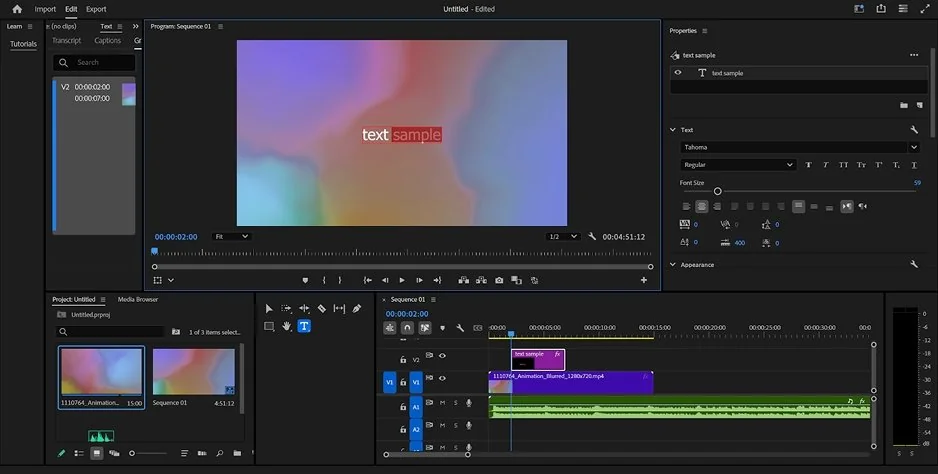
Adobe® Premiere® is built around the assumption that editors may need several things open at once: timelines, audio meters, effect controls, color tools, media bins. For someone cutting interviews, syncing external audio, or managing dozens of clips, that structure becomes useful fairly quickly. Still, the interface can feel crowded during simple edits, especially on smaller laptop screens where panels compete for space.

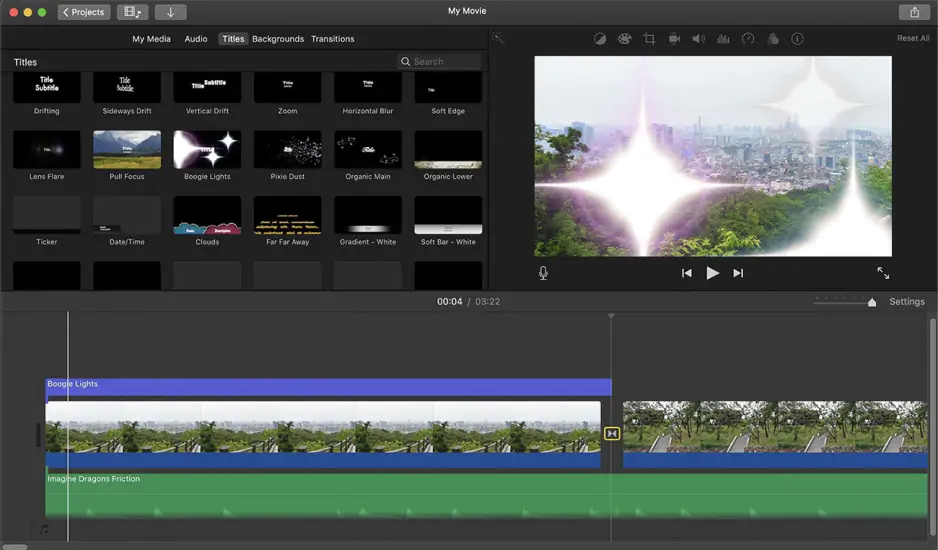
iMovie takes a narrower approach. Most tools stay visible in a single workspace, and there are fewer setup decisions before editing begins. On a MacBook, importing clips from an iPhone through Photos or AirDrop feels more direct than working through Premiere’s® media bins and ingest settings.

Premiere® also allows much deeper workspace customization. Panels can be rearranged, saved, or rebuilt around editing, color, or audio tasks. iMovie offers far less flexibility, but the simpler layout is generally easier to navigate during everyday editing.

Winner: iMovie’s interface requires less setup, and the editing workflow feels easier to follow for shorter projects and routine editing tasks.

Features

Adobe® Premiere® Pro and iMovie are aimed at very different kinds of editing routines. Premiere® is built for projects where footage keeps piling up: multiple camera angles, separate audio recordings, layered graphics, mixed frame rates, large media folders. Managing that kind of material is simply easier when the software includes proxy workflows, nested timelines, detailed media organization, and more advanced timeline controls. Color and audio tools also go much further here. Lumetri Color, for example, gives editors proper control over curves, masks, LUTs, and secondary corrections instead of relying mostly on presets.

iMovie stays much smaller in scope, though it covers more everyday editing tasks than many people expect at first. The magnetic timeline keeps clips connected automatically, which helps avoid messy gaps during quick edits. There are also trailer templates, stabilization tools, green-screen support, soundtrack presets, and speed controls that work well for shorter videos, school projects, or social content. On Apple devices, vertical video workflows feel fairly natural too.

The limitations usually appear once projects become more technical. iMovie does not support third-party plugins or deeper motion graphics workflows, while Premiere® connects directly with Adobe® After Effects® and handles a much wider range of professional production formats.

Winner: Adobe® Premiere’s® editing tools scale far more comfortably once projects become larger, more layered, and more demanding to manage.

Performance

Performance depends largely on project size and hardware. iMovie runs efficiently on recent Macs, especially Apple silicon devices, where playback and exports usually stay responsive during standard editing tasks. Short-form content, home footage, and basic 4K timelines generally process smoothly without much manual optimization.

Premiere® places considerably heavier demands on the system. High-resolution codecs, advanced color correction, animated graphics, and more complex audio processing can increase GPU, RAM, and storage usage quite quickly. GPU acceleration improves rendering and playback performance, but overall responsiveness still depends heavily on the hardware configuration.

Stability also differs between the two editors. iMovie tends to stay more consistent because the workflow and media support are narrower in scope. Premiere® handles a broader range of production formats and post-production requirements, though larger projects often benefit from proxy workflows and cache management.

Winner: iMovie feels more efficient for lightweight editing, while Premiere® is better suited to demanding production work.

Pricing

For many people comparing iMovie and Premiere® Pro, pricing affects the decision long before editing features do. iMovie is included free with Mac, iPhone, and iPad devices, so Apple users can start editing without paying for additional software. Exported videos also remain free of watermarks.

Premiere® is available through Adobe’s subscription system, starting at $22.99 per month for the single-app plan. A 7-day free trial is available before subscribing. The ongoing cost is noticeably higher, though the subscription also includes access to the wider Creative Cloud® ecosystem, including tools like After Effects®, Audition®, and shared cloud assets.

Winner: for users focused mainly on cost, iMovie is the more affordable long-term option.

Platform compatibility

A lot depends on what hardware is already part of the editing setup. iMovie only works inside Apple’s ecosystem, so projects stay limited to Mac, iPhone, and iPad devices. That setup feels fairly natural for users already managing photos and videos through iCloud, Photos, or AirDrop.

Premiere® works on both Windows and Mac, which matters more in collaborative environments where editors, designers, and clients may all be using different systems. Adobe’s ecosystem also allows projects and assets to move between desktop and mobile workflows through Premiere® Rush and Creative Cloud® syncing.

Cross-device editing feels more integrated on Apple hardware, particularly between iPhone, iPad, and Mac. Premiere®, on the other hand, fits more comfortably into mixed-device workflows where operating system flexibility matters more than ecosystem integration.

AI tools

AI features play a much larger role in Premiere® than they do in iMovie. Adobe has gradually added tools aimed at speeding up editing tasks that would normally take longer to do manually. Auto Reframe can resize footage for vertical or social formats automatically, Speech-to-Text generates captions and searchable transcripts, and Scene Edit Detection can identify cuts inside exported footage. Adobe has also started integrating generative AI features through Firefly, including Generative Extend for extending short clips or ambient audio.

iMovie focuses on guided editing tools rather than production-oriented AI features. Magic Movie can automatically assemble clips, transitions, titles, and music from selected footage, while Storyboards provide preset editing structures for common video formats. There are also automatic adjustments for color, stabilization, and pacing, though the controls remain fairly limited compared to Premiere®.

The overall approach feels different. Premiere® focuses more on production efficiency, while iMovie uses automation mainly to simplify shorter editing tasks.

Pros & cons

Adobe® Premiere®

Pros:
  • Advanced editing and color tools

  • Broad format and codec support

  • Works on Windows and Mac

  • Strong integration with Adobe® Creative Cloud®

  • Extensive third-party plugin support

  • Well suited to long-form and commercial editing

Cons:
  • Subscription-based pricing

  • More demanding interface and workflow structure

  • Higher hardware requirements for complex projects

iMovie

Pros:
  • Free on Apple devices

  • Simple editing workflow

  • Quick setup for shorter edits

  • Optimized for Apple silicon hardware

  • Convenient integration with iPhone, iPad, and Photos app

  • Includes built-in templates and presets

Cons:
  • Limited advanced editing features

  • Available only on Apple devices

  • No third-party plugin support

  • Fewer export and customization options

Best use cases

Both editors can handle YouTube videos, social clips, business content, and personal projects, but the editing process feels quite different in each one.

YouTube production: Premiere® fits channels that work with longer videos, multiple camera angles, detailed sound editing, or heavier post-production. iMovie feels more comfortable for straightforward uploads like vlogs, commentary videos, travel edits, or simple tutorials.

TikTok & social content: iMovie fits short-form editing naturally, especially on iPhone and iPad. Vertical projects, quick trimming, and fast exports help keep social-media edits moving. Premiere® becomes more useful once videos start relying on animated graphics, layered captions, or platform-specific formatting.

Beginner editing: iMovie asks for less technical setup. Importing clips, arranging footage, and exporting a finished video usually feels fairly direct, particularly inside Apple’s ecosystem.

Professional editing: Premiere® is better suited to commercial work, client revisions, larger productions, and collaborative editing pipelines where projects continue changing over time.

Business & casual projects: both editors handle presentations, internal videos, and home projects well, though iMovie generally feels less demanding for everyday editing.

Final verdict

A quick phone edit and a project that stays in revision for weeks are very different kinds of work, and that is where iMovie vs. Premiere® Pro starts to separate. iMovie fits projects that need to move quickly from import to export: travel clips, school presentations, casual YouTube uploads, short social videos. On Apple devices, the workflow stays fairly direct through Photos, AirDrop, and iCloud.

Premiere® is built for heavier editing routines. Larger timelines, layered audio, repeated revisions, multiple export versions, long-form projects. It asks more from the editor, but it also handles more demanding production work far more comfortably.

The two editors are aimed at very different editing habits and production needs.

Alternative: Movavi Video Editor

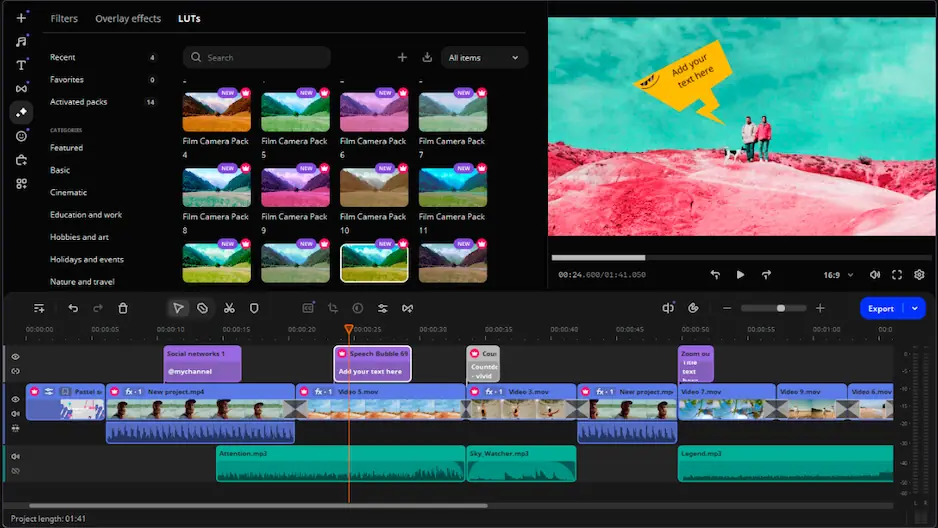
Movavi Video Editor sits somewhere between iMovie and Premiere® in terms of complexity. It is easier to learn than Premiere® and requires far less setup for routine editing, but it also offers more flexibility than iMovie in areas like effects, transitions, timeline tools, and export settings. Unlike iMovie, it works on both Windows and Mac. For users who edit regularly but do not need a full professional post-production workflow, that balance can make more sense day to day.

Frequently asked questions

Is Adobe® Premiere® better than iMovie for beginners?

Not necessarily. iMovie is usually easier for first-time editors because the interface is smaller and the workflow is more direct. Premiere® offers far more editing tools, but the software also takes longer to get comfortable with during everyday editing tasks.

Can iMovie edit professional videos?

It can, depending on the project. iMovie is capable of handling interviews, simple YouTube videos, presentations, and short promotional content. More demanding commercial work, larger timelines, and advanced post-production tasks are generally easier to manage in Premiere®.

Is Premiere® worth paying for?

For regular editing work, often yes. Premiere® makes more sense for creators, freelancers, agencies, or production teams working with larger projects and more advanced workflows. For occasional editing or casual projects, iMovie may already cover everything needed.

Have questions?
If you can’t find the answer to your question, please feel free to contact our Support Team.
Join us for discounts, editing tips, and content ideas

1.5M+ users already subscribed to our newsletter

By signing up, I agree to receive marketing emails from Movavi and agree to Movavi's Privacy Policy.