
DaVinci Resolve vs. Shotcut: Features, Pricing, Performance Compared

Edited by
Ben Jacklin
9,787

The comparison between DaVinci Resolve vs. Shotcut is not so much about two video editors competing. Rather, this topic can be described as a question of choosing between the post-production studio and a useful open-source app. What is the matter here is the necessity to weigh power, willingness to study a software, and a PC's capabilities.

Both DaVinci Resolve and Shotcut have their free versions without a watermark, offer sufficient editing options for creating a video, and, yet, differ in many aspects. Both can perform cuts, apply transitions, process audio, and export a project; however, DaVinci Resolve wins when it comes to professional editing, color correction, motion graphics, and advanced audio processing. Shotcut is the preferable choice for beginners and lightweight edits.

Comparison parameter

DaVinci Resolve

Shotcut

Who it's for

Editors, colorists, filmmakers, YouTubers, agencies, advanced creators

Beginners, casual editors, open-source fans, creators with basic projects

Supported platforms

Windows, Mac, Linux

Windows, Mac, Linux

Ease of use

Clean, but deep. The interface takes time to learn

Less polished, but simpler once you understand the layout

Quick summary

Best for professional workflows: DaVinci Resolve. It has a proper post-production structure, with separate pages for editing, color, Fusion effects, Fairlight audio, and delivery.

Best for color grading: DaVinci Resolve again, and not by a tiny margin. This is one of the reasons people choose it even when they edit elsewhere.

Best for advanced editing: DaVinci Resolve. Multicam, trimming, media management, audio mixing, and effects all go deeper.

Best overall performance: It depends on the machine. On a powerful PC or Mac, DaVinci Resolve can be fast and stable. On an older laptop, Shotcut may feel less demanding and more forgiving.

Ease of use

Shotcut

DaVinci Resolve

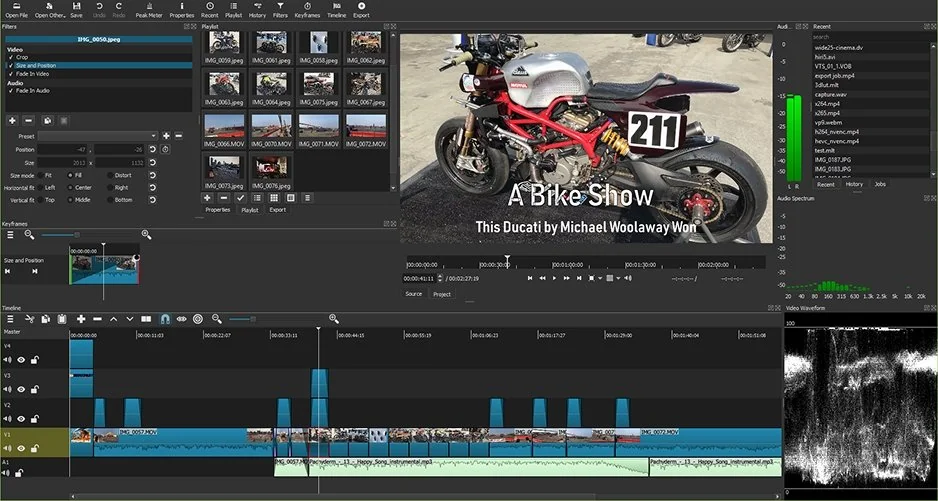
Shotcut looks less intimidating at first. You open it, add clips, drag things around, and start building a timeline. Some parts feel a bit old-school, and the interface is not as slick as paid editors, but that can actually work in its favor. There are fewer “rooms” to get lost in. A simple cut, a fade, a title, and an export can be done without feeling like you’ve walked into a film school exam.

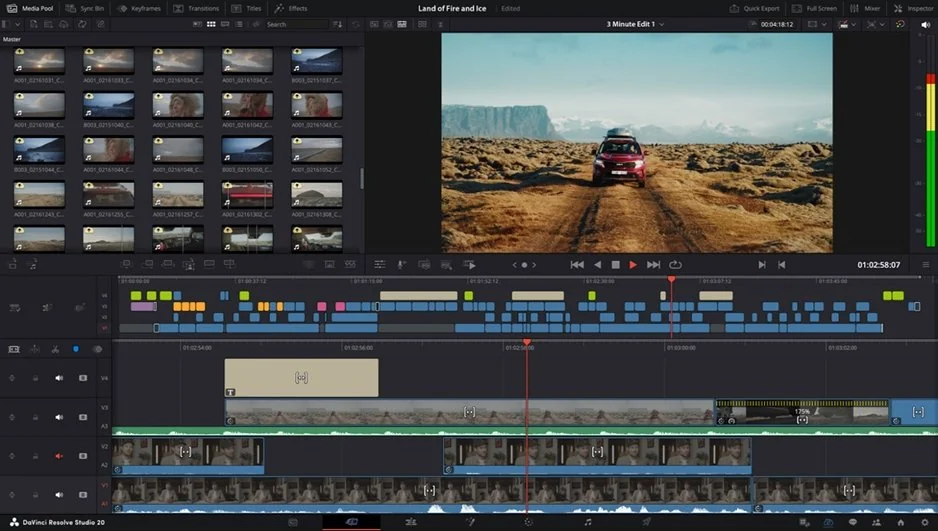
DaVinci Resolve feels more polished, but it also asks more from you. The Cut page is friendly enough for quick edits, but the full Edit page, Color page, Fusion page, and Fairlight page make it clear that this program was built for serious work. You can ignore many of those tools, of course. Still, they’re sitting there, and beginners may feel that quiet pressure of “I should probably know what this does.”

For onboarding, Shotcut is more direct. For long-term comfort, DaVinci Resolve becomes better once you’ve learned the logic. The problem is getting there. If you edit once a month, Shotcut is easier to live with. If you edit every week, DaVinci Resolve repays the effort.

Winner: Shotcut for beginners; DaVinci Resolve for users willing to learn.

Features

DaVinci Resolve is the stronger editor in almost every advanced category. Timeline editing is smoother, trimming tools are more precise, and multicam editing is built for real production work. The color tools are excellent, not just “good for a free editor.” You can do all sorts of tone adjustment, color separation, complicated grading, and professional format work without feeling restricted.

The inclusion of motion graphics and compositing is a nice addition to Fusion. Fairlight gives you a dedicated environment for audio production in DaVinci Resolve, with features for mixing, cleaning, and editing that go way past simple volume control. This makes sense for people editing client projects such as interview footage or music videos.

Shotcut has covered all the basics in an efficient manner. This includes the native support for timeline editing, a variety of formats, filtering, transitions, text, keyframes, and 4K editing. Format support is an unsung strength of Shotcut since it uses FFmpeg, which means that it can deal with all kinds of media files efficiently.

Where Shotcut feels thinner is in advanced workflow. Multicam work is not as comfortable. Motion graphics are more limited. Color grading is fine for correction, but not for complex looks. Audio tools are useful, though not in the same league as Fairlight.

Winner: DaVinci Resolve, with a much stronger feature set for advanced editing and professional workflows.

Performance

DaVinci Resolve can perform excellently; however, it needs good hardware. An excellent graphics card, sufficient RAM, and speedy drives can make all the difference in the performance of the software. For example, DaVinci Resolve performs incredibly well on an advanced desktop PC or an updated Mac. However, in cases where users have color grading or effects in videos with multicamera projects and other advanced editing, older and less powerful computers begin to show some problems.

Shotcut is light-weight, which means that its use may not necessarily require powerful computers, especially those that need multicore processors or even workstations. In case one needs to edit videos and use basic effects in 1080P videos, Shotcut will probably do the job effectively.

Render times are more challenging to determine objectively due to the variables at play including video, effects, output parameters, and hardware used. DaVinci Resolve takes the lead in terms of render performance when GPU processing capabilities are properly harnessed. Shotcut tends to be slower when handling challenging timelines but its ease of use is advantageous here.

When it comes to stability on larger projects, DaVinci Resolve is the better choice provided that the hardware in use is powerful enough. Shotcut proves to be a more suitable application for smaller projects when hardware is underpowered.

Winner: DaVinci Resolve for powerful hardware; Shotcut for modest hardware.

Pricing

Shotcut wins the simplicity contest here. It’s free, open-source, and does not add a watermark to exported videos. There’s no subscription, no premium tier to compare, and no “almost free” trap waiting at export.

DaVinci Resolve also has a very generous free version. For many users, it’s more than enough. You can edit serious projects, use high-quality color tools, export without a watermark, and build a proper workflow without paying. DaVinci Resolve Studio adds more advanced features and is sold as a paid version rather than a subscription. The exact value depends on whether you need those extra tools. Many casual editors won’t.

The main thing is that both programs are unusually fair compared with many video editors. Neither forces a watermark in normal free use, which is refreshing.

Winner: Shotcut for completely free use; DaVinci Resolve for best free professional toolkit.

Platform compatibility

Shotcut and DaVinci Resolve both work on Windows, Mac, and Linux. That makes the comparison easier. If you move between operating systems or work with people who use different setups, either option can fit.

DaVinci Resolve may be more sensitive to hardware and driver support, especially on Linux and GPU-heavy workflows. Shotcut feels more relaxed in that sense. It’s not trying to be a full post-production suite, so expectations are lower and setup is usually less demanding.

Winner: Tie, with Shotcut slightly easier for low-maintenance use.

AI tools

This stands out to be one of the most distinct differences. DaVinci Resolve incorporates AI in its operations much more than Shotcut, thanks to features like the DaVinci Neural Engine as well as the various AI-assisted tools offered in different versions of DaVinci Resolve depending on whether you are using the Studio version.

Shotcut does not stand to be compared when it comes to AI. The software has various useful editing tools but it does not incorporate any AI-assisted operations. With regards to AI-assisted editing in terms of captions, smart reframing or voice tools among others, DaVinci Resolve takes the cake.

Winner: DaVinci Resolve, thanks to its advanced AI-powered editing features.

Pros & cons

DaVinci Resolve

Pros:
  • Excellent color grading tools

  • Strong free version with no watermark

  • Professional editing, audio, effects, and delivery workflow

  • Good choice for long-term skill building

  • Studio version adds more advanced tools

Cons:
  • Steeper learning curve

  • Demands stronger hardware

  • Some advanced AI and effects tools are tied to Studio

  • Can feel like too much for simple edits

Shotcut

Pros:
  • Completely free and open-source

  • No watermark

  • Works on Windows, Mac, and Linux

  • Good format support

  • Practical for simple edits and lighter projects

Cons:
  • Interface feels less polished

  • Fewer advanced tools for color, audio, and motion graphics

  • Not ideal for large professional workflows

  • AI features are limited

Best use cases

  • For YouTube, both editors can work. When you’re producing talking head clips, tutorial series, product reviews, or basic vlogs, all you need is Shotcut. With it, you will be able to cut clips, use titles, edit the sound, and export your footage without spending a single dollar. In case you are looking for better color grading, multi-camera edits, sound cleanup, and more refined graphics, DaVinci Resolve is the right tool for you.
  • When it comes to TikTok, Reels, and Shorts, Shotcut offers the basics in terms of reframing, effects, audio, and templates. However, DaVinci Resolve allows having full control over these things. While that is so, creators who just want to produce quick social media clips don’t see any benefits in using DaVinci Resolve.
  • Shotcut is easier to learn when compared with DaVinci Resolve. Despite being user-friendly, it is not flawless, but allows learning how to edit videos without struggling to do this. DaVinci Resolve is a better fit for beginner editors who have patience and understand their intentions clearly.
  • For professional editing, DaVinci Resolve is the clear pick. It has the structure, depth, and reliability expected in serious post-production. Shotcut is useful, but it is not really built to replace a professional editing suite.
  • For business videos, it depends on the business. A small company making simple social posts could use Shotcut. A team producing product videos, interviews, ads, or training content will probably benefit from DaVinci Resolve’s cleaner workflow and stronger finishing tools.
  • For casual editing, Shotcut makes more sense. Birthday videos, quick clips, family footage, basic YouTube uploads – no need to bring a tank to a bike ride.

Final verdict

Choose DaVinci Resolve if you want professional power, serious color grading, advanced editing tools, and room to grow. It takes more time to learn, and it prefers stronger hardware, but the payoff is real.

Choose Shotcut if you want a free, open-source editor for practical everyday work. It’s not as polished and doesn’t go as deep, but it handles basic editing without watermark issues or payment pressure.

So, in the Shotcut vs. DaVinci Resolve comparison, DaVinci Resolve is the better editor overall. Shotcut is the better lightweight choice.

Alternative: Movavi Video Editor
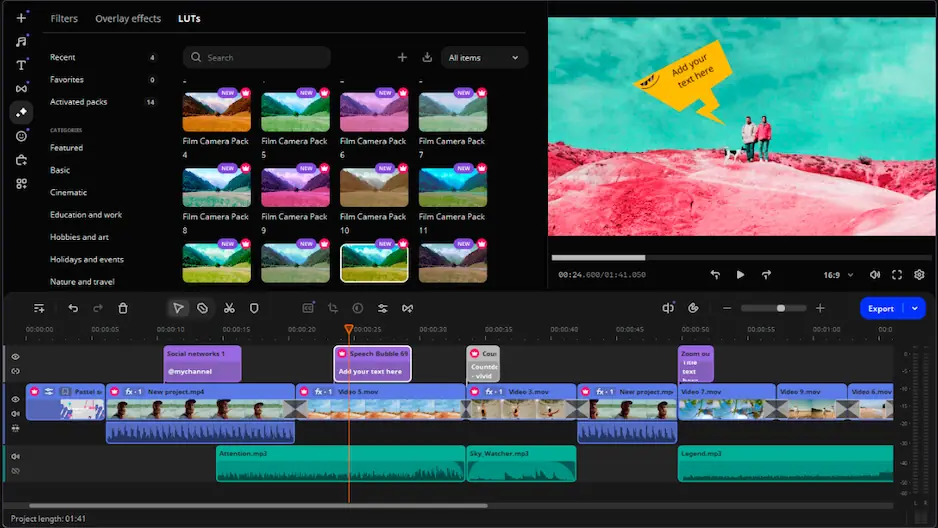
In case both of these tools don’t appeal to you, give Movavi Video Editor a try. In comparison with DaVinci Resolve, it can seem a bit too simple, but in comparison with Shotcut, it’s a little bit more complex and more professional. Overall, it strikes the right balance, being simpler to use than DaVinci Resolve and more straightforward than Shotcut.

Movavi Video Editor contains all standard functions required for video editing: from trimming and cropping to adding titles, applying transition effects, filters, and overlays, working with colors, changing speed. More recent versions of the program provide several AI-based functionalities including background removal, noise reduction, object tracking, automatic subtitles creation, and other fast editing capabilities.

It’s a sensible option for creators making YouTube videos, family clips, course materials, social content, or small business videos. Not every project needs a full professional suite. Sometimes you just want the edit to look clean and be done before midnight.


Frequently asked questions

Is Shotcut better than DaVinci Resolve for beginners?

Shotcut is typically more accessible as an absolute beginner software program because of its smaller scale and structure. DaVinci Resolve is certainly more potent, yet it requires more time and patience to master. If you simply need to make simple cuts and exports, consider beginning with Shotcut. Otherwise, if you plan to seriously learn how to edit, then choose DaVinci Resolve.

Does DaVinci Resolve add a watermark?

No, the free version of DaVinci Resolve will not watermark regular exports. Some of the functions are locked in DaVinci Resolve Studio, but the free version is sufficient nonetheless.

Is Shotcut good enough for YouTube videos?

Surely Shotcut is good enough to produce YouTube videos for tutorials, commentary, basic vlogs, and even screen records. If you intend to use more complex color correction or audio editing features, or even multilayered clips, go for DaVinci Resolve.

Have questions?
If you can’t find the answer to your question, please feel free to contact our Support Team.
Join us for discounts, editing tips, and content ideas

1.5M+ users already subscribed to our newsletter

By signing up, I agree to receive marketing emails from Movavi and agree to Movavi's Privacy Policy.