Premiere® Pro vs. Vegas Pro: Features, Pricing, Performance Compared

Edited by
Ben Jacklin
8,363

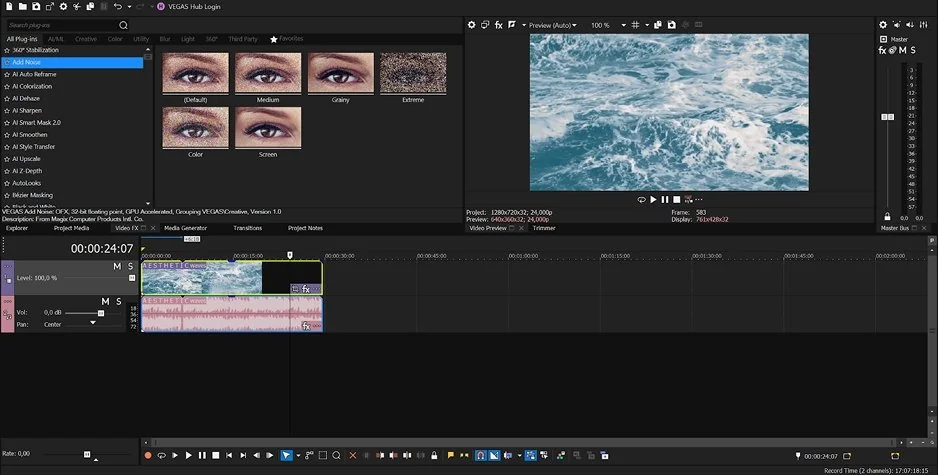
Adobe® Premiere® (formerly Premiere® Pro) and Vegas Pro have been competing for the attention of video editors for decades, but they continue to appeal to different audiences. In this Premiere® Pro vs. Vegas Pro comparison, Adobe® Premiere® stands out for its collaborative workflows and extensive professional toolset, while Vegas Pro focuses on speed, flexibility, and ease of navigation. If you work on complex productions or as part of a team, Adobe® Premiere® may be the stronger option. If you want a faster workflow with a gentler learning curve, Vegas Pro is worth considering.

Premiere® Pro vs. Vegas Pro comparison table

Comparison parameters

Adobe® Premiere®

Vegas Pro

Who it's for

Professional editors, filmmakers, production teams, agencies

Independent creators, freelancers, enthusiasts, and professional Windows users

Supported platforms

Windows, macOS

Windows

Ease of use

Powerful but more complex interface

More straightforward and accessible interface

Quick summary

  • Best for professional workflows: Adobe® Premiere® suits production teams and agencies thanks to collaboration tools, Frame.io integration, and Adobe app integration.
  • Best for color grading: Adobe® Premiere® has a slight edge with its Lumetri Color panel and advanced grading controls. Vegas Pro also offers capable grading tools.
  • Best for advanced editing: Adobe® Premiere® provides more depth through advanced multicam editing, proxy media support, motion graphics integration, and broader plugin support.
  • Best overall performance: Vegas Pro often feels faster during everyday editing on Windows. Adobe® Premiere® handles demanding projects well but generally requires more hardware resources.

Ease of use

Adobe® Premiere®

Vegas Pro

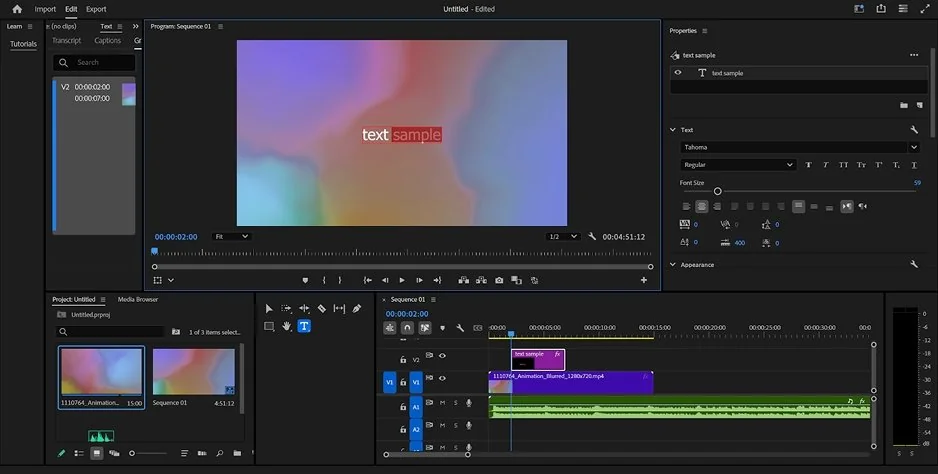
Adobe® Premiere® organizes its tools into dedicated workspaces for editing, color grading, audio, and motion graphics. The structure is designed for professional post-production, but it also means more panels, menus, and settings to navigate. Editors who work across multiple stages of a project can tailor the interface extensively, rearranging panels and creating custom layouts that match their workflow.

Vegas Pro takes a different approach. Most core editing functions are accessible from the main interface, with fewer workspace changes required during a project. Trimming clips, applying effects, adjusting audio, and exporting content generally involve less navigation, which can make day-to-day editing feel more direct.

Both Premiere® Pro and Vegas Pro provide documentation, tutorials, and onboarding resources. The difference lies in how quickly users can become comfortable with the software. Vegas Pro typically requires less initial training, while Adobe® Premiere® asks for more time upfront before its broader toolset and workflow options become fully useful.

Winner: Vegas Pro. Its interface is easier to navigate, and new users can reach a productive workflow more quickly.

Features

The timeline is the center of both applications, but they emphasize different strengths. Adobe® Premiere® supports nested sequences, adjustment layers, proxy media management, and advanced timeline organization tools that help manage long-form productions. Vegas Pro offers a flexible timeline with fewer structural requirements, allowing editors to move quickly between editing tasks.

Both Vegas Pro and Premiere® Pro include multicam editing, enabling footage from multiple cameras to be synchronized and edited within a single project. Premiere® provides more options for complex productions, while Vegas Pro covers the needs of most creator and corporate workflows.

Color work is handled through the Lumetri Color panel in Premiere® and the built-in grading tools in Vegas Pro. Both support primary and secondary corrections, LUTs, scopes, and HDR workflows. Audio capabilities are also strong in both programs, although Vegas Pro retains an advantage in native audio editing thanks to its long-standing focus on sound production.

Motion graphics represent one of the largest differences. Premiere® benefits from direct access to After Effects® compositions and Adobe's graphics ecosystem, while Vegas Pro relies more heavily on built-in tools and third-party extensions.

Both editors support modern professional codecs and delivery formats, making them suitable for broadcast, online publishing, and commercial production.

Winner: Adobe® Premiere®. Vegas Pro covers nearly all professional editing requirements, but Premiere® offers greater depth for graphics-heavy projects and complex post-production pipelines.

Performance

Rendering performance depends on both hardware configuration and project requirements. Adobe® Premiere® supports GPU acceleration across NVIDIA, AMD, Intel, and Apple Silicon devices, helping it process high-resolution footage, effects, and color adjustments efficiently. Vegas Pro also uses modern GPUs well and delivers competitive export speeds, especially on Windows workstations.

Hardware optimization differs between the two applications. Premiere® is developed across multiple operating systems and processor architectures, while Vegas Pro focuses on Windows. This narrower scope can produce strong results on compatible systems.

Stability matters more as timelines grow and assets, effects, and media sources increase. Both editors can handle demanding productions, but Premiere® generally offers greater consistency in projects with heavy media management, motion graphics, and layered effects.

Winner: Adobe® Premiere®. Both applications perform well on modern hardware, but Premiere® provides broader hardware support and stronger scalability for demanding production workloads.

Pricing

The main difference between these applications is their licensing model. Adobe® Premiere® is available only through a subscription, either as a standalone application or as part of Creative Cloud®. Vegas Pro offers both subscription and perpetual licensing, allowing users to keep using a purchased version without ongoing payments.

At the time of writing, Adobe® Premiere® costs $22.99 per month for the standalone plan. Vegas Pro subscriptions start at $8.33 per month, while perpetual licenses start at $219.95. Both applications offer free trials.

Adobe®'s subscription includes ongoing updates. Vegas Pro's perpetual option may be more economical for users who prefer a one-time purchase and do not need every major release.

Winner: Vegas Pro. The availability of both subscription and perpetual licensing provides greater pricing flexibility.

Platform compatibility

Adobe® Premiere® is available for both Windows and macOS, which is important for editors working across different operating systems or in mixed-device production environments. The software supports a broad range of hardware configurations, including systems based on NVIDIA, AMD, Intel, and Apple Silicon technologies.

Vegas Pro is available exclusively for Windows. This platform focus allows for targeted optimization, but excludes macOS users and organizations that operate within Apple's hardware ecosystem.

Project portability is another distinction. Adobe® Premiere® benefits from integration with Creative Cloud® services and related Adobe applications, supporting workflows that span multiple devices and production stages.

AI tools

Artificial intelligence has become a major area of development for both editors, although the focus of their AI toolsets differs.

Adobe® Premiere®

Premiere® uses AI to automate editing, transcription, and content adaptation tasks. Key features include:

  • Generative Extend for extending clips with AI-generated frames
  • Auto Reframe for automatically adjusting videos to different aspect ratios
  • Speech-to-Text for generating transcripts and captions
  • Enhance Speech for reducing background noise and improving dialogue clarity
  • Scene Edit Detection for identifying cuts in edited footage

Vegas Pro

Vegas Pro emphasizes AI-assisted visual effects and content enhancement. Its AI tools include:

  • AI Upscaling for increasing video resolution
  • AI Smart Mask 2.0 for isolating people and objects
  • AI Z-Depth for generating depth maps from standard footage
  • Text-based Editing for editing clips through automatically generated transcripts
  • AI-powered effects and compositing tools for visual enhancements and depth-based effects

Both applications use AI to reduce manual work, but they target different stages of the editing process. Premiere focuses more on automation, transcription, and content repurposing, while Vegas Pro places greater emphasis on masking, compositing, and footage enhancement.

Pros & cons

Adobe® Premiere®

Pros:
  • Industry-standard editor

  • Adobe ecosystem integration

  • Team collaboration features

  • Broad codec support

  • Windows and macOS support

Cons:
  • Subscription-only model

  • Steeper learning curve

Vegas Pro

Pros:
  • Efficient editing workflow

  • Beginner-friendly interface

  • Perpetual license option

  • Strong audio tools

  • AI-assisted features

Cons:
  • Windows-only

  • Smaller plugin ecosystem

Best use cases

The differences between Adobe® Premiere® and Vegas Pro become more noticeable when you look at the types of projects they are typically used for.

YouTube videos: Adobe® Premiere® is often the stronger choice for long-form content with multiple camera angles, layered audio, motion graphics, and frequent revisions. Vegas Pro remains a capable option for creators who prioritize editing speed.

TikTok, Reels, and Shorts: Vegas Pro's streamlined editing environment is well suited to short-form content, where projects are often edited and published on tight schedules.

Social media content: Vegas Pro works well for creators producing a high volume of content across multiple platforms. Adobe® Premiere® becomes more attractive when projects require advanced graphics or extensive brand assets.

Beginner editing: Vegas Pro requires less initial training and allows new users to start editing productively with fewer workflow concepts to learn.

Professional editing: Adobe® Premiere® is more common in film, television, advertising, and post-production environments, where compatibility with industry-standard tools is often important.

Business projects: Adobe® Premiere® fits agency and marketing workflows through integration with Creative Cloud® applications and Frame.io.

Casual editing: Vegas Pro is a practical option for personal projects, event videos, travel footage, and other productions that do not require a broader production ecosystem.

Final verdict

In the Vegas Pro vs. Premiere® Pro comparison, neither editor is the right choice for everyone. Adobe® Premiere® offers broader platform support, deeper integration with creative applications, and a feature set geared toward demanding production environments. Vegas Pro stands out with its more accessible editing experience, flexible licensing options, and strong built-in audio tools. Adobe® Premiere® is better suited to editors working on advanced commercial or post-production projects, while Vegas Pro is a compelling option for independent creators and Windows-based professionals.

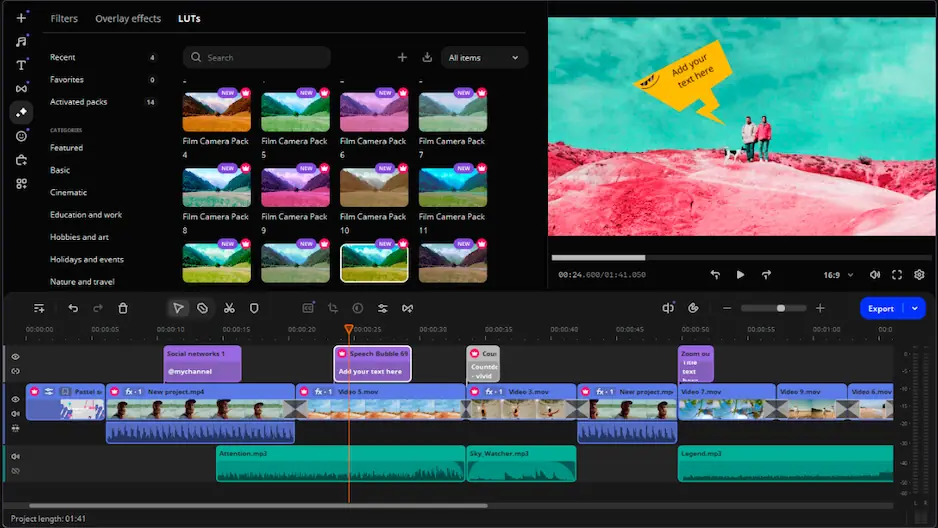
Alternative: Movavi Video Editor

Adobe® Premiere® and Vegas Pro provide extensive professional functionality, but that level of control is not necessary for every editing task. Movavi Video Editor is aimed at users who need a more straightforward workflow and a shorter onboarding period.

The software includes AI-powered features such as background removal, motion tracking, noise reduction, and automatic subtitle generation. It is well suited to content creation, educational projects, presentations, travel videos, and other personal or small-business productions where ease of operation is a higher priority than advanced post-production capabilities.

Frequently asked questions

Is Vegas Pro easier to learn than Premiere® Pro?

For most users, yes. Vegas Pro has a more straightforward interface, and common editing tasks are easy to access from the main workspace. Premiere® offers more customization and advanced workflow options, but it usually takes longer to become comfortable with the software.

Which software is better for YouTube videos?

Both editors are capable of producing high-quality YouTube content. Vegas Pro is often a good fit for creators who value a direct editing workflow, while Premiere® is better suited to projects that involve extensive graphics, detailed post-production work, or larger amounts of footage.

Can beginners use Premiere® Pro or Vegas Pro?

Yes. Both applications can be learned by new editors. Vegas Pro is generally easier to approach at the start, while Premiere® requires a greater time investment. The choice often depends on how much complexity a user is willing to take on and what types of projects they plan to create.

Have questions?
If you can’t find the answer to your question, please feel free to contact our Support Team.
Join us for discounts, editing tips, and content ideas

1.5M+ users already subscribed to our newsletter

By signing up, I agree to receive marketing emails from Movavi and agree to Movavi's Privacy Policy.