CapCut vs. iMovie: Features, Pricing, Performance Compared

Edited by
Ben Jacklin
5,978

A massive wave of creators nowadays concocts video clips daily right from their mobile screens and laptops. This CapCut vs. iMovie evaluation delivers concrete facts to help vloggers and clip makers select the ideal software for quick publishing. You get a thorough breakdown of each toolkit to decide what suits your actual video production.

Comparison parameter

CapCut

iMovie

Who it's for

Social media creators and daily vloggers

Students, beginners, and casual tech users

Supported platforms

Windows, macOS, iOS, Android, Web

macOS, iOS, iPadOS

Ease of use

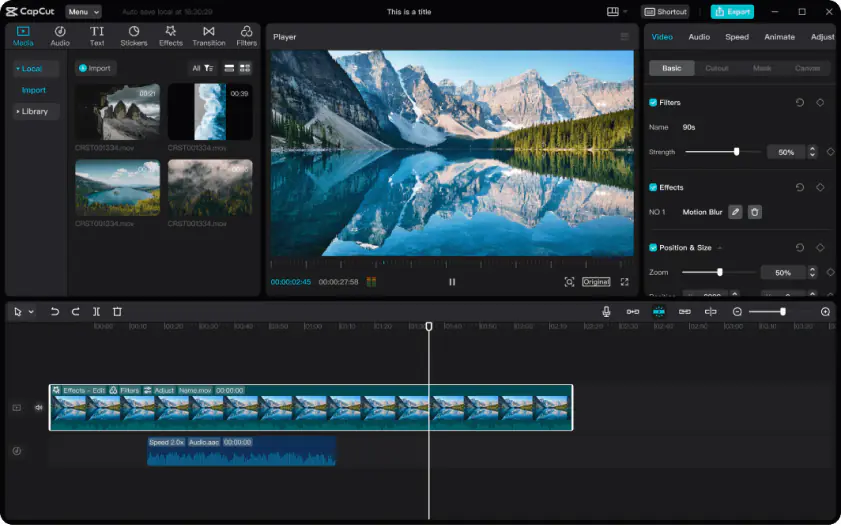
Busy layout with dense side panels

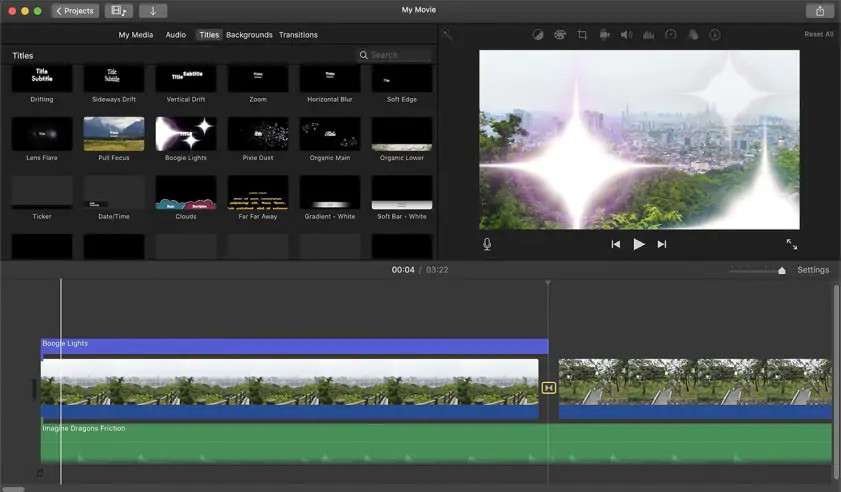
Completely clean workspace with basic setup

Quick summary

  • Best for TikTok: CapCut wins here because it creates text subtitles from voice clips and changes frame shapes with one click.
  • Best for beginners: iMovie takes this spot because the clean screen removes extra buttons and lets you drop clips straight down.
  • Best mobile workflow: CapCut fits phone editing best since you pull current sounds and filters right inside your project timeline.
  • Best free option: iMovie provides the top free deal because you never see a hidden bill or an unexpected corporate logo.

Ease of use

CapCut

iMovie

iMovie presents a completely clean dashboard where clips drop into place without extra setup. Apple built the software around a magnetic timeline that automatically snaps clips together, preventing accidental gaps and making basic edits feel almost effortless. Onboarding takes only a few minutes because you simply drag footage onto a single timeline and start trimming. The interface intentionally avoids clutter and complicated submenus to keep beginners focused on fast edits rather than technical settings.

CapCut approaches editing differently. The software packs more buttons, side panels, overlays, and timeline layers onto the screen immediately. The editor also relies heavily on a multi-track timeline that lets creators stack effects, graphics, text layers, and adjustment clips without breaking the project structure. That flexibility is powerful, but beginners usually spend their first hour figuring out where tools are located and how the layout works.

Winner: iMovie offers a cleaner onboarding and simpler editing flow.

Features

CapCut delivers a much larger toolkit for modern content creators. The platform includes thousands of animated stickers, trending titles, social-media-ready templates, and direct export tools for TikTok and YouTube Shorts. Its multi-track timeline supports layered edits with overlays, effects, adjustment tracks, and animated assets that would be impossible inside simpler editors. CapCut also generates automatic subtitles directly from voice tracks in seconds and allows instant aspect-ratio switching for vertical or horizontal content.

The rival iMovie focuses on traditional editing instead. Apple gives users a magnetic timeline, clean trimming tools, decent color controls, and straightforward transitions for family videos, presentations, or basic vlogs. However, the software limits editors to only two video tracks, which severely restricts layered edits and modern short-form video styling. Titles and effects remain relatively basic, and subtitles must be typed manually.

Winner: CapCut has a better creative flexibility and stronger social-media-focused tools.

Performance

Apple designed iMovie specifically for macOS and Apple Silicon hardware, and that optimization becomes obvious during editing. The application renders 4K footage quickly, rarely crashes, and keeps battery consumption relatively low even during long editing sessions. The magnetic timeline also stays smooth during playback because the software avoids heavy background processing and layered rendering.

CapCut performs well on newer systems, but its feature-heavy interface consumes significantly more memory. Older laptops can struggle once multiple overlays, subtitles, or effects appear on the timeline. Mobile exports also include a closing logo unless users manually remove the final branded frame before rendering.

Winner: iMovie provides faster optimization and smoother playback on Apple devices.

Pricing

iMovie costs absolutely nothing. Apple includes the editor free with macOS and iOS devices, and every feature remains unlocked without subscriptions, upgrade prompts, or premium export restrictions. Users install the application and immediately receive the full experience.

CapCut follows a freemium business model instead. While the free version includes many tools, several premium effects, transitions, templates, and export settings remain locked behind paid plans. CapCut Standard costs nothing, while CapCut Pro reaches around $19.99 per month or $179.99 annually. Trying to export certain premium edits without a subscription often triggers restrictions or blocked renders.

Winner: iMovie is completely free with no hidden limitations.

Platform compatibility

iMovie stays fully locked inside Apple’s ecosystem. The software only runs on macOS, iOS, and iPadOS devices, which means Windows and Android users cannot access projects or continue edits outside Apple hardware. Apple built iMovie mainly for casual desktop editing, family videos, and clean landscape projects rather than cross-platform collaboration.

CapCut takes the opposite approach. ByteDance released versions for Windows, Mac, Android, iPhone, and web browsers, allowing projects to move between devices much more easily. The software also supports cloud-based workflows, making it practical for creators who regularly edit on laptops, phones, and tablets throughout the day.

AI tools

CapCut integrates AI automation deeply into its editing workflow. The software automatically generates subtitles from speech tracks, isolates subjects from backgrounds with one click, and applies vocal filters without requiring manual adjustments. AI reframing tools also help convert horizontal footage into vertical formats instantly for TikTok or Reels.

The application focuses heavily on speeding up modern social-media production. Combined with automated captioning and fast template generation, the AI system minimizes repetitive editing work and accelerates publishing.

The opponent iMovie avoids AI-assisted workflows almost entirely. Apple keeps the editor focused on manual trimming, basic transitions, and traditional timeline editing without automated subtitle systems, AI masking, or intelligent reframing tools.

Pros & Cons

CapCut

Pros:
  • Multi-track flexibility allows complex asset layering.

  • Automatic subtitles save hours of manual transcription.

  • The massive asset library provides trending filters, sticker packs, and popular social music tracks instantly.

Cons:
  • The app causes quick laptop battery drain during complex rendering tasks.

  • Aggressive premium paywalls lock away the best text transitions and advanced tracking features.

iMovie

Pros:
  • Zero financial cost means absolute access without subscription warnings.

  • Perfect hardware stability eliminates unexpected application crashes on Apple devices.

  • The exporter leaves no ugly watermarks on your finished video clips.

Cons:
  • Rigid track limitations restrict your editing timeline to just two concurrent video layers.

  • The static toolset offers zero trending social graphics or automated sticker assets.

Best use cases

iMovie copes with traditional landscape videos, school presentations, and simple holiday clips. It fits the editor who dislikes subscription models and only needs simple cuts.

CapCut is rather built for vertical TikTok production, rapid Instagram Reels, and daily YouTube Shorts clips. Business marketing teams pick CapCut to catch online internet trends quickly and sync audio clips to popular music.

Final verdict

This detailed iMovie vs. CapCut evaluation proves that there are two distinct paths for content creation. Choose iMovie if you edit traditional landscape files on Apple hardware and require complete financial freedom without recurring bills. Pick CapCut if you manufacture quick vertical videos for social networks and need automated caption tools.

Alternative: Movavi Video Editor

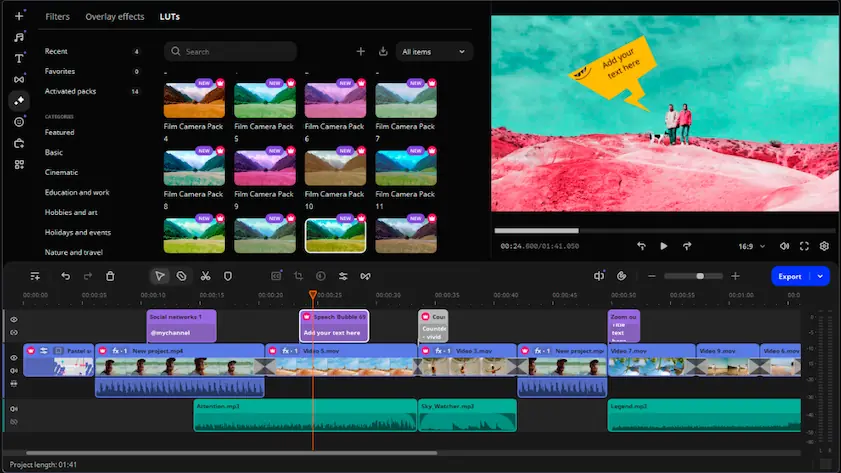
If neither CapCut or iMovie meets your current video production demands, look at Movavi Video Editor. It provides advanced multi-layer timelines that a beginner can master within ten minutes. The program runs comfortably on standard computers, bypassing the strict track limits of Apple and the endless premium pop-ups of CapCut. You get a stable desktop setup that exports 4K files quickly on basic hardware.

Frequently asked questions

Which software works best for modern social media posts?

CapCut takes the lead here because the application includes automatic subtitle generators, vertical templates, and direct upload paths to TikTok.

What is a good alternative to both iMovie and CapCut editing tools?

Movavi Video Editor occupies the middle ground here. The software combines multi-track timelines and fast processing speeds. It replaces monthly billing traps with a permanent one-time purchase option. Your computer processes 4K footage efficiently even on standard 8 GB RAM setups.

How do you remove the watermark from your finished video?

iMovie exports completely clean files by default, while CapCut requires you to manually delete the final logo frame from your mobile timeline before tapping export.

Have questions?
If you can’t find the answer to your question, please feel free to contact our Support Team.
Join us for discounts, editing tips, and content ideas

1.5M+ users already subscribed to our newsletter

By signing up, I agree to receive marketing emails from Movavi and agree to Movavi's Privacy Policy.