
Is iMovie Free?

Edited by
Ben Jacklin
35,360

Short answer: yes. iMovie is free to use, with no purchase, no subscription, and no watermark on your exports. Apple gives it away with every Mac, iPhone, and iPad, so the honest response to "does iMovie cost money?" is simply no — for Apple users, at least. The catch isn't a hidden fee; it's that iMovie only runs on Apple hardware and stays deliberately simple. This article breaks down exactly what you get for free, where the real limits sit, and who should look elsewhere.

What's included in the free version

The first thing to understand is that iMovie isn't a "free tier" with a paid version lurking behind it. It's fully free, and every feature it ships with is available to everyone at no cost. So when people ask "is iMovie free to use?", the answer covers the whole app, not a trimmed-down sample.

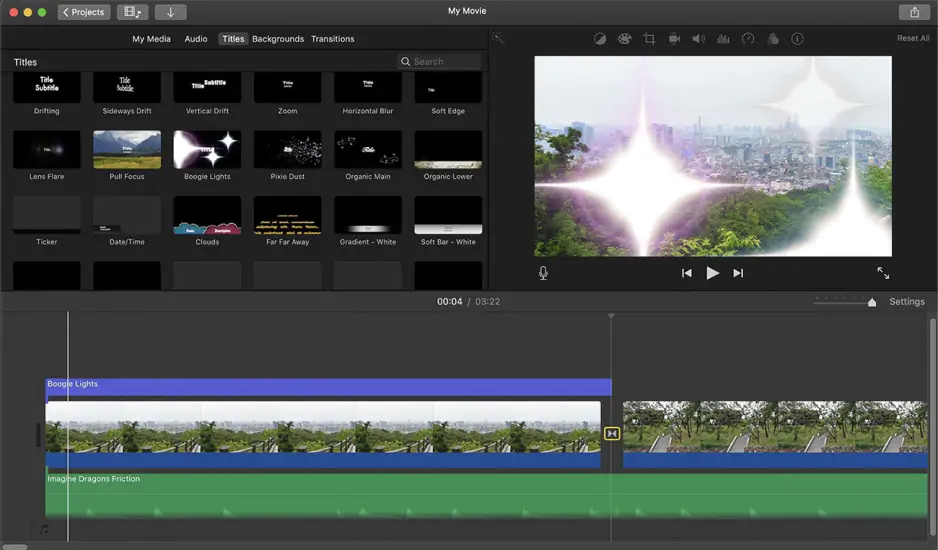
On the video side, you can import clips and trim, split, and reorder them on a clean drag-and-drop timeline. Transitions, speed adjustments, and a picture-in-picture and split-screen mode let you assemble a polished sequence quickly. iMovie also supports editing at resolutions up to 4K, so your footage keeps its quality all the way to export.

Creative extras are included too. You get animated titles and text, a library of themes and filters, built-in trailer templates that turn raw clips into Hollywood-style teasers, and audio tools for background music, sound effects, and voiceover recording. Color correction, image stabilization, and green-screen keying round out a surprisingly capable toolkit for something that costs nothing.

Just as important is what's absent: there are no ads, no crown-icon "premium" assets, and no logo stamped across your finished video. Everything exports clean. That's a meaningful contrast with many mobile editors, where the free experience is really just a sales pitch for an upgrade.

The indirect costs: hardware and upgrades

Here's where the usual "free vs. paid" comparison breaks down, because inside iMovie there's nothing to pay for. There is no iMovie subscription, so questions like "imovie subscription price" or "how much is the iMovie app" don't really have an answer – the price is zero. You won't be nudged toward a monthly plan or asked to unlock features one at a time.

If iMovie has a cost, it's an indirect one: the hardware. iMovie is free on Mac, free on iPhone, and free on iPad, but it is an Apple-only app. There is no iMovie for Windows and no Android version, so the only way to run it is to own an Apple device. For people already inside that ecosystem this is a non-issue; for everyone else, the "free" software effectively requires buying into Apple first.

The other thing worth knowing is that iMovie deliberately caps its own ceiling. Advanced editing – multicam, more than a couple of video tracks, detailed keyframing, advanced audio mixing, and professional color tools – simply isn't there. Apple's answer for creators who outgrow it is Final Cut Pro, which is a separate, paid app (a one-time purchase, not a subscription). So the real "how much does iMovie cost" question becomes: free forever for what it does, but you'll pay for a different program once your projects get ambitious.

One more practical note on the iMovie price: because it's tied to the operating system, the latest version needs a reasonably current Mac or iOS device. Older hardware may be stuck on an earlier release, though that older version still costs nothing.

Who iMovie is the best choice for

iMovie is the obvious pick for anyone editing casually inside the Apple world. If you're wondering "is iMovie free on my MacBook, iPhone or iPad?" and you mainly make home videos, travel montages, social clips, or school projects, the app covers those needs completely and asks for nothing in return.

It's especially strong for people who move between devices. You can start a project on your iPhone, hand it off to an iPad, and finish on a Mac through iCloud, with the edit following you across screens. That continuity, combined with a genuinely beginner-friendly interface, makes it one of the easiest ways to get a clean, watermark-free video out the door fast.

Students, hobbyists, and small creators who value simplicity over control get the most here. There's no learning curve steep enough to slow you down, no cost to justify, and no ads to sit through. For a large share of everyday editing, iMovie is not just "good enough for free" – it's the right tool, full stop.

Who iMovie isn't the best choice for – and what to use instead

iMovie's strengths flip into weaknesses the moment your needs grow. If you're on a PC, the conversation ends immediately: iMovie isn't free on Windows because it isn't available on Windows at all. And if you want layered timelines, precise keyframing, motion tracking, or a large effects library, iMovie's simplicity starts to feel like a wall rather than a convenience.

The best value paid editor: Movavi Video Editor

For those users, a cross-platform editor makes more sense, and Movavi Video Editor is one of the easiest to recommend. It runs on both Windows and Mac, so it sidesteps iMovie's biggest limitation, and it pairs a clean, beginner-friendly interface with a much deeper toolkit – layered timelines, keyframe animation, motion tracking, a big library of transitions and effects, and AI-assisted extras like auto-captioning and background removal.

The other advantage is flexible pricing that fits the way you actually work. Movavi offers subscription plans as well as a one-time lifetime license, so you can avoid recurring fees if you prefer. Exact figures shift with region and promotions, so it's worth checking the official store before buying.

Best of all, you can try it risk-free. Movavi provides a 7-day free trial that opens the full editor before you spend anything – just note that trial exports carry a watermark and a 60-second length cap, and the trial can auto-renew, so set a reminder to cancel if you're only testing. Edit one real project in it and you'll quickly know whether the extra power is worth the price.

The bottom line: iMovie is free, capable, and perfectly matched to casual Apple users who want quick, clean edits at no cost. But if you need more control, more platforms, or a professional finish, a paid editor like Movavi gives you room to grow that iMovie was never built to offer.


Have questions?
If you can’t find the answer to your question, please feel free to contact our Support Team.
Join us for discounts, editing tips, and content ideas

1.5M+ users already subscribed to our newsletter

By signing up, I agree to receive marketing emails from Movavi and agree to Movavi's Privacy Policy.