
Final Cut Pro for iPad: Price & Subscription Guide 2026

Edited by
Ben Jacklin
5,932

Final Cut Pro for an iPad brings professional-grade video-editing tools to your tablet, but its business model works differently than what many creators are used to. Rather than a one-time purchase like the Mac version of Final Cut Pro, the iPad edition runs on a subscription plan, which means understanding the pricing structure upfront is essential before you commit. This shift can catch new users off guard, especially those coming from free or one-time-payment editing tools. In this article, we'll break down exactly how much Final Cut for an iPad costs, what the free trial includes, whether a yearly or monthly plan makes more sense for your workflow, and what features you actually get for your money. By the end, you'll have a clear picture of whether this subscription fits your editing needs and budget.

Why Final Cut Pro for an iPad has its own pricing

Apple treats its iPad and Mac apps as distinct products, even when they share a name. This is exactly why the Final Cut Pro for iPad price doesn't match what you'd pay on a desktop. The Mac version is a single lifetime purchase, while the iPad app follows a recurring subscription model, reflecting how Apple approaches mobile software differently than traditional computer applications.

This separation exists partly because of how App Store economics work, and partly because the iPad version receives continuous updates, cloud syncing, and touch-optimized features that require ongoing development and support. Apple has chosen to fund this through recurring payments rather than a single upfront cost.

For everyday users, this means budgeting differently depending on which device they edit on most. If you already own Final Cut Pro on a Mac, you won't automatically get iPad access included, and vice versa. Each platform requires its own separate payment, so understanding this distinction early helps you plan your editing budget more accurately.

Feature comparison: iPad edition vs. desktop edition

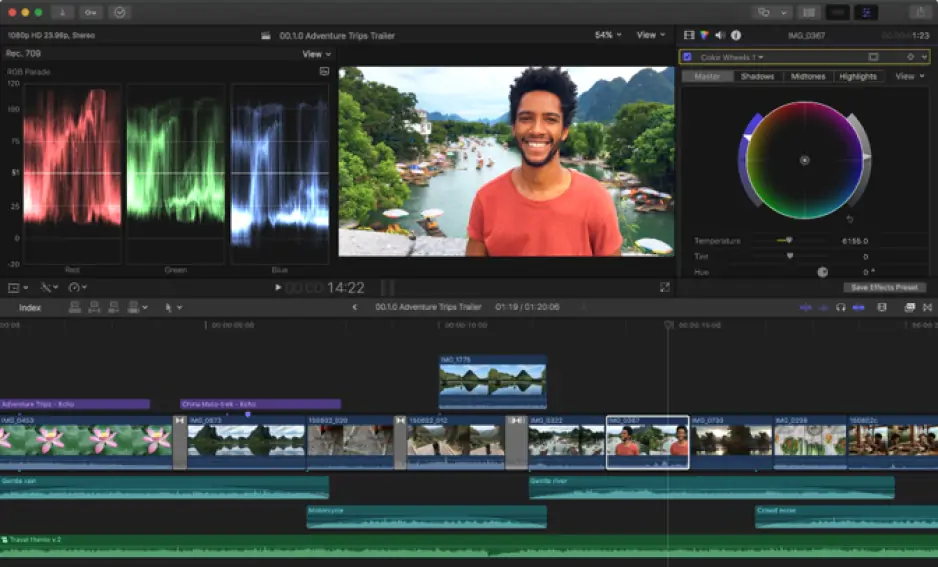
Running Final Cut for an iPad Pro doesn't mean you're getting a stripped-down version of professional editing software. Apple built the app to handle multi-layer timelines, color grading, and audio mixing, all core capabilities that serious editors expect. That said, the toolset isn't a perfect mirror of its desktop sibling, and knowing where the two diverge helps set realistic expectations before you start a project.

One of the most noticeable differences comes down to workflow design. Final Cut Pro on an iPad relies heavily on touch and Apple Pencil input, which changes how you trim clips, adjust keyframes, and navigate menus compared to a mouse-and-keyboard setup. Some advanced plugins and third-party extensions available on a Mac simply don't have iPad equivalents yet, since the ecosystems for extending each app remain separate.

The Final Cut Pro iPad interface itself reflects this touch-first philosophy. Buttons are larger, gesture controls replace many keyboard shortcuts, and the timeline is optimized for finger and stylus precision rather than pixel-perfect mouse clicks. This redesign makes the app intuitive for tablet users, though editors switching from a Mac may need a short adjustment period.

Storage and file management also work differently. The iPad version leans on iCloud and local device storage, while the desktop app offers more flexibility with external drives and complex project libraries. For editors juggling large 4K or 8K footage, this distinction can matter quite a bit.

Despite these differences, both versions share the same underlying editing philosophy: magnetic timelines, non-destructive editing, and fast rendering. The core creative experience remains consistent, even if the tools to get there look and feel different depending on your device.

Can one subscription cover all your devices?

Many users wonder if paying once covers every iPad they own. The good news is that your Final Cut Pro iPad subscription price applies to your Apple ID rather than a single device, meaning you can install and use the app across multiple iPads you personally own, as long as you're signed in with the same account.

This works similarly to how other Apple subscriptions function, syncing access rather than locking you to one physical tablet. If you switch between an iPad Pro at your desk and a lighter iPad Air while traveling, you won't need to pay twice or juggle separate accounts to keep editing.

However, this doesn't extend to sharing with other people unless you use Apple's Family Sharing feature, which allows a subscription to be shared among family members under certain conditions. Outside of that setup, the subscription remains tied to your personal Apple ID and its associated devices only.

Alternative: Movavi Video Editor

If the subscription model of Final Cut Pro feels like more commitment than you're ready for, Movavi Video Editor offers a refreshing alternative for editing on desktop. Designed with beginners and casual creators in mind, it strips away the steep learning curve often associated with professional editing software while still delivering solid results for everyday projects like vlogs, social media clips, and family videos.

Movavi's interface favors simplicity over complexity, with drag-and-drop functionality, built-in templates, and one-click effects that make editing approachable even if you've never touched video software before. This makes it a practical pick for users who want quick turnaround without wrestling with a steep interface.

Before committing to a paid plan, you can test the software through its 7-day free trial, giving you enough time to explore its tools, effects, and export options firsthand. This hands-on trial period helps you decide whether Movavi Video Editor fits your editing style before spending any money.


Have questions?
If you can’t find the answer to your question, please feel free to contact our Support Team.
Join us for discounts, editing tips, and content ideas

1.5M+ users already subscribed to our newsletter

By signing up, I agree to receive marketing emails from Movavi and agree to Movavi's Privacy Policy.