1. OBS Studio
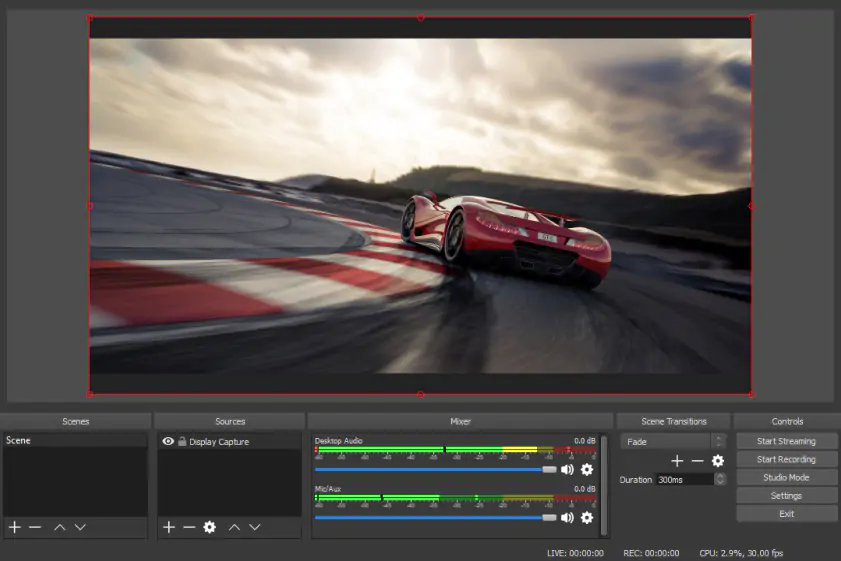
Why I picked it: OBS Studio gives me near-total control over every element of recording, from multiple sources to audio mixing. I liked how, once I got past the learning curve, it felt less like software and more like running my own mini production studio.
When I first opened OBS Studio, I had the distinct feeling that I’d stepped into something built for professionals rather than casual users. The interface is dense, almost intimidating, with panels for scenes, sources, audio mixers, and transitions all competing for attention. It took me a solid half hour just to understand how to properly set up a basic recording with screen capture and microphone input. But once I got past that initial barrier, the software began to reveal its real strength – control. I could layer multiple sources, switch between scenes, and fine-tune audio levels with precision that most tools simply don’t offer. Recording gameplay, tutorials, and even webcam overlays felt seamless once everything was configured correctly.
What impressed me most was how scalable OBS feels. On one hand, you can use it for a simple screen recording; on the other, you can build something that resembles a live production studio. I experimented with adding transitions and overlays, and suddenly my recordings looked far more polished than I expected. There are no watermarks or time limits, which makes it particularly appealing for long-form content. However, this level of freedom comes at the cost of simplicity: it’s not something I’d recommend if you need a quick, no-friction recording. OBS demands time and patience, but in return, it gives you near-total creative control.