
VN vs. Capcut: Features, Pricing, Performance Compared

Edited by
Ben Jacklin
12,187

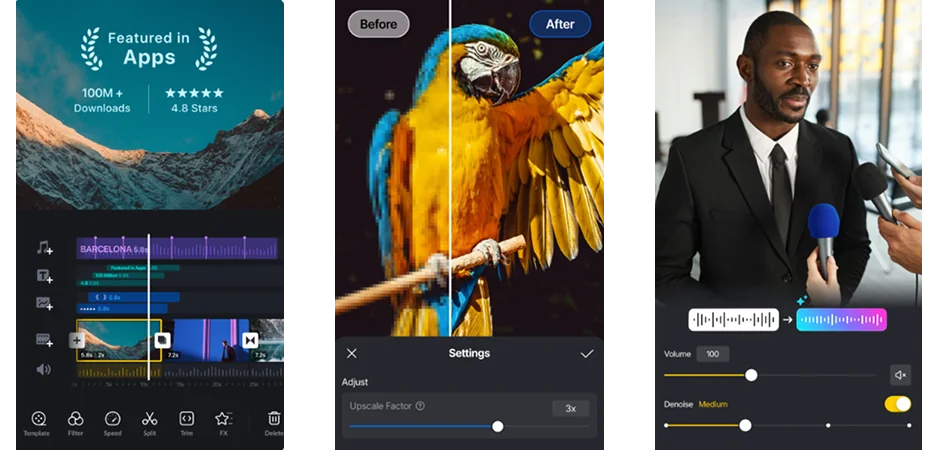
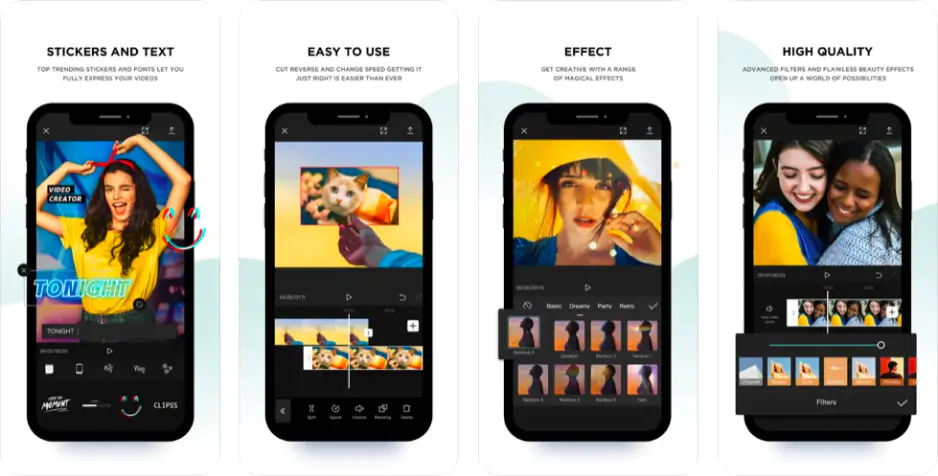
VN and CapCut are two mobile-first editing apps built for creators who prioritize speed and simplicity. CapCut stands out with its trend-driven templates, strong social media integration, and AI-powered tools, while VN Video Editor focuses on a cleaner timeline experience, finer manual controls, and a less cluttered interface. CapCut suits creators who edit primarily for TikTok and Instagram, while VN fits editors who want more hands-on control without the distraction of viral content features.

Comparison parameter

VN Video Editor

CapCut

Who it's for

Content creators, vloggers, editors who prefer manual control

TikTok and social media creators, trend-driven editors

Supported platforms

iOS, Android, macOS, Windows

iOS, Android, Windows, macOS, web

Ease of use

Clean interface with moderate setup

Highly intuitive with guided templates

Quick summary

Best for TikTok: CapCut is built around trending formats, viral effects, and one-tap templates that make TikTok-ready content faster to produce than any manual timeline workflow.

Best for beginners: CapCut requires almost no setup, while VN Video Editor suits beginners who want to grow into more precise editing habits gradually.

Best mobile workflow: CapCut feels more natural on a phone screen. VN Video Editor also performs well on mobile but rewards users who spend more time in the timeline.

Best free option: Both apps are free, but VN Video Editor skips the watermark entirely without requiring a subscription upgrade.

Ease of use

VN Video Editor

CapCut

CapCut opens with a template library front and center, which means most users can drop footage into a ready-made structure and export something watchable within minutes. The interface stays shallow by design, keeping the most common actions within one or two taps. That approach works especially well on mobile, where screen space is limited and long menus slow everything down.

VN Video Editor’s workspace feels cleaner than CapCut, but it also assumes the user wants to build edits from scratch rather than work from presets. The timeline is more exposed from the start, which suits editors who already have a sense of how they want a video to flow. For complete beginners, that openness can feel less guided than CapCut's template-first experience.

Winner: CapCut is easier to pick up for first-time editors because the guided template workflow removes most early decision-making and gets results on screen faster.

Features

CapCut builds most of its feature set around content that is designed to be shared immediately. Its template library covers trending formats across TikTok, Reels, and Shorts, letting creators drop footage into pre-timed sequences with music, transitions, and text already in place. Auto-captions generate quickly and support multiple languages, while the effects and sticker library updates regularly to stay aligned with what is currently performing well on social platforms.

VN Video Editor approaches features from a different direction. Templates exist but play a smaller role in how most users actually work inside the app. The stronger side of VN is its timeline control: keyframe animation, speed curves, multi-layer editing, and precise audio adjustments give creators more room to shape footage manually. Subtitles and captions are supported, though the process feels more hands-on compared to CapCut's largely automated approach.

When comparing VN vs. CapCut, CapCut wins on trend-awareness, while VN Video Editor wins on depth and precision.

Winner: CapCut offers a more complete feature set for short-form social content, with stronger template variety, faster caption tools, and platform-ready export options built directly into the editing flow.

Performance

Export speed in both apps is generally solid on modern devices, though the experience starts to separate once projects become more demanding. CapCut handles its own template-based edits efficiently, but timelines loaded with multiple effect layers, transitions, and high-resolution footage can slow playback on mid-range and older phones. The app is optimized primarily for the kind of short clips it was designed to produce, and performance stays consistent when projects stay within that scope.

VN Video Editor tends to remain stable across a wider range of project sizes. The timeline handles multiple layers without degrading as noticeably, and exports at higher resolutions feel reliable even on devices that are not particularly powerful. The app does not carry the same processing overhead that comes with CapCut's AI features and live effect previews, which contributes to its steadier feel during longer editing sessions.

Winner: VN Video Editor holds up more consistently across different device types and project sizes, and its watermark-free exports give it a practical performance advantage over CapCut's free tier.

Pricing

VN Video Editor is fully free with no subscription required. There are no locked feature tiers, no time-limited trials, and no watermarks added to exported videos regardless of resolution or project length. Creators can access the full editing toolkit, including keyframe controls, multi-layer timelines, and 4K export, without ever being prompted to upgrade.

CapCut is also free at its base level, and the core editing features remain accessible without payment. However, certain AI-powered tools, premium effects, and template packs are reserved for CapCut Pro subscribers. More significantly, some exports carry a watermark under the free plan.

The practical difference between CapCut vs. VN comes down to what each app withholds. VN Video Editor withholds nothing meaningful behind a paywall. CapCut withholds the watermark-free exports and advanced AI tools that regular creators may eventually feel pressure to subscribe.

Platform compatibility

VN Video Editor runs on iOS, Android, macOS, and Windows. The experience stays consistent across mobile and desktop, and the timeline-based workflow translates reasonably well between a phone screen and a larger display. Editors who start a project on their phone and want to finish it on a computer can do so without significant friction.

CapCut covers the same platforms and adds a browser-based version on top of them. That web app extends CapCut's reach to any device with a modern browser, which removes the need to install software entirely. For creators working across multiple machines, or those who occasionally edit on a device they do not own, the web version adds genuine flexibility that VN Video Editor currently does not offer.

AI tools

VN Video Editor includes AI-assisted tools, but they stay close to the editing workflow rather than becoming the centerpiece of the experience. Auto-captions generate transcriptions that can be styled and adjusted directly on the timeline. Beat sync analyzes audio tracks and aligns cuts to the rhythm automatically, which saves time on music-driven edits. The tools feel practical, designed to speed up tasks that would otherwise require manual attention rather than to replace editorial decisions entirely.

CapCut invests more heavily in AI across a wider range of functions. Background removal works without manual masking, text-to-video can generate clip sequences from written prompts, and AI avatars allow creators to produce talking-head content without appearing on camera. Auto-captions are faster and more polished than in most competing apps, and the AI reframe tool resizes footage intelligently for different aspect ratios without requiring frame-by-frame adjustments.

The gap between the two apps is noticeable here. VN Video Editor uses AI to support editing, while CapCut uses AI to partially replace it, which suits different creative habits and output expectations.

Pros & cons

VN Video Editor

Pros:
  • Completely free with no watermark on any export

  • Clean timeline interface suited to manual editing

  • Keyframe animation and speed curves available

  • Stable performance across a wide range of devices and project sizes

  • Available on iOS, Android, macOS, and Windows

Cons:
  • Smaller template library compared to CapCut

  • AI tools are more limited in scope and variety

  • Less suited to trend-driven content creation

  • No browser-based version

  • Caption and subtitle tools require more manual adjustment

CapCut

Pros:
  • Extensive template library built around TikTok, Reels, and Shorts formats

  • Advanced AI features like text-to-video, AI avatars, and intelligent background removal

  • Browser-based version available

  • Fast and accurate auto-captions

  • Regular updates keep templates aligned with current social media trends

Cons:
  • Watermark appears on some exports under the free plan

  • Advanced AI tools and premium effects locked behind CapCut Pro subscription

  • Performance can feel less stable on older or lower-end mobile devices

  • Template-driven workflow offers less flexibility

  • Heavier processing demands due to live AI and effect previews

Best use cases

YouTube production: VN Video Editor suits YouTube creators who build longer videos with deliberate pacing, manual cuts, and careful audio adjustments. The timeline handles multi-layer projects comfortably without pushing users toward preset structures. CapCut works better for shorter YouTube content, channel trailers, or videos built around trending formats where speed of production matters more than detailed finishing.

TikTok and social content: CapCut is the stronger choice here without much debate. Its template library, trending effects, and platform-specific export presets are built precisely for the pace and format that TikTok, Reels, and Shorts demand. VN Video Editor can produce vertical content too, but the workflow is not oriented around social trends in the same way.

Beginner editing: CapCut removes more obstacles for first-time editors through its guided templates and automated tools. VN Video Editor suits beginners who are willing to spend slightly more time learning a timeline before they start seeing results.

Professional and business editing: Neither app is designed for heavy commercial post-production, but VN Video Editor's cleaner manual controls make it more appropriate for business explainers, internal presentations, and polished product content where template aesthetics would feel out of place.

Casual editing: Both apps handle casual projects comfortably. VN Video Editor gives casual editors more control without added complexity, while CapCut gets casual projects finished faster with less deliberate effort involved.

Final verdict

Choosing between CapCut and VN feels more like identifying which editing habit each one actually supports.

CapCut’s template library, AI tools, and export options are all designed to keep social content moving from an idea to a published video. For creators who measure success by consistency and output frequency, that pipeline is genuinely difficult to match.

VN Video Editor’s timeline gives editors more room to shape footage on their own terms, the free version never withholds meaningful features, and the experience stays stable across different devices. For creators who care more about the quality and precision of individual videos than about publishing speed, that balance makes more practical sense.

The right choice depends almost entirely on what the editing process is meant to serve. Creators who live inside social media trends will find CapCut fits their workflow more naturally. Creators who want a clean free editor will find VN Video Editor the more reliable long-term tool.

Alternative: Movavi Video Editor

Movavi Video Editor  is worth considering for users who found CapCut too trend-dependent and VN Video Editor too bare-bones for their specific needs. It combines a simple editing interface with a more developed feature set than most mobile-first tools typically offer.

The timeline feels familiar to anyone who has spent time in a desktop editor, and the learning curve stays manageable without relying on templates to fill the gap. Effects, transitions, titles, and color adjustment tools are all accessible without requiring users to understand professional workflows first.

For users editing tutorials, presentations, family videos, or casual YouTube content who want something more considered than a template app but less demanding than a professional suite, Movavi Video Editor sits comfortably in that space without feeling like a compromise in either direction.


Frequently asked questions

Is VN Video Editor completely free to use?

Yes. VN Video Editor is free to download and use across all supported platforms without any hidden subscription tiers or feature walls. Exports are watermark-free regardless of resolution or project length, which makes it one of the more genuinely open free editors currently available for mobile and desktop users.

Does CapCut work without an internet connection?

Basic editing in CapCut can be done offline, but several of its most prominent features rely on an active connection. AI-powered tools such as text-to-video, certain background removal functions, and template downloads require internet access to process and load correctly. VN Video Editor generally functions more fully offline since its core tools do not depend on cloud processing.

Which app is better for someone who edits both short and long videos regularly?

VN Video Editor handles that range more comfortably. Its timeline scales better across different project lengths, and the manual controls give editors more precision on longer videos where pacing and audio adjustments matter more. CapCut is optimized for short-form content, and while it can technically handle longer timelines, the workflow is not built around that kind of editing in the same way.

Have questions?
If you can’t find the answer to your question, please feel free to contact our Support Team.
Join us for discounts, editing tips, and content ideas

1.5M+ users already subscribed to our newsletter

By signing up, I agree to receive marketing emails from Movavi and agree to Movavi's Privacy Policy.