
VEED vs. CapCut: Features, Pricing, Performance Compared

Edited by
Ben Jacklin
11,079

VEED and CapCut are browser-friendly video editors built for very different creative needs. VEED stands out with its clean web-based workflow, collaboration tools, and professional subtitle features, while CapCut excels at fast mobile editing, trending effects, and social-media-first content creation. VEED suits teams and online creators who prioritize polish and precision, whereas CapCut is the stronger choice for individual creators, TikTok editors, and anyone who edits primarily on a phone. In this article, we’ll compare VEED vs. CapCut main features, ease of use, pricing, and performance.

Comparison parameter

VEED

CapCut

Who it's for

Online creators, teams, marketers, educators

Mobile-first creators, TikTokers, short-form video editors

Supported platforms

Web (browser-based), Windows, macOS

iOS, Android, Windows, macOS, web

Ease of use

Clean, guided interface with minimal setup

Intuitive workflow optimized for mobile

Quick summary

  • Best for TikTok: CapCut is the stronger choice for TikTok content, with trending templates, beat-synced cuts, and effects libraries that refresh alongside platform trends. Its vertical timeline and one-tap style presets are built specifically around the short-form format.
  • Best for beginners: CapCut has template-driven workflows that produce finished-looking results before any manual editing skills develop. VEED is also approachable, but its guided tools work better for beginners who already know what kind of content they want to make.
  • Best mobile workflow: CapCut's native iOS and Android apps make it the clear choice for editing on a phone or tablet. The interface was designed around mobile interaction from the start, and that shows in how naturally trimming, effects, and audio adjustments respond to touch.
  • Best free option: CapCut's free tier covers the full editing experience for personal use without watermarks or hard time restrictions pushing users toward a paid plan. VEED's free version is functional but limited enough that regular creators will encounter its boundaries quickly.

Ease of use

VEED

CapCut

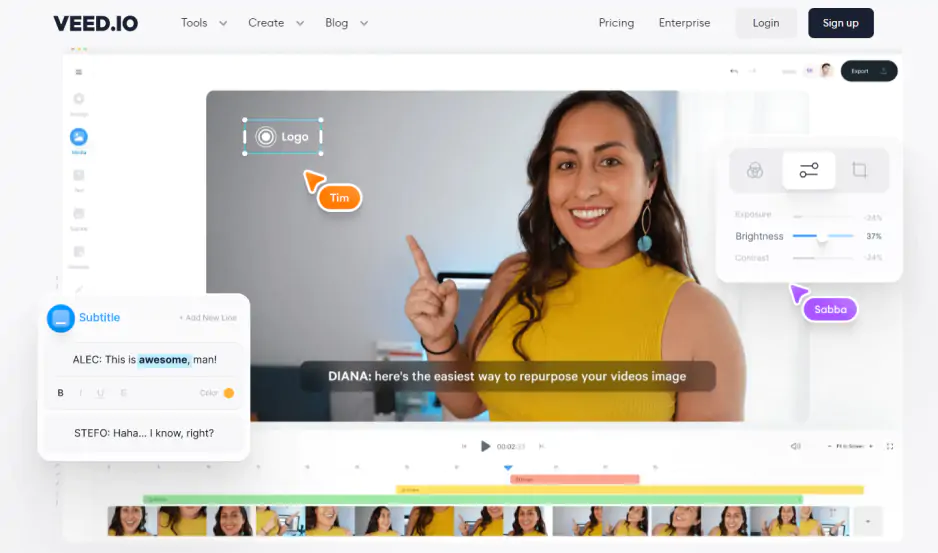
VEED keeps its interface organized around a straightforward browser-based workspace. The timeline sits at the bottom, media controls stay accessible in a left-side panel, and most editing actions like trimming, adding subtitles, or adjusting audio require only a few clicks. New users can start a project without any installation or account configuration beyond signing in, and the layout rarely forces you to dig through nested menus to find common tools.

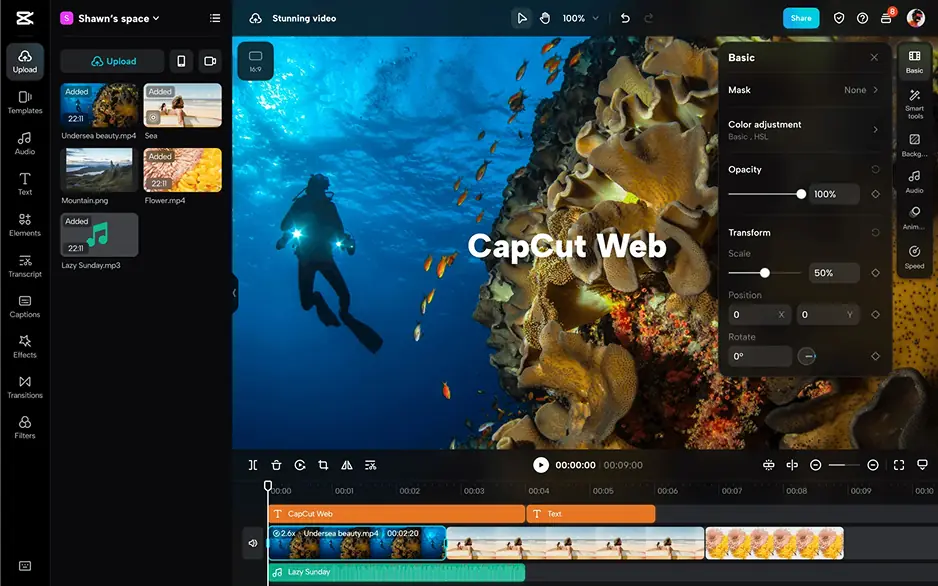
CapCut takes a different approach shaped heavily by its mobile origins. On a phone, the bottom toolbar keeps effects, text, audio, and transitions a single tap away, and the gesture-based trimming feels natural for anyone already comfortable editing on a touchscreen. The desktop version translates that same logic into a slightly wider interface without dramatically changing how the workflow feels, which makes switching between devices less disorienting than it might be with other editors.

Winner: CapCut is easier to pick up immediately, particularly on mobile, where its interface feels purpose-built rather than adapted from a desktop environment.

Features

VEED’s timeline supports multiple video and audio tracks, text layers, and subtitle tracks simultaneously, giving editors enough structure to handle interviews, tutorials, and branded videos. Subtitle tools go further than most browser-based editors, with word-level timing controls, style customization, and automatic translation. Screen recording, eye contact correction, and AI avatar generation round out a toolset clearly aimed at creators who produce content for professional or educational contexts.

CapCuts effects library is extensive and regularly updated with trending styles tied to popular social formats, which makes it genuinely useful for creators. Chroma key support, keyframe animation, and a growing collection of AI-powered tools like text-to-video generation and style transfer give CapCut more creative range than its mobile reputation might suggest. Audio tools include beat syncing, vocal effects, and a built-in royalty-free music library that integrates directly into the timeline.

Winner: VEED offers a more complete feature set for structured content production, while CapCut leads in effects variety and creative flexibility for short-form social content.

Performance

VEED processes everything through the browser, which means rendering and playback depend more on internet connection quality. For shorter projects and standard-resolution footage, that works reliably. Timelines with longer video clips can introduce noticeable lag during preview playback, and export times on more complex projects tend to run longer than in locally installed software. Stability is generally consistent for everyday editing, though browser tab management and connection interruptions occasionally affect the experience on heavier workloads.

CapCut handles performance differently depending on the device. On mobile, the app is tightly optimized for the hardware it runs on, and playback stays smooth even when effects, transitions, and audio layers stack up on shorter timelines. The desktop version benefits from local processing, which reduces the dependency on network conditions that affects VEED. GPU acceleration improves rendering speed on supported hardware, and export times for common social formats are fast relative to the project complexity most CapCut users are working with.

Winner: CapCut delivers more consistent performance across devices, with faster exports and smoother playback that is less dependent on connection quality or browser conditions.

Pricing

VEED's free plan allows video editing with a 10-minute export limit and a watermark on finished videos. Paid plans start at $18 per month on the Basic tier and scale upward through Pro and Business options, each unlocking higher export quality, longer video limits, additional AI features, and the ability to remove the watermark entirely. Team and enterprise tiers add shared workspaces and brand kit functionality.

CapCut remains free for the vast majority of its users, with no export time limits and watermark-free downloads on personal projects. The CapCut for Teams plan, aimed at business use, starts at $19.99 per month and adds commercial licensing, collaborative features, and expanded cloud storage. For solo creators producing content for social platforms, the free version covers nearly everything the editor offers without requiring a subscription.

Winner: CapCut offers a more genuinely usable free tier, with watermark-free exports and no hard time limits that push casual users toward a subscription.

Platform compatibility

VEED operates as a browser-based tool, which gives it a form of platform neutrality. Any device with a modern browser and a stable internet connection can run it, covering Windows, macOS, and Chromebook environments without requiring separate installations or version management.

CapCut offers dedicated apps for iOS and Android, and the desktop versions for Windows and macOS. A web version is also available, giving CapCut coverage across essentially the same range of devices as VEED, but with the added advantage of locally installed options that reduce dependency on browser performance and internet stability.

The difference between CapCut vs. VEED is that VEED's cross-platform reach is entirely browser-dependent, while CapCut offers genuine flexibility between native and browser-based workflows.

AI tools

VEED focuses on tools that reduce time spent on repetitive tasks like captioning, translation, and on-camera presentation. Its AI toolset includes:

  • Auto subtitles with multilingual translation across 100+ languages
  • Eye contact correction for adjusting gaze direction in talking-head footage
  • AI avatars for generating presenter-style videos without recording
  • Noise removal for cleaning up background audio automatically
  • Text-to-speech for voiceover generation across multiple voices and accents

CapCut integrates generative tools that help creators produce visually dynamic content faster and with less manual effort. Its AI toolset includes:

  • Text-to-video generation from written prompts
  • Auto captions with style customization and speaker detection
  • Background removal without requiring a green screen
  • AI art and style transfer for applying visual aesthetics to footage
  • Smart cutout for isolating subjects across moving frames

Pros & cons

VEED

Pros:
  • Browser-based access with no installation required

  • Strong subtitle and caption tools with multilingual support

  • Collaboration features and shared workspaces for teams

  • Brand kit and asset management on higher-tier plans

  • Eye contact correction and AI avatar tools for professional presentations

  • Clean, guided interface suited to structured content workflows

Cons:
  • Watermark on free exports limits practical use without a subscription

  • Performance can degrade on longer or more complex browser-based projects

  • No native mobile app for on-the-go editing

  • Advanced AI features locked behind paid tiers

  • Export format options narrower than locally installed editors

CapCut

Pros:
  • Fully featured free tier with watermark-free personal exports

  • Native apps for iOS, Android, Windows, and macOS

  • Extensive effects and trending template library updated regularly

  • Strong mobile performance with an interface built for touchscreen editing

  • AI creative tools including text-to-video and style transfer

  • Beat syncing and built-in royalty-free music library

Cons:
  • Less suited to structured, long-form, or team-based production

  • Commercial use requires a paid Teams subscription

  • Desktop interface less refined than the mobile experience

  • Fewer tools for subtitle precision and multilingual workflows

  • Limited codec and export format support

Best use cases

YouTube production: VEED suits channels built around talking-head content and educational videos that rely heavily on accurate subtitles, clean audio, and consistent branding. CapCut works better for YouTube Shorts, reaction content, and visually dynamic videos where effects and pacing matter more than detailed post-production finishing.

TikTok and social content: CapCut is the more natural fit for fast-turnaround social content across TikTok, Instagram Reels, and YouTube Shorts. Its template library and trending effects reduce the gap between having footage and having something ready to post.

Beginner editing: Both tools are accessible, but CapCut requires less prior knowledge to produce something that looks intentional. Template-driven workflows lower the barrier for creators who are still developing their editing instincts.

Professional workflows: VEED handles professional content more comfortably, particularly for marketers, educators, and teams producing branded video at scale. Its collaboration and brand management tools add structure that solo-focused editors like CapCut do not replicate.

Business and corporate content: VEED's workspace features, AI avatars, and subtitle precision make it better suited to internal communications, product demos, and training videos where clarity and consistency matter more than visual flair.

Casual editing: CapCut handles casual personal projects with less friction, especially on mobile, where quick edits for family videos, travel clips, or informal social posts stay fast and uncomplicated.

Final verdict

Choosing between CapCut and VEED feels less like picking the objectively better editor and more like recognizing which creative rhythm matches how you actually work.

VEED is built for creators who think in terms of structure. The workflow rewards editors who arrive with a clear plan, whether that means a branded series, a captioned tutorial, or a polished corporate video that needs to look consistent across every upload.

CapCut is built for creators who think in terms of momentum. The interface moves quickly, the effects library keeps pace with what is trending, and the mobile experience makes it possible to go from raw footage to a finished post without sitting down at a desk.

Alternative: Movavi Video Editor
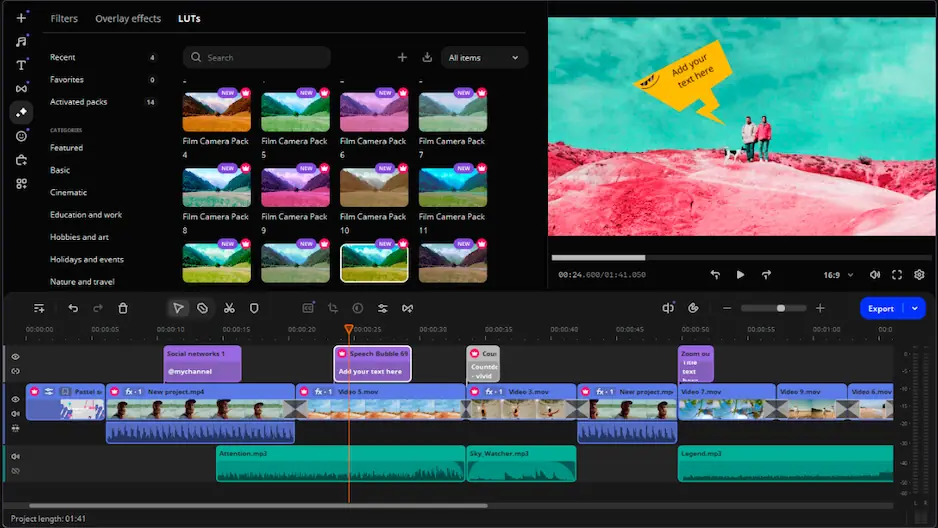
If VEED feels too subscription-dependent for casual use and CapCut feels too social-media-focused for the kind of content you actually make, Movavi Video Editor sits in a useful middle position. It runs as a locally installed application on both Windows and Mac, which removes the browser dependency while also offering a structured timeline. The interface stays approachable without stripping out tools that matter for everyday editing, and features like transitions, color correction, audio controls, and title customization are accessible without requiring a steep learning curve or a recurring monthly payment. For users who edit regularly but do not need a full professional post-production environment, Movavi offers a straightforward desktop editing experience.


Frequently asked questions

Is VEED good for professional video editing?

VEED handles professional content well within its intended scope – branded videos, captioned presentations, educational content, and team-based production. It is not a replacement for dedicated post-production software when projects involve RAW footage, but for most online professional content it covers the essentials without demanding a steep learning curve.

Can I use CapCut for free without a watermark?

Yes, for personal use. CapCut's free tier allows watermark-free exports on individual projects, which sets it apart from many competing tools that treat watermark removal as a paid feature. The distinction matters for commercial use, where CapCut's terms require a Teams subscription to license content for business purposes properly.

Which editor is better for someone who edits on both a phone and a computer?

CapCut handles cross-device workflows more naturally because its mobile and desktop versions share the same interface logic, making it easy to start a project on one device and continue on another without relearning the layout. VEED's browser-based access works across devices technically, but the experience on a phone screen is noticeably less comfortable than CapCut's purpose-built mobile app.

Have questions?
If you can’t find the answer to your question, please feel free to contact our Support Team.
Join us for discounts, editing tips, and content ideas

1.5M+ users already subscribed to our newsletter

By signing up, I agree to receive marketing emails from Movavi and agree to Movavi's Privacy Policy.