
OpenShot vs. DaVinci Resolve: Features, Pricing, Performance Compared

Edited by
Ben Jacklin
10,055

OpenShot vs. DaVinci Resolve is an easy choice after one takes their eyes off the two as free video editing software. OpenShot is the easier and less demanding option if someone wants to do some basic cuts on a video, fast and social videos or doesn’t have enough time to learn new interface tools. DaVinci Resolve would be better for serious projects, color correction and sound editing, even if the user must meet higher requirements as well as their computer. DaVinci Resolve vs. OpenShot – which one should be picked?

Comparison parameter

OpenShot

DaVinci Resolve

Who it's for

Beginners, casual editors, students, small creators

Advanced creators, YouTubers with complex workflows, colorists, editors, post-production teams

Supported platforms

Windows, macOS, Linux, ChromeOS according to the OpenShot user guide and support materials

Windows, macOS, and Linux

Ease of use

Simple drag-and-drop editing, easy to start

Clean but dense; easier than many pro tools, still not exactly casual

Quick summary

Best suited for professional work: DaVinci Resolve. It is a software that provides a combination of editing, color grading, visual effects, motion graphics, and audio editing under the same interface, hence its heaviness. As described by the software creators, it is an all-in-one tool for editing, color, VFX, motion graphics, and audio.

Best for color grading: DaVinci Resolve, without a doubt. While OpenShot is capable of performing basic color grading functions, Resolve has more of a focus on color grading than most other editors.

Best for advanced editing: DaVinci Resolve. Multicam support, advanced audio options, and Fusion visual effects set it apart from other editors.

Best performance: DaVinci Resolve if your computer can handle it. OpenShot is lighter than Resolve, but Resolve will perform better in complex editing jobs.

Ease of use

OpenShot

DaVinci Resolve

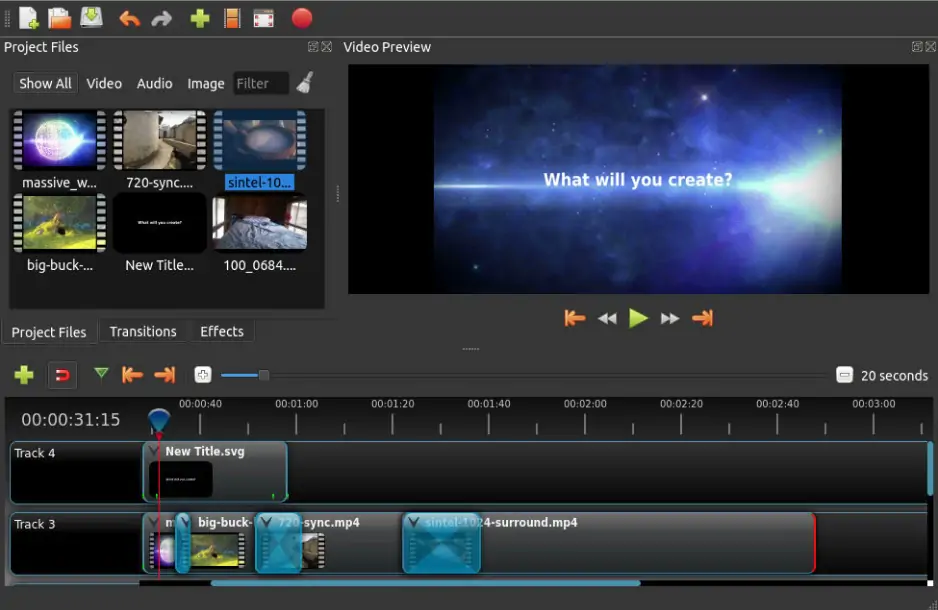
OpenShot feels like the kind of editor you open when you just want to get something done. Drag in a clip, cut the boring bit, add a title, export. The interface doesn’t ask you to understand post-production language before you can make your first edit. That matters. A lot of people don’t want a “cinematic workflow.” They want to trim a birthday video, make a quick YouTube intro, or put together a TikTok without feeling like they’ve wandered into a colorist’s workstation.

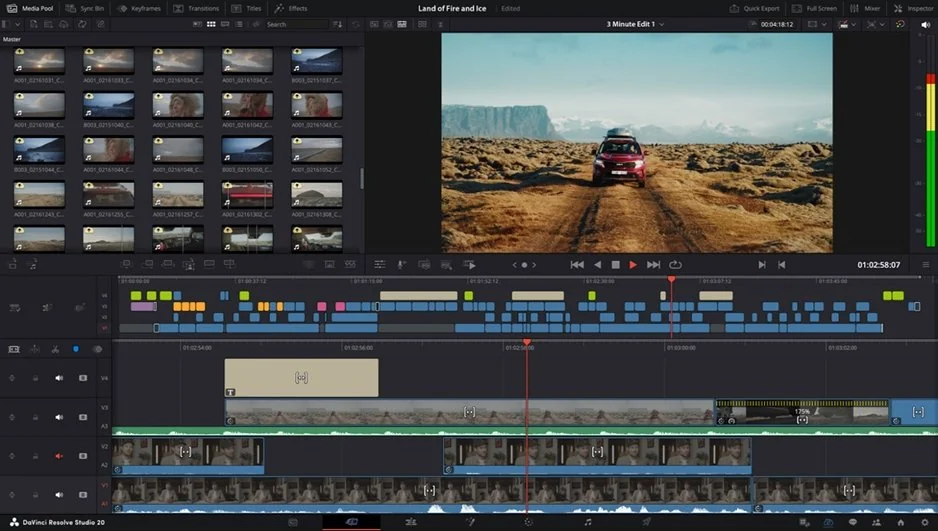
DaVinci Resolve is more polished, but it’s also much deeper. The interface is divided into pages, and each page has its own logic. Once you understand it, the setup makes sense. At first, though, it can feel like walking into a studio where every button has a job and nobody has labeled the coffee machine. The Cut page helps beginners move faster, but Resolve still carries the weight of professional software.

Winner: for onboarding, OpenShot wins. For long-term growth, Resolve wins. A beginner can learn OpenShot in an afternoon. Resolve might take longer, but it gives you more room to grow without switching apps later.

Features

This is where OpenShot and DaVinci Resolve stop feeling like direct rivals. OpenShot has the basics most casual editors need: trimming, slicing, keyframe animation, transitions, titles, effects, layers, and support for many media formats through FFmpeg. Its official site also emphasizes simple drag-and-drop editing and cross-platform support. That’s enough for plenty of real projects.

DaVinci Resolve goes much further. Timeline editing is more precise, multicam support is stronger, and the Color page is one of the main reasons people use Resolve in the first place. Then there’s Fusion for motion graphics and visual effects, Fairlight for audio post-production, and broader support for professional workflows.

Codec support is also a serious point. OpenShot’s FFmpeg base gives it wide everyday compatibility. Resolve supports a broad range of professional formats, but some advanced options are tied to Studio, including encoding video resolutions at 4K or higher in certain cases and immersive audio support.

Winner: DaVinci Resolve for features. If you’re cutting a talking-head video, OpenShot can do the job. If you’re balancing camera angles, cleaning dialogue, grading footage, adding motion graphics, and exporting for a client, Resolve makes more sense.

Performance

OpenShot is lightweight in spirit, but performance can vary. For short edits, it usually feels simple enough. Add large files, high-resolution footage, many layers, or heavier effects, and you may run into slower previews or longer exports. OpenShot does support hardware acceleration, but its own documentation notes that GPU acceleration is experimental and may not always be faster, especially on older graphics cards. That’s a refreshingly honest warning.

DaVinci Resolve wants better hardware. There’s no polite way around it. A weak laptop may open the program, but that doesn’t mean it will enjoy the experience. With a proper GPU, enough RAM, and fast storage, Resolve handles big timelines much more confidently. It is built for large projects, high-quality media, and professional delivery. The trade-off is obvious: you get more power, but your computer has to bring something to the table.

Winner: for rendering speed and stability on serious projects, DaVinci Resolve is stronger. For tiny edits on a basic machine, OpenShot may feel less intimidating.

Pricing

OpenShot keeps pricing beautifully simple: it’s free and open-source. No subscription, no Studio tier, no confusing upgrade ladder. That’s a real advantage for students, hobbyists, and anyone who only edits video once in a while.

DaVinci Resolve is also unusually generous. The free version includes a lot: editing, color, VFX, motion graphics, audio tools, multi-user collaboration, and HDR grading. Blackmagic says the free version works with virtually all 8-bit video formats at up to 60fps and up to Ultra HD 3840 × 2160. DaVinci Resolve Studio costs $295 and adds the Neural Engine, extra Resolve FX, advanced HDR grading, noise reduction, higher-end format support, and other professional tools.

Neither tool adds a watermark to standard exports, which is nice. OpenShot is still the cleaner “free forever” choice. Resolve is the better free-to-pro pipeline, especially if you may eventually pay for Studio.

Winner: OpenShot for zero-cost simplicity; DaVinci Resolve for free professional value.

Platform compatibility

Both editors cover the major desktop platforms. OpenShot supports Windows, Mac, Linux, and ChromeOS, which gives it a slight edge for users on less common setups. DaVinci Resolve supports Mac, Windows, and Linux, and that is enough for most professional editors.

The more practical difference is hardware. OpenShot is friendlier for casual computers, though performance still depends on the project. Resolve is more demanding, especially when you start working with 4K footage, heavy color grades, Fusion effects, or noise reduction.

AI tools

AI is not really OpenShot’s main selling point. It has experimented with computer-vision and audio-related features in past versions, but if AI-assisted editing is high on your list, OpenShot will probably feel limited.

DaVinci Resolve is much stronger here, especially in the Studio version. Blackmagic lists Neural Engine features such as automatic AI region tracking, and Resolve 21 adds newer AI tools including IntelliSearch, CineFocus, and facial refinement tools. These are not little decorative extras. In the right workflow, they can save real time.

Pros & cons

OpenShot

Pros:
  • Free and open-source

  • Easy to learn

  • Works on Windows, Mac, Linux, and ChromeOS

  • No watermark

  • Good enough for simple edits, titles, transitions, and social videos

  • FFmpeg-based format support

Cons:
  • Limited advanced editing tools

  • No serious color grading workflow

  • Performance can struggle on larger projects

  • Hardware acceleration is still experimental

  • Not ideal for professional post-production

DaVinci Resolve

Pros:
  • Very powerful free version

  • Excellent color grading

  • Strong editing, audio, VFX, and motion graphics tools

  • No watermark

  • Built for professional workflows

  • Studio version adds advanced AI and high-end features

Cons:
  • Steeper learning curve

  • Needs stronger hardware

  • Some advanced features require Studio

  • Interface may feel too much for quick casual edits

  • Overkill for very simple projects

Best use cases

YouTube: OpenShot can handle basic YouTube editing needs – cuts, titles, music, and simple transitions. DaVinci Resolve is a better fit if you have channels requiring color correction, multiple camera angles, graphics, and a standard workflow.

TikTok: OpenShot will do well for fast edits, especially if you like working from your desktop. DaVinci Resolve would be a better choice if there’s color, sound cleaning, or timing polishing to do.

Social media: OpenShot works best for fast-paced content that doesn't require a lot of thought or stress. DaVinci Resolve is best for social video producers taking their work seriously.

Beginners: start with OpenShot. It's not as overwhelming, and you'll probably appreciate how much time you don't waste wondering which window you should be looking at.

Professional users: go with DaVinci Resolve. This is the tool built specifically for editing, color grading, sound work, visual effects, and delivery in one workspace.

Business: quick and dirty business videos can be edited in OpenShot, but for anything involving clients, whether for product demonstration or advertisement, DaVinci Resolve offers greater flexibility.

Casual editing: OpenShot. Sometimes the most important part of editing is getting rid of an awkward pause.

Final verdict

DaVinci Resolve and OpenShot are both useful, but they serve different kinds of editors. Choose OpenShot if you want a free, simple, open-source editor for basic projects and don’t need advanced color, audio, or VFX tools. Choose DaVinci Resolve if you want a professional editor that can grow with you, handle serious workflows, and give you some of the best color tools available outside high-end studio systems.

Alternative: Movavi Video Editor
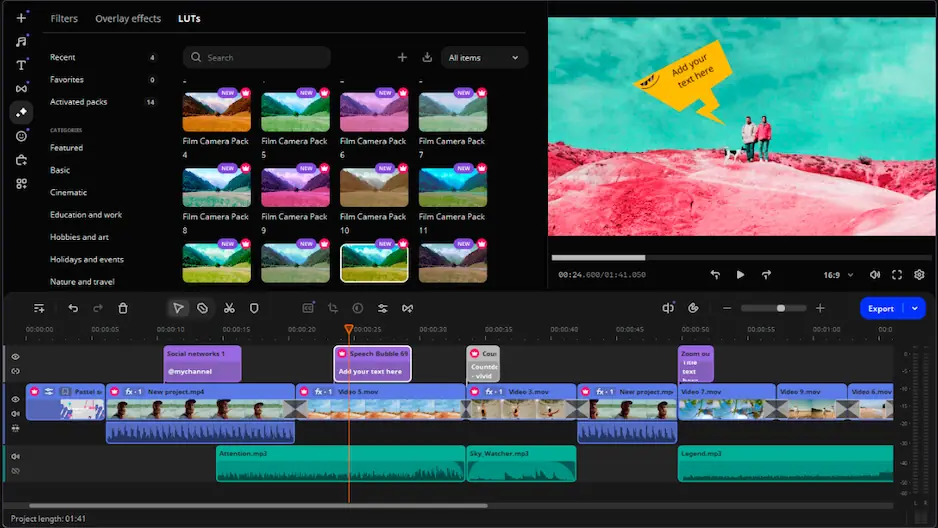
If OpenShot feels too basic and DaVinci Resolve feels too heavy, Movavi Video Editor sits in a more comfortable middle space. It’s made for users who want quick editing, a friendly interface, and practical tools without stepping into a full post-production suite. Movavi lists features such as cutting, cropping, speed changes, color adjustment, transitions, titles, motion tracking, automatic subtitles, AI noise removal, and silence removal.

That makes it a good alternative for creators who edit YouTube videos, short social clips, tutorials, family videos, or small business content. It won’t replace Resolve for professional color grading or complex VFX work, and it’s not open-source like OpenShot. But for many people, that’s not the point. They need an editor that opens quickly, explains itself without a manual, and helps them finish the video instead of turning the edit into a second job.

Movavi Video Editor is worth considering if you want something more guided than OpenShot but less technical than DaVinci Resolve.


Frequently asked questions

Is OpenShot better than DaVinci Resolve for beginners?

OpenShot in most cases would be preferable for newcomers since its concept is more intuitive and drag-and-drop workflow is easier. DaVinci Resolve can be hard to understand by some newbies because it includes multiple panels and pages.

Does DaVinci Resolve have a watermark?

No, it doesn’t. The free version of DaVinci Resolve does not put any watermarks on videos exported with it.

Which editor should I choose for YouTube videos?

YouTube editors require basic features and do not need many advanced ones. In this case, OpenShot would be sufficient. However, for more professional-looking content that would have quality colors, sound, visual effects, as well as multi-camera capability, DaVinci Resolve would work better. You could go with Movavi Video Editor, too.

Have questions?
If you can’t find the answer to your question, please feel free to contact our Support Team.
Join us for discounts, editing tips, and content ideas

1.5M+ users already subscribed to our newsletter

By signing up, I agree to receive marketing emails from Movavi and agree to Movavi's Privacy Policy.