
Movavi Video Editor
Create awesome videos easily
I opened Movavi and VEGAS Pro expecting a simple comparison between “easy” and “advanced,” but after editing the same footage in both, the gap turned out to be more about workflow than raw capability. Movavi Video Editor kept pushing me toward faster decisions with a cleaner interface, built-in effects, AI-assisted tools, and an editing process that never seemed interested in slowing me down, while VEGAS Pro gave me more control over detailed edits, audio work, and heavier projects at the cost of a steeper learning curve. During my tests, Movavi felt much more comfortable for content creation, YouTube videos, and everyday editing, whereas VEGAS Pro started making more sense once timelines became more complex and I wanted deeper customization. My quick takeaway is this: Movavi Video Editor suits creators who want speed and accessibility without spending days learning software, while VEGAS Pro is a stronger match for users who prefer more advanced tools and don’t mind a more demanding workflow.
Best overall performance
Movavi Video Editor wins on everyday responsiveness. Clips loaded quickly, edits stayed smooth, and the software rarely interrupted the rhythm, which matters more than benchmarks when there’s an actual deadline waiting.
Best for professional workflows
The moment projects became heavier and timelines started filling up, VEGAS Pro looked much more comfortable. It offers the kind of deeper editing environment that makes long-form and more demanding workflows easier to manage.
Best for color grading
VEGAS Pro takes this one simply because it gives more room to push color beyond basic corrections. I spent more time fine-tuning footage instead of settling for “good enough” after two adjustments.
Best for advanced editing
VEGAS Pro kept revealing more options the deeper I went, especially with compositing, multicam editing, and timeline customization. Movavi stayed focused on speed, while VEGAS seemed happier handling complexity.
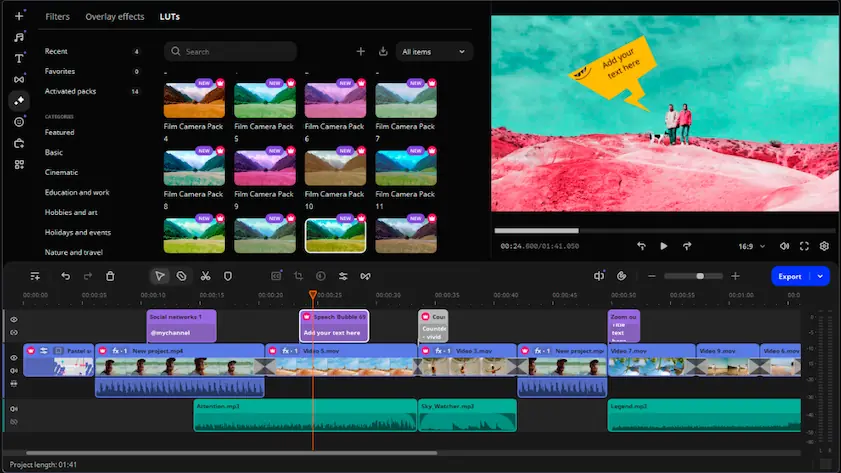
Movavi Video Editor
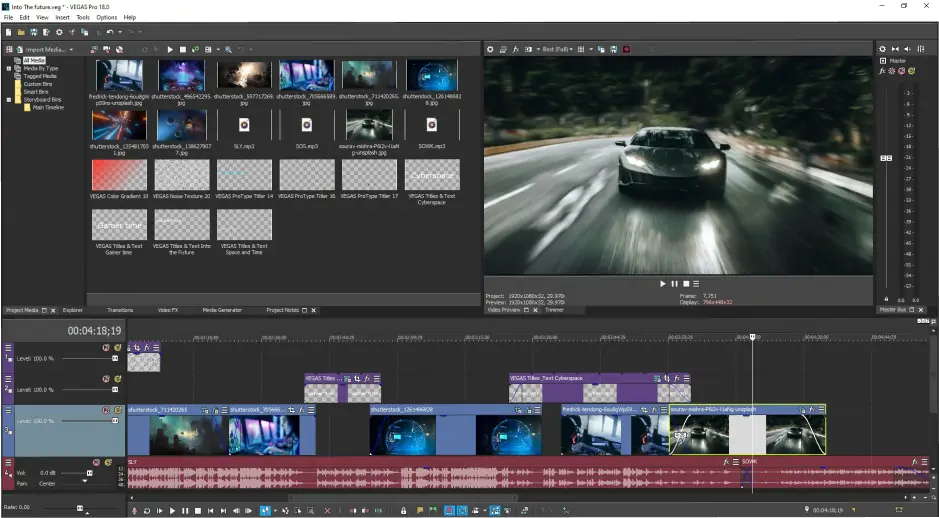
VEGAS Pro
In the battle Movavi vs. VEGAS Pro, difference in usability showed up almost immediately. Movavi Video Editor has the kind of interface that quietly removes friction: drag footage in, move clips around, add effects, and within minutes it feels less like learning software and more like editing. VEGAS Pro took a different approach and gave me more control, but also more decisions, more panels, and more moments where I stopped to figure out where a tool was hiding. The deeper customization becomes valuable over time, although the onboarding experience is noticeably heavier. For someone opening an editor for the first time, Movavi asks for far less patience before things start making sense.
Winner: for onboarding, interface clarity, and overall ease of learning, Movavi gets to the finish line faster.
For those who want to start editing with AI tools, effects, and ready-made templates in minutes, Movavi Video Editor could be a real catch.
The comparison of VEGAS Pro and Movavi changed quickly once I moved beyond basic edits. Movavi Video Editor stayed focused on speed, with a simple timeline, built-in effects, motion tracking, AI tools, and features that made everyday projects feel straightforward without slowing down the workflow. VEGAS Pro opened a much larger toolbox: multicam editing, deeper color correction, stronger audio mixing, broader timeline customization, plugin support, and workflows better suited to layered or long-form projects. The difference became more noticeable as edits grew more complex, because Movavi kept prioritizing accessibility while VEGAS seemed much more comfortable with detailed adjustments and advanced editing tasks.
Winner: Movavi Video Editor made finishing videos easier, but VEGAS Pro offered more depth when editing started getting serious.
VEGAS Pro vs. Movavi performance competition turned into a comparison between efficiency and endurance. Movavi Video Editor stayed light throughout, with fast rendering on everyday projects, modest hardware requirements, and enough GPU acceleration to keep exports moving smoothly without putting much pressure on the system. VEGAS Pro handled larger timelines, heavier effects, and more demanding edits with greater confidence, although it also relied more heavily on stronger CPUs and GPUs to reach that level. The difference became more obvious as projects grew because Movavi prioritized responsiveness and quick workflows, while VEGAS seemed more prepared for layered edits and longer productions. On smaller systems, Movavi felt easier to run comfortably, whereas VEGAS benefited much more from extra hardware power.
Winner: for advanced projects, GPU-intensive tasks, and heavier editing workloads, VEGAS Pro has a higher performance ceiling, even if Movavi feels quicker in everyday use.
Pricing started feeling less like a list of numbers and more like two different expectations about who is sitting behind the keyboard. Movavi Video Editor keeps the entry point relatively low with a free trial, subscription plans, and lifetime license options, although the trial version includes export limitations and a watermark. VEGAS Pro moves further into premium territory with higher subscription costs and perpetual licenses, while trial versions can also come with restrictions depending on the edition. After spending time with both, the difference became fairly clear: Movavi seems designed for creators looking for accessible costs and faster entry, while VEGAS Pro assumes users may be willing to invest more for deeper editing capabilities and advanced workflows.
Winner: for affordability, flexibility, and a lower barrier to entry, Movavi Video Editor is easier to justify for everyday editing and content creation.
Users looking for an editor with a lower entry cost and a shorter path from installation to their first finished video may find Movavi a better option.
Platform support creates a bigger gap here than some of the editing features do. Movavi Video Editor runs on both Windows and macOS, which gives it more flexibility for creators who switch devices or work across different setups. VEGAS Pro stays firmly inside the Windows ecosystem, and while that may not matter for dedicated PC editors, it becomes noticeable the moment a Mac enters the workflow or collaboration involves mixed systems. After spending time with both, Movavi felt easier to fit into different environments because the software adapts to more devices instead of asking users to adapt around it.
The AI category ended up showing two very different priorities. Movavi Video Editor puts most of its attention on saving time during everyday editing: auto subtitles generate and sync captions automatically, AI background removal cuts subjects out without needing a green screen, and AI enhancement tools help improve visuals and clean up audio with fewer manual adjustments. I also spent time with Movavi’s smart tools, including motion tracking and automated editing helpers, and the overall impression was clear: remove repetitive tasks and keep the workflow moving. Auto subtitles, background removal, and AI cleanup have become some of its most visible strengths in recent updates. VEGAS Pro takes a more technical route. Its AI toolkit includes speech-to-text, text-to-speech, masking assistance, and tools designed to support larger editing workflows rather than simply speed up routine tasks. Movavi’s AI seems focused on helping creators publish faster, while VEGAS Pro leans more toward giving experienced editors additional control.
Movavi Video Editor
Clean interface that makes editing feel approachable from the first project
AI tools like auto subtitles, background removal, and AI enhancement help speed up repetitive tasks
Large built-in library of effects, transitions, filters, and titles
Runs smoothly on mid-range computers without demanding high-end hardware
Well suited for YouTube videos, social media content, and quick editing workflows
Short learning curve compared to more advanced editors
Trial version exports include a watermark
Limited advanced color grading and post-production capabilities
Fewer tools for complex workflows or professional editing environments
Less flexibility for highly customized projects
VEGAS Pro
Strong multicam editing, timeline customization, and advanced editing workflows
Broad range of professional tools including detailed audio editing, color correction, and compositing
Good plugin support and flexible workspace customization for experienced users
AI features such as speech-to-text and editing assistance help reduce manual work
Handles long-form and more demanding editing projects comfortably
Strong rendering performance and efficient raw editing speed according to user reviews
Windows-only support limits flexibility across devices
More advanced workflows come with a steeper learning curve for newer editors
Some features rely on subscriptions or additional plugins for full functionality
Larger projects and advanced effects benefit from stronger hardware
Interface depth can slow down users who mainly need fast edits for everyday content
The difference in use cases became obvious long before I reached the export button. Movavi Video Editor kept fitting naturally into YouTube uploads, TikTok clips, social posts, and everyday creator work because the workflow stayed quick and rarely interrupted momentum. I spent less time navigating menus and more time actually assembling videos, which also made Movavi easier to recommend for beginners and casual editing. VEGAS Pro became more interesting once projects started growing in complexity, especially with longer timelines, heavier edits, and workflows that demanded more detailed control over audio, effects, or customization.
For social media and everyday content creation, Movavi keeps the process simple, fast, and beginner-friendly without sacrificing useful features.
Final verdict
After spending time with both editors, I stopped thinking about which one was more powerful and started noticing which one I naturally opened for different kinds of work. Movavi Video Editor kept the process fast, approachable, and surprisingly difficult to overcomplicate, which made it an easy fit for content creation and everyday projects. VEGAS Pro offered more depth and more room for detailed editing decisions, but also expected more patience in return. If speed and accessibility matter most, I’d reach for Movavi; if deeper control is the priority, VEGAS Pro starts making more sense.

That depends on what “professional” means in practice. VEGAS Pro gave me more control over complex timelines, audio adjustments, and detailed workflows, which makes it more comfortable for larger productions. Movavi, on the other hand, kept projects moving faster and felt easier to manage when the goal was creating content efficiently rather than building a heavy post-production process.
The answer became obvious fairly quickly. Movavi Video Editor let me start editing almost immediately because the interface stayed simple and the workflow rarely interrupted momentum, while VEGAS Pro expected more patience before everything started feeling familiar. Both can be learned, but one clearly asks fewer questions at the beginning.
I started noticing the difference once projects became heavier and timelines filled with effects. Movavi Video Editor stayed relatively comfortable on modest hardware, while VEGAS Pro seemed much happier when stronger CPUs and GPUs entered the picture. Both can run on everyday systems, but VEGAS tends to reward extra hardware with smoother performance on more demanding edits.



1.5M+ users already subscribed to our newsletter