
Movavi Video Editor
Create awesome videos easily
I expected the biggest difference between Movavi and Shotcut to be pricing, but after working through similar projects in both, the contrast turned out to be much more about editing philosophy. Movavi Video Editor kept steering me toward a smoother, more guided experience with AI tools, built-in effects, and a workflow that seemed designed to reduce hesitation, while Shotcut offered a more open environment with deeper manual control and the unmistakable feeling that users are expected to build their own habits around the software. The trade-off appeared repeatedly: Movavi prioritized speed, accessibility, and getting projects finished without much friction, whereas Shotcut rewarded patience and experimentation, even if that occasionally meant spending longer adjusting settings or exploring menus. The pattern that stayed with me afterward was fairly simple: Movavi suits creators who want editing to feel straightforward and efficient, while Shotcut makes more sense for users who prefer free software and do not mind a steeper path to flexibility.
Best overall performance
Movavi Video Editor moved through everyday edits with less resistance. Imports, timeline work, and exports stayed smooth, which mattered more than extra complexity when the goal was simply finishing the project.
Best for professional workflows
Shotcut takes this category simply because it gives more room to build detailed workflows around the editor rather than inside predefined limits. The extra flexibility asks for patience, but it also leaves more space for users who prefer control over convenience.
Best for color grading
Neither editor is chasing high-end cinematic grading, but Shotcut gives more manual control once I started pushing beyond basic corrections. Movavi Video Editor kept things faster, while Shotcut allowed more adjustment before reaching the point where “good enough” becomes subjective.
Best for advanced editing
The gap widened as projects became more layered. Shotcut handled customization, keyframes, and deeper editing decisions more comfortably, whereas Movavi Video Editor stayed focused on keeping the process efficient.
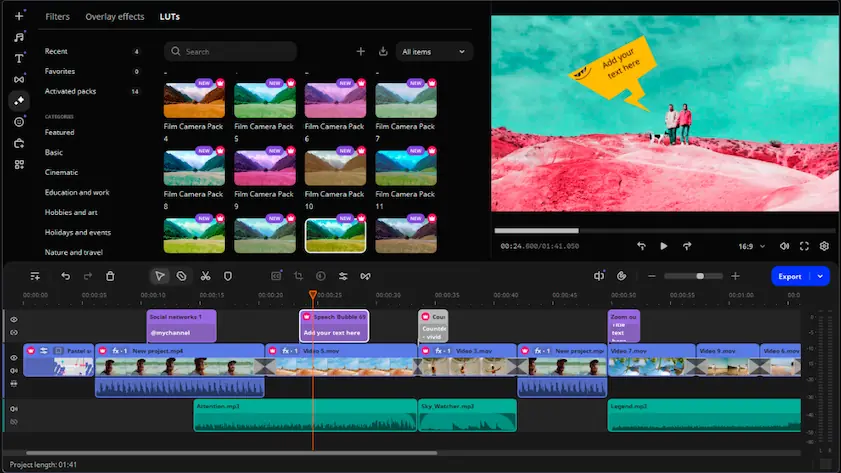
Movavi Video Editor
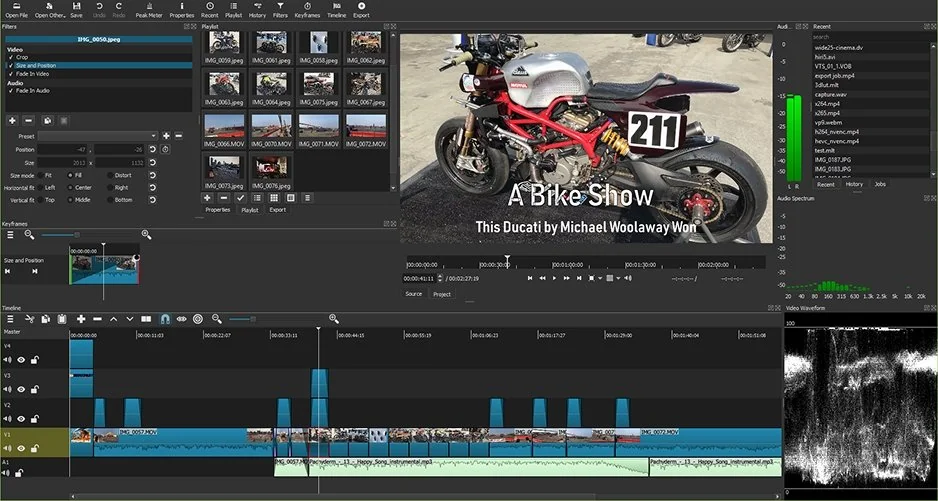
Shotcut
When I just started comparing Shotcut and Movavi, the first few minutes inside each editor already hinted at who they were built for. Movavi Video Editor keeps the interface unusually direct: import clips, drag them onto the timeline, add effects, and the workflow starts making sense before you’ve spent much time looking for tutorials. Shotcut takes a more open-ended approach and gives users plenty of control, but the interface feels more technical, with fewer cues guiding beginners through the process. Reviews and comparisons consistently point to Movavi as the easier option overall, while Shotcut earns points for flexibility rather than onboarding. That contrast remained consistent: Movavi lowers the effort required to get comfortable, whereas Shotcut expects users to invest more time before the workflow begins to feel natural.
Winner: for UX, onboarding, and simply reaching a comfortable editing rhythm faster, Movavi comes out ahead.
Movavi Video Editor may attract creators who want editing software to feel intuitive from the first project rather than after several tutorials.
In the Movavi vs. Shotcut competition, the difference in features became clearer once projects demanded more than cuts and transitions. Movavi Video Editor keeps most tools within easy reach: a simple timeline, built-in effects, AI features, motion tracking, and enough editing options to move from raw footage to export without much friction. Shotcut takes a more manual route and offers broader codec support, stronger customization, advanced filters, keyframes, and more flexibility around color grading and audio adjustments. The gap becomes more noticeable as edits grow because Movavi prioritizes speed and accessibility, while Shotcut leaves more room for experimenting with workflows and fine-tuning technical details. One stays focused on getting projects finished quickly, the other gives users more freedom to shape the process itself.
Winner: Movavi Video Editor helped me finish projects faster, but Shotcut offered more depth once editing became more technical.
Shotcut vs. Movavi performance contest created a surprisingly clear split between efficiency and flexibility. Movavi Video Editor stayed light throughout longer editing sessions, with fast rendering, modest hardware requirements, and stable performance that seemed comfortable even on mid-range systems. Shotcut handled larger formats, broad codec support, and more technical workflows well, but the extra flexibility often meant relying more on manual configuration, especially around GPU acceleration and proxy workflows. Open-source users regularly highlight Shotcut’s support for hardware acceleration and advanced formats, while Movavi earns stronger scores for responsiveness and ease in everyday editing. The difference became more visible as projects grew: Movavi kept prioritizing smooth editing and quick exports, while Shotcut offered more control but occasionally asked for more patience.
Winner: for rendering speed, lower hardware demands, and smoother performance in everyday workflows, Movavi reaches the finish line with less effort.
Users editing on everyday laptops or looking for lighter software requirements may find Movavi Video Editor relevant.
This category separates the two editors faster than most feature lists do. Movavi Video Editor follows a more traditional model with a free trial, subscription plans, and lifetime licenses, although trial exports include a watermark and some features remain restricted until upgrading. Shotcut skips the entire upgrade conversation because the software is free, open source, and available without subscriptions, premium tiers, or watermarked exports. The difference becomes noticeable almost immediately: Movavi combines paid access with AI tools, built-in effects, and a more guided experience, while Shotcut gives users full functionality and assumes they are willing to trade convenience for flexibility.
Winner: for unrestricted access, no subscriptions, and zero-cost editing, Shotcut has a difficult advantage to ignore.
Platform support keeps both editors widely accessible, although one clearly casts a wider net. Movavi Video Editor runs on Windows and macOS, covering the operating systems most creators are likely to use for everyday editing and content production. Shotcut extends support further by adding Linux alongside Windows and macOS, which gives it more flexibility and makes it easier to fit into mixed environments, older systems, or workflows built around open-source software. That difference may not matter much for casual editing, but it becomes more noticeable once projects move between devices or users prefer keeping software choices independent of a specific ecosystem.
Winner: for broader operating system support and more flexibility across open-source and mixed-device environments, Shotcut holds the stronger advantage.
The contrast in AI features appears quickly because the two editors approach automation from very different directions. Movavi Video Editor focuses on speeding up routine work: auto subtitles generate captions automatically, AI background removal isolates subjects without manual masking, and AI enhancement tools help improve visuals with fewer adjustments. I also spent time with Movavi’s smart tools, including motion tracking and automated editing features, and the overall pattern stayed the same: reduce repetitive steps and keep projects moving. Most of the AI tools target everyday creator tasks rather than experimental features. Shotcut takes a much lighter approach and relies more on manual editing than built-in AI assistance. That gives users more control, but far fewer shortcuts compared to modern commercial editors.
Winner: for faster workflows, practical automation, and beginner-friendly AI features, Movavi Video Editor delivers the more useful editing experience.
Creators interested in automating routine editing tasks such as subtitles, cleanup, or background edits may be the audience Movavi Video Editor targets most directly.
Movavi Video Editor
The interface stays approachable and does not overwhelm new users with too many controls at once
AI features such as auto subtitles, background removal, AI enhancement, and smart tools reduce repetitive editing work
Built-in effects, filters, titles, and transitions help create polished videos quickly
Runs comfortably on many mid-range computers without demanding powerful hardware
Suitable for YouTube uploads, social media content, and fast editing workflows
Available with subscription and bundle license options
Watermark in the trial version
Advanced editing environments remain more limited than in technical or professional editors
Fewer customization options for users who prefer highly flexible workflows
Some creators may outgrow the feature set on larger projects
Shotcut
Completely free and open source, with no subscriptions required
No watermark added to exported videos
Supports Windows, macOS, and Linux
Broad codec compatibility thanks to integration with FFmpeg
More freedom to customize workflows and editing processes
Strong community support around updates, tutorials, and troubleshooting
Interface takes longer to become comfortable for new users
Lacks the AI tools and automated features common in newer commercial editors
Fewer built-in templates, creative assets, and ready-made effects
Workflow can feel slower because more settings require manual adjustment
Less guided experience for beginners looking for quick results
These two editors ended up dividing work in a surprisingly clear way. Movavi Video Editor seemed much more comfortable around fast-moving creator routines: YouTube uploads waiting for a thumbnail, social clips needing quick edits, or projects where the goal is to publish rather than spend hours adjusting settings. Shotcut moved in a different direction and started making more sense when editing became slower, more deliberate, and built around customization instead of convenience. The split was not really between simple and advanced, but between speed and control.
Movavi Video Editor may fit users producing regular YouTube uploads, short-form videos, tutorials, or everyday social content.
Final verdict
The longer I switched between these editors, the less they felt like two tools competing for the same user. Movavi Video Editor kept pulling editing toward speed, simplicity, and everyday content creation, with a workflow designed to shorten the distance between importing footage and exporting a finished video. Shotcut moved in the opposite direction and offered more freedom, more customization, and fewer restrictions, although it also expected more patience in return. One tries to reduce effort, the other reduces limits. If the goal was to edit efficiently and keep the process straightforward, Movavi would be the easier pick; if customization and greater freedom inside the workflow mattered more, Shotcut would have the advantage.

That question followed me for most of the comparison because free software often arrives with compromises hidden somewhere in the workflow. Shotcut surprised me by offering broad format support, customization options, and enough editing depth to handle more than simple projects. The trade-off appears elsewhere: you save money, but spend more time learning the environment.
Movavi Video Editor keeps more tools within immediate reach, adds AI features for routine tasks, and reduces the number of decisions between importing footage and exporting a finished video. Shotcut offers more freedom, but that flexibility can also slow things down.
Not necessarily, and Shotcut is a good example of that. Open-source editors can still provide advanced controls, broad codec support, and flexible workflows, although they often rely more heavily on manual adjustments rather than automation or AI-assisted shortcuts.



1.5M+ users already subscribed to our newsletter