
Movavi Video Editor
Create awesome videos easily
The goal of both Movavi Video Editor and OpenShot is to simplify video editing for their respective users, but each goes about it in an entirely distinct way. Movavi Video Editor is a sleeker program and comes with artificial intelligence capabilities, templates, effects, and, most importantly, a paid license required to access all the features. OpenShot Video Editor, on the other hand, is open-source and free, meaning that you can explore the program to your heart’s content without worrying about breaking anything.
Best for professional workflows: Neither is a full replacement for a high-end editor like Final Cut Pro or DaVinci Resolve. Between Movavi vs. OpenShot, Movavi Video Editor is better for small business and creator workflows because it moves faster from import to export. OpenShot is better when cost, openness, or Linux support matters more.
Best for color grading: Movavi Video Editor wins for accessible color correction. It’s not a dedicated grading suite, but the workflow is cleaner for quick adjustments. OpenShot can handle basic visual corrections, though it feels more utilitarian.
Best for advanced editing: OpenShot has some surprisingly flexible timeline tools, including unlimited tracks and keyframe animation. Movavi Video Editor has a more approachable toolkit and stronger smart features. For advanced manual tinkering, OpenShot has appeal; for advanced-looking results with less friction, Movavi is easier.
Best overall performance: Movavi’s interface, paid product polish, and guided workflow make it feel steadier for everyday projects.
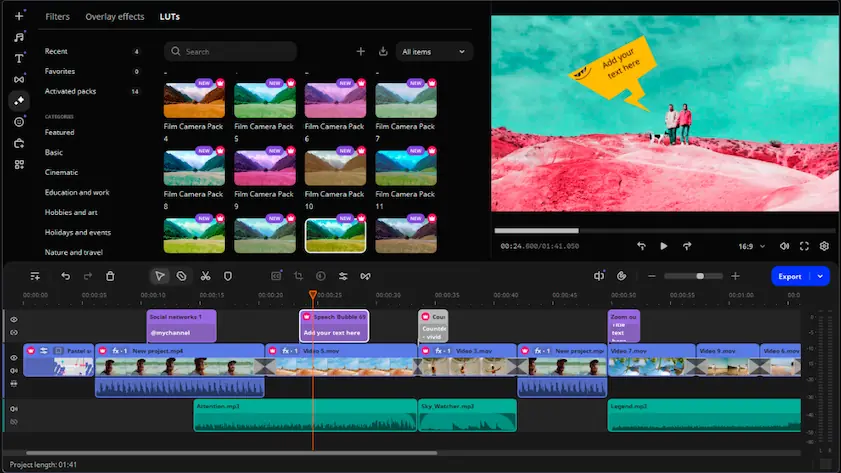
Movavi Video Editor
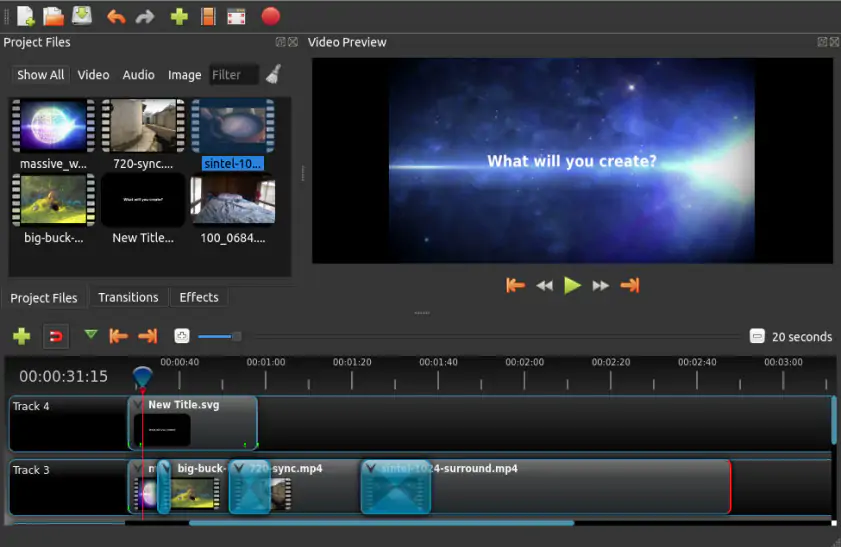
OpenShot
Movavi Video Editor feels like software made for someone who has a video to finish before lunch. The interface doesn’t ask you to admire it. You import clips, trim the awkward pauses, add titles, maybe generate subtitles, and export. That’s the whole charm. It’s built around the idea that most people don’t want to become editors, but want their footage to stop looking like raw footage.
OpenShot is also beginner-friendly, at least on paper. Its official documentation describes it as easy to use and beginner-oriented, with a drag-and-drop interface and a built-in tutorial. The difference is polish. OpenShot can feel more like a capable workshop than a tidy studio. The tools are there, but some parts require more patience, especially if you’re dealing with titles, profiles, or export settings.
Winner: Movavi Video Editor – not because OpenShot is difficult, but because Movavi makes fewer demands on your attention.
If you prefer editing software that feels straightforward from the start, Movavi Video Editor is worth downloading.
For everyday editing, Movavi Video Editor covers the expected ground: cutting, cropping, speed changes, color tweaks, titles, transitions, overlays, and filters. It also leans into AI-assisted tools, including auto subtitles, noise removal, background removal or replacement, motion tracking, and AI upscaling in the current product lineup. That matters if you’re making tutorials, short ads, TikToks, YouTube intros, or internal business clips where speed counts.
OpenShot has the open-source editor personality: less glossy, more flexible than it first appears. It supports unlimited tracks and layers, keyframe animation, transitions, effects, and FFmpeg-based media format handling. Its 3D animated titles are powered by Blender, which is cool, though also a reminder that some workflows depend on external setup.
Neither program is the obvious pick for multicam editing, deep audio post-production, or serious color grading. That’s not really their lane. In a Movavi vs. OpenShot comparison, Movavi Video Editor feels stronger for fast creator work, while OpenShot is more appealing if you like free software with a traditional timeline.
Winner: Movavi Video Editor for practical feature accessibility. OpenShot deserves credit for free timeline flexibility.
Movavi’s advantage is consistency. Its system requirements are modest – Windows 10/11 or macOS, 4GB RAM, and basic supported graphics hardware for the current version – and the app is designed around quick consumer and creator projects. For long 4K edits with piles of effects, you’ll still want a stronger machine. That’s true of any editor, no matter how friendly the landing page looks.
OpenShot’s performance depends more visibly on the project, system, codec, and hardware acceleration path. Official OpenShot materials note broad FFmpeg support, and OpenShot’s library documentation says hardware acceleration support can change depending on FFmpeg, drivers, operating systems, and GPU generations. That doesn’t make OpenShot bad. It just means the experience can be less predictable, especially on heavier edits.
Winner: Movavi Video Editor for smoother day-to-day performance.
OpenShot is free and open-source: no subscription, export watermark, or trial clock quietly tapping its foot in the corner.
Movavi Video Editor is a commercial software. At the time of research, Movavi Video Editor 2026 was listed with a 1-year license from $54.95, with bundle options also available. The free trial version may add a watermark, limit video export to 60 seconds or half audio length, and restrict some advanced features during export, depending on the build.
So, Openshot vs. Movavi on price? OpenShot wins. But price is not the whole story. If Movavi saves you an hour every week, that paid license starts looking less dramatic.
Winner: OpenShot for cost. Movavi Video Editor for value if you edit regularly.
OpenShot has the broader platform story: Windows, macOS, Linux, and ChromeOS are listed in its documentation. That makes it especially attractive for Linux users, schools, and mixed-device environments.
Movavi Video Editor is available for Windows and macOS. Its current system requirements list Windows 10/11 64-bit and modern macOS support, including Apple Silicon support in the latest Video Editor according to Movavi’s support materials.
Winner: OpenShot for platform range almost without limitations.
This is where Movavi Video Editor pulls away. Auto subtitles are useful in the most ordinary way: you stop typing captions from scratch. AI background removal helps when you don’t have a green screen. Noise reduction cleans up audio that was recorded in a kitchen, office, or room with a laptop fan doing its little helicopter impression. Movavi also lists AI motion tracking and AI upscaling in its paid options.
OpenShot’s official feature set focuses on classic editing: tracks, transitions, effects, titles, animation, and FFmpeg support. That’s enough for many projects. But if the question is Movavi or OpenShot for AI-assisted editing, Movavi is the obvious answer.
Winner: Movavi Video Editor as it offers a much stronger set of AI-powered features for faster and easier editing.
In case you want AI editing tools to save your time, Movavi is the more practical editor to download and try.
Movavi Video Editor
Friendly interface with a short learning curve
Built-in AI tools for subtitles, background work, noise reduction, and tracking
Good fit for YouTube, TikTok, business videos, tutorials, and quick social edits
Paid version removes trial limits and watermark restrictions
More polished onboarding and effects library
Full functionality requires a paid license
Trial version may include watermark and export limits
Not designed for high-end professional post-production workflows
Windows and macOS only
OpenShot
Free and open-source
No standard export watermark
Works on Windows, macOS, Linux, and ChromeOS
FFmpeg-based support for many formats
Unlimited tracks, keyframes, transitions, and Blender-powered 3D titles
Interface and workflow feel less polished
No comparable built-in AI toolkit
Performance can vary more depending on hardware, drivers, and project complexity
Some features may require external tools or extra setup
For YouTube, Movavi Video Editor is better if you want captions, cleaner audio, quick trims, intros, and a finished export without fuss. OpenShot works for simpler YouTube edits, especially if you’re keeping costs at zero.
For TikTok and social content, Movavi Video Editor is the stronger pick. Short-form video rewards speed, and Movavi’s templates, effects, and AI subtitles fit that pace. You can download Movavi Video Editor and test the workflow before deciding whether the paid version makes sense.
For a beginner, Movavi is easier. OpenShot is approachable, but Movavi Video Editor does more hand-holding without making the room feel padded.
For professional work, neither is the top-end choice for broadcast-grade editing. Still, Movavi Video Editor is better for small business videos, product explainers, training clips, and marketing assets. OpenShot is better for teams or users who specifically need free, open-source software.
For casual editing, OpenShot is a perfectly reasonable pick. Birthday montage, class project, quick trim? It can do the job. For casual editing that needs to look dressed up quickly, Movavi Video Editor has the edge.
Both OpenShot and Movavi Video Editor work well and can serve as good options, but their use cases are different. OpenShot is a practical and versatile choice for video editing enthusiasts, offering an open-source, multiplatform solution. Movavi Video Editor is the preferable application for those who need fast video editing that includes AI capabilities and does not require assembling multiple applications into a workflow.
Thus, which one to choose – Movavi Video Editor or OpenShot? Select OpenShot if you value freedom and open-source software. Opt for Movavi Video Editor if you appreciate convenience and speed of the process. The latter is a preferable option for social media content producers, small companies, and novice video editors. Download Movavi Video Editor and start working with your actual footage, not just a test video or fake sample file.

OpenShot would be a better option if you seek an open-source and free video editing software, especially when working on Linux machines. Movavi could be a better alternative if you prefer a more user-friendly interface, AI-powered functions, and quicker editing processes for social media, YouTube videos, or business videos.
Yes, the trial and free versions of Movavi software might include watermarks in your video file after editing. However, the paid version doesn’t have any such restrictions.
OpenShot is capable of handling simple and even moderately complicated video editing tasks, but it doesn’t really suit advanced processes common in the professional sector, such as multicamera editing, intricate audio editing, or color grading.



1.5M+ users already subscribed to our newsletter