
Movavi Video Editor
Create awesome videos easily
I started this Movavi vs. Filmora comparison assuming the biggest difference would be appearance, but after editing with both, the contrast had much more to do with rhythm. Movavi Video Editor behaved like the software equivalent of a quick conversation: direct, clear, and focused on getting me to a finished video without adding unnecessary stops along the way. Filmora took a more crowded route and offered a larger collection of effects, templates, AI features, and creative tools, which opened more possibilities but also made the workflow feel busier at times. The pattern that kept repeating was simple: Movavi seemed built for creators who want editing to stay fast and approachable, while Filmora rewards users who enjoy experimenting and don’t mind spending longer shaping the final result.
Best for beginners
Movavi Video Editor wins this one because it never seemed interested in turning editing into homework. I could open a project, move clips around, and start creating before thinking too much about where tools were hiding.
Best ease of use
Movavi kept the workflow cleaner and quieter. Filmora offers more features, but that extra creative space sometimes comes with extra clicks and more decisions.
Best desktop workflow
For everyday editing on a computer, Movavi Video Editor stayed focused on momentum. Filmora invited more experimenting, while Movavi seemed more interested in getting me from timeline to export without detours.
Best overall value
Filmora packs in more effects and creative extras, but Movavi Video Editor balanced pricing, simplicity, AI tools, and accessibility in a way that felt easier to justify for regular use.
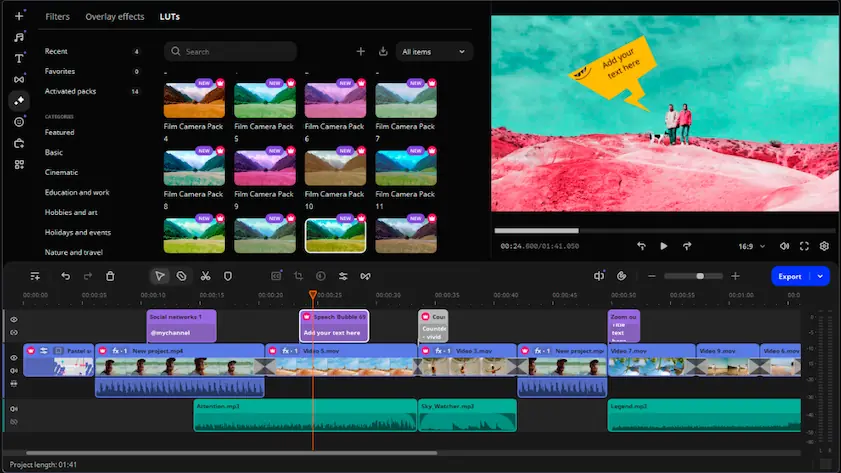
Movavi Video Editor
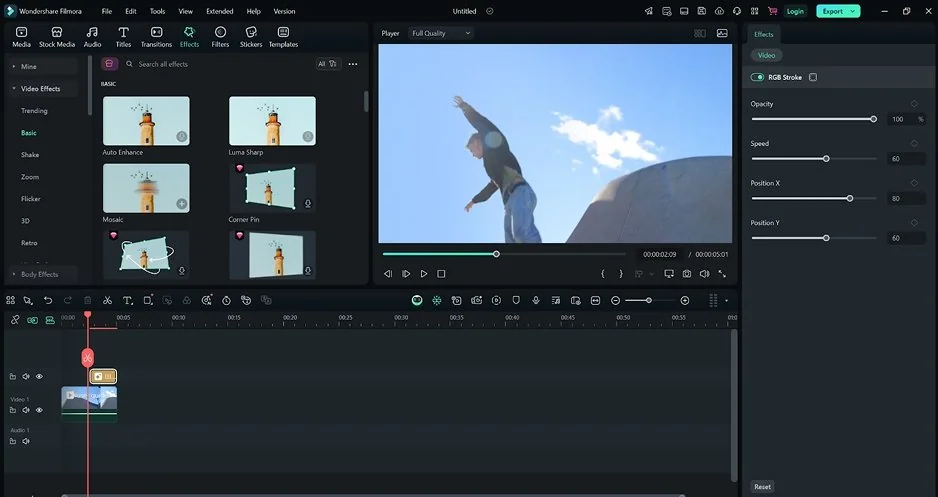
Filmora
The difference in UX between Movavi and Filmora appeared before I had even finished importing footage. Movavi Video Editor kept everything unusually calm: drag clips in, rearrange the timeline, add effects, and within minutes the workflow started feeling familiar rather than something I needed to study. Filmora stayed beginner-friendly too, but the larger collection of effects, templates, and creative tools made the interface feel busier, with more choices appearing at almost every step. That extra flexibility becomes useful later, although it also means spending more time exploring the software before everything feels natural. Movavi seemed more interested in getting me editing quickly, while Filmora gave me more room to experiment and customize.
Winner: for onboarding, interface clarity, and reaching the point where editing starts feeling automatic, Movavi Video Editor gets there faster.
Creators looking for a shorter learning curve and a cleaner editing workflow may be interested in Movavi Video Editor.
The feature gap between Filmora and Movavi started becoming clearer the moment projects needed more than basic cuts and quick exports. Movavi Video Editor kept things focused on speed, with a simple timeline, built-in effects, transitions, AI tools, and enough templates to make projects look polished without slowing down the workflow. Filmora opened a much larger creative space with more effects, stronger template support, richer transitions, animated elements, and extra customization options that seem designed for creators who enjoy experimenting before hitting export. Both editors keep everyday editing approachable and offer broad export options, but Filmora gives users more room to shape the final look of a project, while Movavi stays focused on getting from raw footage to a finished video with fewer interruptions. That difference ended up appearing repeatedly: Movavi prioritized momentum, while Filmora encouraged exploration.
Winner: Movavi Video Editor helped me move faster, but Filmora opened more creative doors once edits became more ambitious.
Filmora vs. Movavi performance comparison turned into a question of speed versus creative weight. Movavi Video Editor stayed noticeably lighter, with smooth editing, modest system requirements, and stable performance that seemed comfortable even on older or mid-range machines. Filmora handled everyday projects well too, but the larger effects library, AI features, and heavier creative tools started asking more from the hardware, especially as projects became more layered. Sources comparing both editors regularly point out that Movavi Video Editor is the lighter option, while Filmora benefits more from stronger systems once effects and advanced features enter the workflow. The difference became clearer on longer editing sessions: Movavi kept prioritizing responsiveness and quick exports, whereas Filmora traded some efficiency for a broader creative toolkit.
Winner: for stability, lower hardware demands, and smoother everyday editing, Movavi Video Editor keeps things moving with less effort from the machine underneath.
Users editing on mid-range systems or prioritizing smooth everyday workflows may find Movavi Video Editor relevant.
The pricing difference started looking less like numbers on a page and more like two different ideas about how creators should pay for software. Movavi Video Editor keeps things relatively straightforward with a free trial, subscription plans, and bundle licenses, although trial exports include a watermark and some features stay locked until upgrading. Filmora follows a similar structure with annual and perpetual plans, but places more emphasis on AI credits, creative assets, and premium add-ons, while its free version also exports with a visible watermark. The gap becomes more noticeable over time because Filmora’s larger ecosystem can gradually increase the overall cost, whereas Movavi keeps the path from trial to full access simpler and more predictable.
Winner: for clearer pricing, more predictable costs, and fewer extra layers around premium features, Movavi is easier to justify long term.
Movavi Video Editor may appeal to those who prefer simpler pricing structures and lower entry costs.
Platform support does not create a dramatic gap here, but the differences become more noticeable once editing moves beyond a single device. Movavi Video Editor runs on Windows and macOS, which covers most desktop workflows and keeps switching between systems relatively painless. Filmora stretches further by adding mobile apps for iOS and Android alongside its desktop versions, making it easier to start editing on one screen and continue somewhere else. That extra flexibility matters more than it sounds, especially for creators working across laptops, phones, and different content formats. Movavi keeps things simple for traditional desktop editing, while Filmora builds a wider ecosystem around how people create today.
Winner: Filmora offers a combination of desktop and mobile apps which provides a more flexible cross-device editing ecosystem.
The AI category revealed two different ideas about what editing software should automate. Movavi Video Editor focuses on speeding up everyday work: auto subtitles generate and sync captions automatically, AI background removal cuts subjects out without manual masking, and AI enhancement tools help improve visuals with fewer adjustments. I also spent time with Movavi’s smart tools, including motion tracking and automated cleanup features, and the direction stayed consistent throughout: reduce repetitive tasks and keep editing moving. Filmora takes a broader approach with AI text-based editing, thumbnail generation, music tools, portrait cutout features, and other AI-powered options designed to reshape content rather than simply accelerate the process. The result is a noticeable difference in philosophy because Movavi prioritizes practical automation, while Filmora leans more heavily into AI-assisted creativity.
Winner: Movavi Video Editor is stronger for practical AI automation, while Filmora offers a broader range of AI-powered creative tools.
Users interested in AI-assisted editing, quick workflows, and beginner-friendly tools may want to explore Movavi Video Editor further.
Movavi Video Editor
Clean interface with a short learning curve and beginner-friendly workflow
AI tools such as auto subtitles, background removal, AI enhancement, and smart editing features help reduce manual work
Runs smoothly on mid-range systems with lower hardware requirements
Large collection of built-in effects, transitions, filters, and titles
Good fit for YouTube videos, social content, and everyday editing projects
Lifetime license options available alongside subscriptions
Trial exports include a watermark
Fewer advanced creative features compared to some competitors
Limited flexibility for highly complex or layered projects
Smaller ecosystem of templates and AI-powered extras
Wondershare Filmora
Extensive library of effects, templates, transitions, and creative assets
Broad AI toolkit including AI text-based editing, AI music, thumbnail generation, and portrait cutout tools
Beginner-friendly while offering more creative depth than many entry-level editors
Available on desktop and mobile platforms for more flexible workflows
Strong support for social content creation and visually driven projects
Large ecosystem of templates and creator-focused resources
Free exports include a watermark
AI tools, premium assets, and extra features can increase long-term costs
Heavier effects and advanced features may require stronger hardware
Interface can feel busier as more creative tools are added
Subscription structure can become more expensive over time
The difference in use cases became clearer the moment editing stopped being about features and started being about habits. Movavi Video Editor kept fitting naturally into YouTube uploads, casual projects, beginner workflows, and everyday social content because the process stayed quick and rarely interrupted momentum. Filmora moved comfortably into TikTok edits, visually heavier social posts, and creator workflows where templates, effects, and AI tools play a larger role in shaping the final result. For beginners, both stayed approachable, although Movavi asked for less adjustment time, while Filmora seemed happier when creativity started competing with efficiency.
Final verdict
The longer I worked with both editors, the less this started looking like a battle over which one was “better.” Movavi Video Editor kept stripping away obstacles and made editing feel closer to a routine, while Filmora constantly offered another effect, another AI feature, or another way to reshape the project. One seemed built around finishing videos efficiently, the other around exploring creative options for a little longer. If my priority was speed, I’d lean toward Movavi; if the goal was squeezing more style out of a project, Filmora would make a stronger argument.

I noticed the gap before finishing my first project. Movavi Video Editor made the process feel more direct, with fewer distractions between importing footage and exporting a finished video, while Filmora offered more tools but also more choices along the way. Both are accessible, though one reaches “comfortable” faster.
That depends on whether everyday editing means speed or customization. Movavi stayed closer to quick edits, regular content creation, and projects where I wanted to finish efficiently, while Filmora made more sense when I wanted to spend extra time shaping visuals, effects, or style.
The short answer is yes, and the difference becomes obvious fairly quickly. Filmora comes with a larger ecosystem of effects, templates, transitions, and AI-powered features, which gives creators more ways to experiment with the final look of a video. Movavi Video Editor stays more selective and focuses on keeping editing fast instead of turning every project into a creative detour.



1.5M+ users already subscribed to our newsletter