
Movavi Video Editor
Create awesome videos easily
I went into this Movavi vs. DaVinci Resolve comparison expecting a simple “beginner versus professional” story, but after editing the same footage in both, things became more interesting than that. Movavi Video Editor felt like the editor that wanted me to sit down and immediately start creating, with a clean interface, fast workflow, and tools that stayed out of the way, while DaVinci Resolve felt more like walking into an entire post-production studio with separate rooms for editing, color, audio, and effects.
My quick takeaway is this: if you want fast editing, social content, YouTube projects, and a shorter learning curve, Movavi Video Editor feels like the smoother ride; if you want cinematic workflows, advanced control, and tools that grow with bigger ambitions, DaVinci Resolve starts looking much harder to ignore.
Best for professional workflows
I noticed the difference when projects started becoming less about editing clips and more about managing an entire production process. DaVinci Resolve felt completely at home there, almost like it expected me to throw bigger and more demanding work at it.
Best for color grading
Color work in DaVinci Resolve felt a bit dangerous in the best possible way. I would open the grading tools planning to make two small tweaks, and suddenly I was twenty minutes deep into adjusting shadows and chasing a completely different mood.
Best for advanced editing
The deeper I pushed into editing, the more Resolve seemed to keep unfolding. Complex timelines, effects, audio work, and detailed adjustments felt less like extra features and more like part of its natural habitat.
Best overall performance
Movavi Video Editor felt faster in a very different sense because it kept the process moving. I spent less time searching through panels and more time actually building something, which ended up making everyday editing feel lighter and quicker.
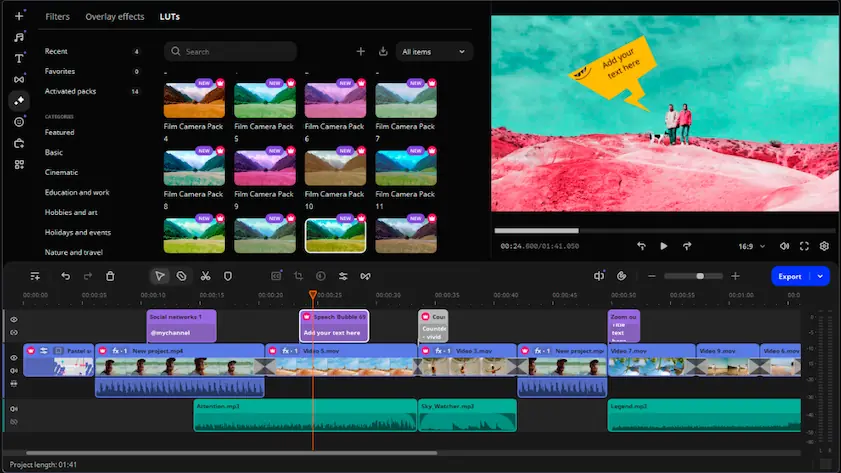
Movavi Video Editor
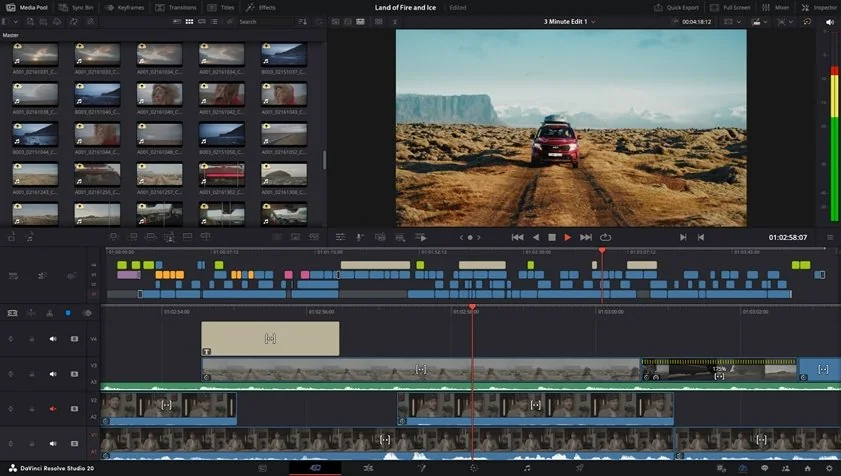
DaVinci Resolve
The UX difference between DaVinci Resolve and Movavi showed up almost immediately during my testing, and it felt like walking into two very different workspaces. Movavi Video Editor had that “sit down and start editing” energy, with a clean drag-and-drop layout and tools that stayed visible instead of hiding behind layers of menus, which made the first hour feel surprisingly effortless. DaVinci Resolve felt more like entering a production studio where every room has a purpose, with separate spaces for editing, color, audio, and effects, and while that depth becomes powerful later, it definitely asks for more attention at the beginning. User reviews also consistently rate Movavi higher for ease of use, while Resolve tends to score higher for depth and professional functionality.
Winner: For onboarding, interface usability, and simply getting comfortable quickly, Movavi Video Editor felt lighter on its feet and easier to settle into.
Editors who want to start cutting videos without spending hours learning the interface may feel more comfortable with Movavi Video Editor.
The DaVinci Resolve vs. Movavi feature comparison showed that the two programs solve the same problem with completely different instincts. Movavi Video Editor focused on keeping things moving with a straightforward timeline, ready-made effects, transitions, filters, and editing tools that felt designed to get me from “raw footage” to “finished video” without unnecessary detours. DaVinci Resolve played a much deeper game: multicam editing, industry-level color grading, the built-in Fairlight audio environment, Fusion for motion graphics and VFX, broader codec support, and workflows built for larger productions all started appearing the further I explored. Resolve also separates work into dedicated spaces for editing, effects, color, and delivery, while Movavi keeps nearly everything in one place for speed and accessibility. User and platform comparisons consistently position Resolve as stronger in feature depth, while Movavi scores higher in ease and everyday workflow comfort.
Winner: Movavi felt faster to jump into, but DaVinci Resolve kept opening new layers the deeper I went into editing.
When I started looking at performance, Movavi and DaVinci Resolve seemed to approach speed each in its own way. Movavi Video Editor launched quickly, stayed responsive, and moved through everyday edits without making my system feel like it had suddenly started training for a marathon. DaVinci Resolve took a heavier approach and clearly leaned harder on GPU acceleration, which started paying off once I moved into larger projects, advanced color work, and more demanding timelines, but I also noticed it asking much more from the hardware underneath. User comparisons regularly highlight Movavi for ease and responsiveness on modest systems, while Resolve is built to stretch its legs on stronger machines and more professional setups.
Winner: Movavi Video Editor is better in day-to-day editing, but for GPU acceleration, large projects, and heavier workloads, DaVinci Resolve had a much higher ceiling.
Users editing on regular laptops or mid-range systems may appreciate how smoothly Movavi Video Editor handles everyday projects.
Movavi Video Editor keeps things fairly straightforward with a trial version and paid plans for unlocking the full experience, which makes the entry process simple but also means some limitations appear before long. DaVinci Resolve takes a different route and hands over a surprisingly capable free version that already includes a large part of the editing experience without placing a watermark over exported videos. During my testing, Resolve never really gave me that familiar feeling of free software constantly reminding me to upgrade, while Movavi made the line between trial and full access much more visible.
Winner: DaVinci Resolve felt less like “try before you buy” and more like getting the keys before anyone asked for payment.
The comparison of platform compatibility ended up less dramatic than some of the other categories, but the differences still showed up pretty quickly. During my work, Movavi Video Editor felt comfortable moving between Windows and macOS, which makes it a practical option for creators who switch machines or work across different setups. DaVinci Resolve stretches even further and adds Linux to the mix, which gives it a wider reach and makes it easier to fit into larger production environments or mixed-device workflows. I never really noticed platform limitations while using either tool, but Resolve definitely gives you a larger map to work with.
Winner: DaVinci Resolve supports Windows, macOS, and Linux, which gives it more flexibility for advanced workflows and mixed production environments.
AI features quickly turned into one of the more interesting parts of my testing because both editors approach them from completely different directions. In Movavi Video Editor, I noticed that the focus stays on speeding up everyday work. I used auto subtitles to generate captions without manually placing text across the timeline, experimented with AI background removal to isolate subjects more quickly, and tested AI enhancement tools that cleaned up visuals with minimal effort. I also spent time with Movavi’s smart tools, which are clearly designed to reduce repetitive editing tasks and keep the workflow moving instead of sending me into endless manual adjustments.
DaVinci Resolve takes a broader and more advanced route. While working on my projects, I used AI-driven tracking, voice isolation, transcription tools, intelligent masking, and features that push further into post-production territory. Resolve gives users more control and more depth, especially once projects become larger and more demanding. Movavi helps remove small editing headaches, while Resolve starts automating parts of the production process itself.
Winner: Movavi Video Editor keeps AI tools simple and practical for everyday editing, while DaVinci Resolve offers deeper AI-assisted workflows for more advanced production work.
Users who want practical AI tools for faster editing without diving into complex workflows may enjoy working with Movavi Video Editor.
Movavi Video Editor
Beginner-friendly interface with a clean drag-and-drop workflow
Short learning curve and quick onboarding
Useful AI tools including auto subtitles, background removal, AI enhancement, and smart editing features
Large library of built-in transitions, filters, titles, and effects
Runs smoothly on mid-range systems and lighter hardware
Good option for YouTube videos, social content, and everyday editing
Trial version includes limitations and export restrictions
Fewer advanced color grading tools compared to professional editors
Less suitable for large, heavily layered projects
DaVinci Resolve
Generous free version with a large set of professional tools included
Advanced color correction and grading capabilities used across the film industry
Built-in audio editing, visual effects, and post-production tools in one platform
Broad format and codec support for different workflows
Strong AI-powered features for automation and workflow assistance
Suitable for large projects and complex editing environments
Takes more time to learn compared to beginner-focused editors
Larger projects can require stronger hardware for smooth performance
Some premium features remain exclusive to the Studio version
Can feel excessive if you only need fast edits for everyday content creation
This comparison started changing shape the moment I stopped looking at features and started looking at how I actually used both editors during everyday work. Movavi Video Editor kept pulling me toward YouTube videos, TikTok clips, social posts, and quick creator projects because I could open it, drop footage onto the timeline, and start building something almost immediately. For beginners and casual editing, I spent far less time figuring out where tools were hiding and much more time actually editing. DaVinci Resolve moved into its comfort zone once projects became larger, more detailed, and more demanding, especially when color work, audio adjustments, and deeper post-production entered the picture.
After spending time with both editors, I stopped looking for a single winner and started paying attention to which one I naturally returned to for different projects. Movavi Video Editor kept the process fast and uncomplicated, and I could move from raw clips to a finished video without getting pulled into menus, settings, and endless adjustments. DaVinci Resolve took a different approach and kept revealing more possibilities the deeper I went, especially once color work, audio editing, and larger production tasks entered the picture. Neither editor seemed interested in solving the same problem in the same way, which made the comparison more interesting than I expected. If I wanted to create quickly and keep the workflow simple, I’d reach for Movavi; if I wanted more control and a larger production toolkit, I’d open Resolve.

I noticed the difference within the first hour of testing. Movavi Video Editor let me jump straight into editing with a drag-and-drop workflow and tools that were easy to find, while Resolve asked me to spend more time understanding how everything was organized. Resolve becomes much more comfortable after some practice, but Movavi got me creating much faster.
Yes, but I would not call it the kind of editor that immediately puts its feet on the table and makes itself comfortable. During my tests, I could absolutely start editing basic videos quickly, but once I moved beyond simple cuts, the amount of tools and dedicated workspaces became much more noticeable. Beginners can learn it, although there is definitely more to absorb.
For regular YouTube uploads, short-form videos, and social content, I naturally kept returning to Movavi Video Editor. I spent less time navigating the software and more time actually putting videos together. Resolve can absolutely do the same work, but for fast creator workflows, Movavi keeps things moving more easily.



1.5M+ users already subscribed to our newsletter