
Kdenlive vs. OpenShot: Features, Pricing, Performance Compared

Edited by
Ben Jacklin
7,763

Kdenlive and OpenShot are two free, open-source video editors that take very different approaches to the same task. Kdenlive offers more advanced tools, multitrack timelines, and greater flexibility, making it a stronger fit for detailed projects. OpenShot stays simpler and more beginner-friendly, suiting casual creators who want quick, straightforward edits.

Comparison parameter

Kdenlive

OpenShot

Who it's for

Hobbyists, editors who want advanced control

Beginners, casual creators, students

Supported platforms

Windows, macOS, Linux

Windows, macOS, Linux

Ease of use

Feature-rich interface with multiple panels

Clean, drag-and-drop workflow

Quick summary

Best for professional workflows: Kdenlive handles layered projects more comfortably, especially once timelines fill with multiple tracks, effects, and audio.

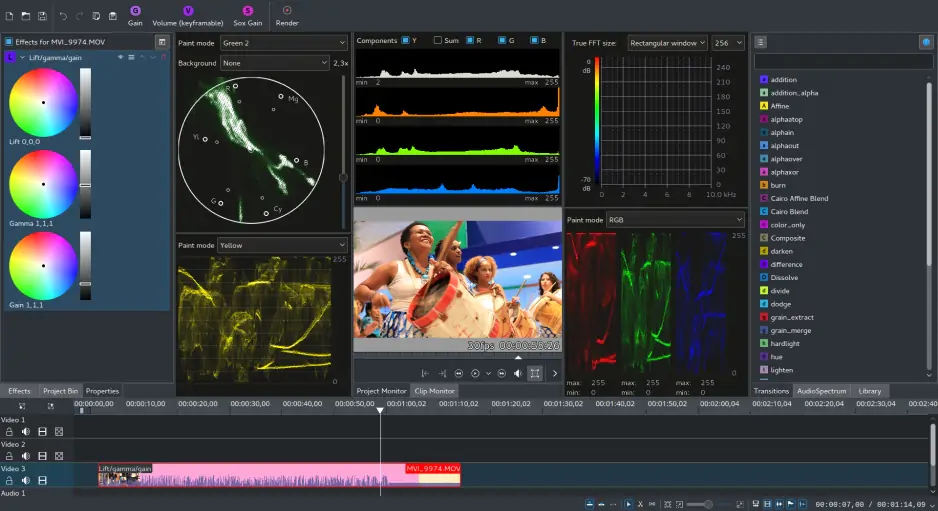
Best for color grading: Kdenlive offers more control through scopes, curves, and dedicated color effects.

Best for advanced editing: Kdenlive supports proxy editing, keyframe animation, and a wider effects library.

Best overall performance: OpenShot runs lightly during basic edits but can stutter on heavier projects. Kdenlive stays steadier with larger timelines, though smooth playback still depends on the hardware.

Ease of use

OpenShot

Kdenlive

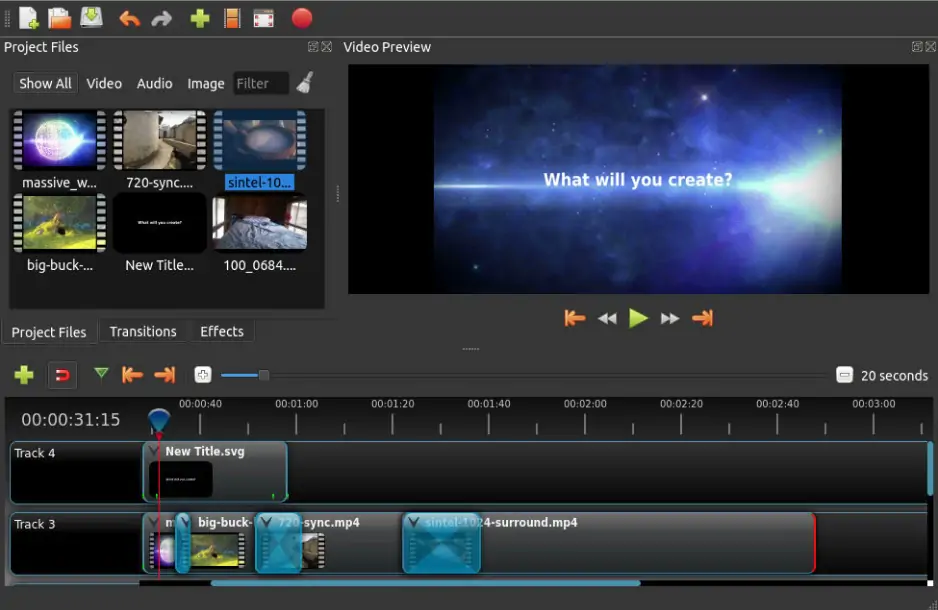
When comparing OpenShot and Kdenlive, the first few minutes inside each editor feel quite different. OpenShot opens with a clean, uncluttered layout built around drag-and-drop editing, so importing clips and arranging them on the timeline feels immediate. There are fewer panels competing for attention, and most beginners can assemble a basic video without hunting through menus or adjusting settings first.

Kdenlive’s interface keeps several elements visible at once: the timeline, effects list, clip monitor, and project bins. That structure becomes useful once projects grow, but it can feel busy during simple edits, especially on smaller screens. Kdenlive also allows more layout customization, letting editors rearrange and save workspaces around specific tasks.

Winner: OpenShot is easier to navigate and quicker to learn, making it the friendlier starting point for newcomers.

Features

The Kdenlive vs. OpenShot feature comparison changes tone quickly once projects move past basic cuts. Kdenlive is built around a flexible multitrack timeline that supports unlimited video and audio tracks, grouped clips, and precise keyframe animation. It handles proxy editing for smoother work with high-resolution footage, includes a large library of effects and transitions through the MLT framework, and offers scopes and curves for more deliberate color grading. Audio work goes further too, with track-level volume control, keyframeable levels, and basic mixing that suits layered soundtracks.

OpenShot stays smaller in scope but covers more everyday tasks than newcomers might expect. Its timeline supports multiple tracks, drag-and-drop trimming, and a friendly animation system with keyframes for position, scale, and rotation. There are built-in titles, transitions, and video effects, along with simple audio adjustments that work well for shorter videos. The limitations appear once editing becomes more technical: there is no true multicam workflow, color tools stay shallow, and heavier motion graphics or advanced compositing are outside its comfort zone.

Winner: Kdenlive offers noticeably deeper editing tools and scales more comfortably as projects grow larger and more layered.

Performance

Performance depends heavily on project size and hardware. OpenShot runs lightly during basic edits, staying responsive with short timelines and simple footage, but it can slow down once projects grow with multiple tracks, effects, or high-resolution clips. Its rendering speed is reasonable for straightforward exports, though heavier timelines sometimes expose stability issues.

Kdenlive handles larger, more layered projects more reliably, especially with proxy editing enabled to ease playback of demanding media. It benefits from modern hardware and offers some GPU-related options during rendering, though overall responsiveness still leans on the system configuration. Stability has improved steadily across recent releases, making it steadier for long editing sessions.

Winner: Kdenlive is more dependable for demanding projects, while OpenShot suits lighter editing.

Pricing

Pricing is refreshingly simple here, since both editors are completely free and open-source with no subscriptions, one-time fees, or paid tiers. Neither adds watermarks to exports or locks features behind a trial, so every tool stays available from the start on any supported platform.

Winner: a tie, since both are fully free without watermarks or paywalls.

Platform compatibility

When it comes to OpenShot vs. Kdenlive comparison, platform compatibility is one area where the two editors line up closely. Both run natively on Windows, macOS, and Linux, which makes either a comfortable choice for editors working across mixed environments or moving between machines. Linux support is particularly strong in each, reflecting their open-source roots and making them popular where commercial editors are unavailable. Kdenlive, part of the KDE project, tends to feel most at home on Linux but works well elsewhere, while OpenShot keeps a consistent, lightweight experience across all three systems without tying projects to a single ecosystem.

AI tools

AI features stay modest in both editors compared to commercial rivals. Kdenlive includes speech-to-text for automatic subtitle generation and motion tracking that follows objects across a clip. OpenShot leans more on simple automation than dedicated AI, offering basic keyframe-driven effects rather than machine-learning tools. Neither aims for the production-grade AI found in paid software.

Pros & cons

Kdenlive

Pros:
  • Free and open-source with no watermarks

  • Multitrack timeline with keyframe animation

  • Proxy editing for high-resolution footage

  • Large effects and transitions library

  • Deeper color and audio controls

  • Available on Windows, macOS, and Linux

Cons:
  • Busier interface with a steeper learning curve

  • Heavier projects lean on stronger hardware

  • Occasional stability quirks in complex timelines

OpenShot

Pros:
  • Free and open-source with no watermarks

  • Clean, drag-and-drop workflow

  • Very beginner-friendly and quick to learn

  • Simple keyframe animation system

  • Runs on Windows, macOS, and Linux

Cons:
  • Limited advanced editing features

  • Shallow color grading tools

  • No true multicam workflow

  • Can stutter on larger, heavier projects

Best use cases

Both editors handle everyday video projects, but the experience shifts depending on the type of work.

YouTube production: Kdenlive fits longer videos with multiple tracks, layered audio, and detailed effects, while OpenShot suits simpler uploads like vlogs, tutorials, or commentary clips.

TikTok & social content: OpenShot's quick, drag-and-drop workflow makes short vertical edits fast and painless. Kdenlive becomes more useful once clips rely on animated titles or stacked effects.

Beginner editing: OpenShot asks for less setup, making it the gentler entry point for first-time editors.

Professional editing: Kdenlive is better suited to detailed, multitrack projects and more demanding post-production tasks.

Business & casual projects: both cover presentations, product demos, and home videos well, though OpenShot generally feels lighter for quick, everyday edits.

Final verdict

Choosing between these two editors comes down to how much depth a project needs. OpenShot is the better starting point for beginners and quick, simple videos, keeping the workflow light, direct, and easy to learn. Kdenlive rewards editors who want more control, handling multitrack timelines, layered effects, and larger projects far more comfortably. Since both editors are completely free, the smartest move is often to try each and see which rhythm fits your editing style best.

Alternative: Movavi Video Editor

Movavi Video Editor makes sense for users who find Kdenlive too technical but OpenShot too limited. It sits comfortably in the middle, pairing a clean, drag-and-drop interface with more polish than a basic editor offers. Setup stays minimal, and the workflow rarely leaves you searching for a missing feature, which makes it approachable for everyday editing without feeling stripped down.

It also leans more heavily on AI than either open-source option. Tools like AI background removal, automatic subtitle generation, motion tracking, and noise reduction handle tasks that would otherwise take manual effort. For users who edit regularly but want convenience over a full professional pipeline, Movavi Video Editor offers a balanced, time-saving middle lane.


Frequently asked questions

Is Kdenlive better than OpenShot for beginners?

Not usually. OpenShot is easier for first-time editors because the layout is simpler and the drag-and-drop workflow feels direct. Kdenlive offers more tools, but it takes longer to get comfortable with during everyday editing.

Can OpenShot handle serious video projects?

It can, within limits. OpenShot suits tutorials, vlogs, presentations, and short social clips. More demanding work with multiple tracks, layered effects, or detailed color grading is generally easier to manage in Kdenlive.

Are Kdenlive and OpenShot really free?

Yes. Both are fully free and open-source, with no subscriptions, hidden fees, or export watermarks. Every feature stays available from the start on Windows, macOS, and Linux.

Have questions?
If you can’t find the answer to your question, please feel free to contact our Support Team.
Join us for discounts, editing tips, and content ideas

1.5M+ users already subscribed to our newsletter

By signing up, I agree to receive marketing emails from Movavi and agree to Movavi's Privacy Policy.