
Final Cut Pro vs. Premiere® Pro: Features, Pricing, Performance Compared

Edited by
Ben Jacklin
14,603

Final Cut Pro vs. Premiere® Pro is a comparison that comes down to speed and simplicity on one side versus depth and flexibility on the other. Final Cut Pro is a Mac-exclusive editor built for fast timelines and content creators who prioritize momentum, while Premiere® Pro is a cross-platform professional tool designed for complex, multi-layered productions with broader format support and deeper post-production control.

Comparison parameter

Final Cut Pro

Premiere® Pro

Who it's for

Mac-based creators, YouTubers, solo editors

Professional editors, agencies, production teams

Supported platforms

macOS only

Windows, macOS

Ease of use

Cleaner interface, easier to learn

Feature-rich but more complex

Quick summary

  • Best for professional workflows: Premiere® Pro handles layered timelines, multicam footage, client revisions, and complex audio more comfortably than Final Cut Pro.
  • Best for color grading: Premiere® Pro's Lumetri Color offers curves, LUTs, masking, and secondary corrections that go deeper than Final Cut Pro's built-in tools.
  • Best for advanced editing: Premiere® Pro supports proxy workflows, nested sequences, After Effects® integration, and broader codec handling for demanding productions.
  • Best overall performance: Final Cut Pro runs noticeably smoother on Apple Silicon Macs, keeping playback fast and exports efficient during everyday editing.

Ease of use

Final Cut Pro

Premiere® Pro

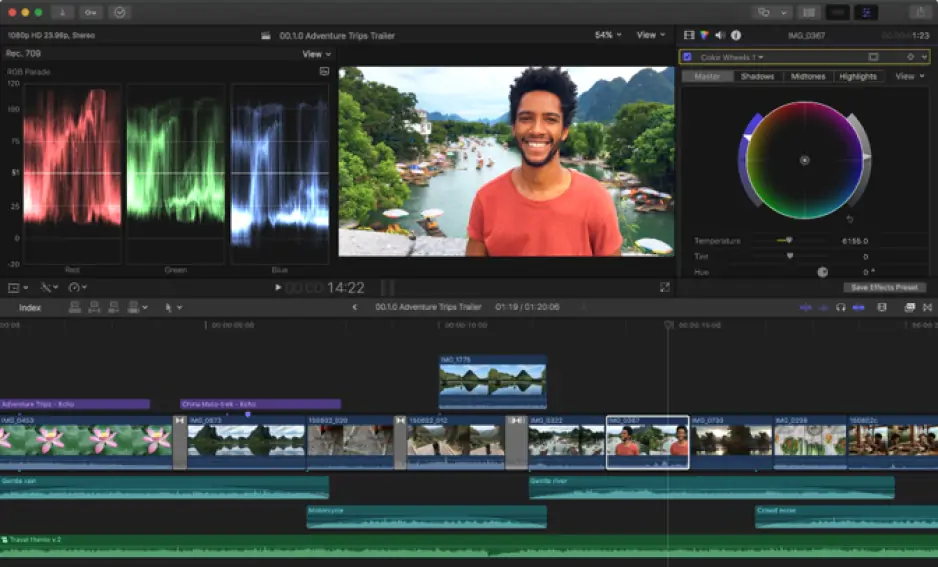
Final Cut Pro keeps most tools inside one clean workspace, so the transition from importing footage to making cuts feels immediate. The Magnetic Timeline removes a lot of manual housekeeping, and the overall layout rarely demands much setup before editing begins.

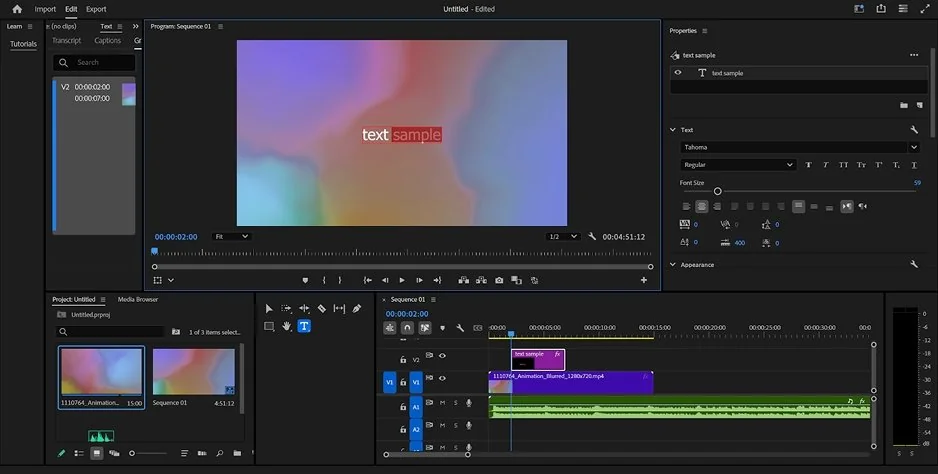
Premiere® Pro takes longer to settle into. Its interface spreads tools across multiple panels – timelines, audio meters, effect controls, media bins – which suits complex projects but can feel crowded during simpler edits. Customizing workspaces helps, though it adds an extra step before the actual editing starts.

Winner: Final Cut Pro offers a more approachable interface and a shorter path from opening the software to producing a finished edit.

Features

Final Cut Pro covers the essentials well. Its Magnetic Timeline keeps multicam editing fluid, ProRes support runs deep, and the built-in tools handle color correction, audio adjustments, and 360° video without requiring additional software. For most creator-focused workflows, that range is genuinely sufficient.

Premiere® Pro pushes further once projects grow more demanding. Nested sequences and proxy workflows keep large timelines manageable, while Lumetri Color handles grading with considerably more precision. Motion graphics connect directly through After Effects®, and the plugin ecosystem extends audio mixing, effects, and finishing well beyond what native tools provide. Codec support is also broader, covering professional delivery formats that Final Cut Pro does not address natively.

Winner: Premiere® Pro offers a more complete toolset for editors working across complex, multi-layered, and professionally demanding productions.

Performance

The Premiere® Pro vs. Final Cut Pro performance gap becomes most visible during day-to-day editing rather than just at the export stage.

Final Cut Pro benefits from deep Apple Silicon optimization. Playback stays smooth even on mid-range MacBooks, background rendering happens quietly without interrupting the workflow, and exports finish quickly on modern hardware. That consistency makes it feel lighter and more responsive during routine editing sessions.

Premiere® Pro handles demanding projects well on properly equipped systems, but it draws considerably more from the GPU, RAM, and storage. High-resolution footage, layered effects, and complex audio processing can slow things down without proxy workflows or cache management in place. Stability also depends more heavily on hardware configuration and driver versions.

Winner: Final Cut Pro delivers more consistent everyday performance, especially on Apple hardware, while Premiere® Pro requires stronger system specs to match that smoothness on large projects.

Pricing

The Premiere® Pro and Final Cut Pro pricing difference comes down to one payment model versus an ongoing one.

Final Cut Pro costs $299.99 as a one-time purchase, includes a 90-day free trial, and delivers the full feature set immediately with no watermarks and no recurring fees.

Premiere® Pro starts at $22.99 per month on an annual plan. That subscription also unlocks the broader Creative Cloud® ecosystem, including After Effects® and Audition®, which adds value for editors already working within Adobe's workflow. A 7-day trial is available before committing.

Winner: Final Cut Pro costs less over time for most individual editors, though Premiere® Pro's subscription makes more financial sense for teams already using Creative Cloud® tools.

Platform compatibility

Final Cut Pro exists entirely within Apple's ecosystem. It runs on macOS only, with no Windows or Linux support, which makes it a natural fit for editors whose entire workflow already lives on Mac hardware.

Premiere® Pro works on both Windows and macOS, and integrates with Creative Cloud® across devices through Premiere® Rush for mobile editing. That cross-platform flexibility matters in collaborative environments where team members may be working on different operating systems or handing projects between machines regularly.

Winner: Premiere® Pro is the more versatile choice for mixed-device workflows, while Final Cut Pro suits editors who work exclusively within the Apple ecosystem.

AI tools

Both Final Cut Pro and Premiere® Pro have been adding AI features steadily, though their focus areas differ noticeably.

Final Cut Pro concentrates on timeline-level automation. Magnetic Mask isolates objects and people without manual rotoscoping, automatic captions generate quickly from spoken audio, and scene removal tools handle background replacement without external software.

Premiere® Pro takes a broader approach tied to production efficiency. Auto Reframe resizes footage for different platforms automatically, Speech to Text generates searchable transcripts alongside captions, and Generative Extend uses Adobe Firefly to stretch clips or fill ambient audio gaps. Media Intelligence also helps organize and search large media libraries faster.

Both toolsets are genuinely useful, but they serve different editing rhythms. Final Cut Pro's AI speeds up individual timeline tasks, while Premiere® Pro's AI targets larger workflow and delivery demands.

Pros & cons

Final Cut Pro

Pros:
  • Highly optimized performance on Apple Silicon

  • One-time purchase with no subscription fees

  • Clean, intuitive interface with a shorter learning curve

  • Strong multicam editing and native ProRes support

  • 90-day free trial with full feature access

Cons:
  • macOS only with no Windows or Linux support

  • Less advanced color grading compared to professional alternatives

  • No third-party plugin ecosystem

  • Limited collaborative workflow options

Premiere® Pro

Pros:
  • Works on both Windows and macOS

  • Deep integration with After Effects®, Audition®, and Creative Cloud®

  • Advanced color grading through Lumetri Color

  • Extensive third-party plugin support

  • Broad codec and format compatibility for professional delivery

Cons:
  • Ongoing subscription cost adds up over time

  • Steeper learning curve with a more complex interface

  • Higher hardware demands on larger projects

  • Performance depends heavily on system configuration

Best use cases

YouTube production: Final Cut Pro suits regular upload schedules, vlogs, and straightforward commentary videos where speed matters. Premiere® Pro fits channels working with multiple camera angles, detailed sound editing, or longer, more produced content.

TikTok & social content: Final Cut Pro handles short-form editing naturally, especially when moving between your iPhone and Mac. Premiere® Pro becomes more useful once social videos involve animated graphics, layered captions, or platform-specific formatting requirements.

Beginner editing: Final Cut Pro asks less of new editors. The workspace stays organized, and the path from raw footage to finished export involves fewer technical decisions upfront.

Professional editing: Premiere® Pro is better suited to client work, agency pipelines, and productions requiring detailed revisions, mixed formats, and collaboration across different systems.

Business & casual editing: Final Cut Pro handles presentations, internal videos, and everyday editing tasks comfortably. Premiere® Pro makes more sense when those projects grow into longer productions requiring advanced finishing tools.

Final verdict

Choosing between Final Cut Pro and Premiere® Pro ultimately depends on how and where you edit rather than which software is objectively stronger.

Final Cut Pro suits editors who want a fast, focused workflow on a Mac without the overhead of a professional post-production environment. The interface stays out of the way, performance feels effortless on Apple hardware, and the one-time purchase removes any ongoing cost concerns.

Premiere® Pro suits editors whose projects demand more: cross-platform collaboration, deeper color control, broader codec support, and tighter integration with a wider creative toolset. The subscription cost and steeper learning curve are real trade-offs, but they come with tools that scale comfortably into commercial and long-form production work.

Alternative: Movavi Video Editor
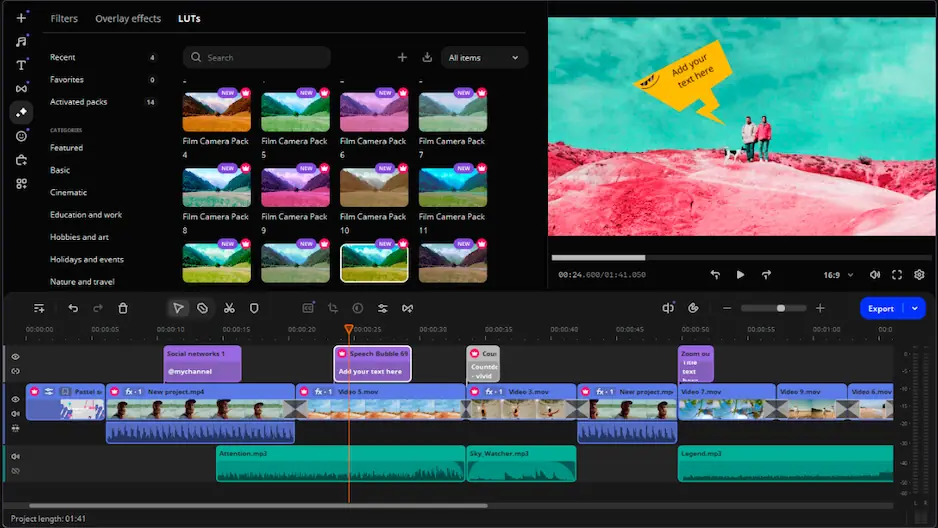
Movavi Video Editor is worth considering for users who find Final Cut Pro too platform-restricted and Premiere® Pro too complex or expensive for their needs.

It runs on both Windows and Mac, which immediately removes the platform limitation that makes Final Cut Pro inaccessible to non-Apple users. The interface is straightforward without feeling stripped down, and routine editing tasks like trimming, transitions, effects, and exports stay manageable without a steep learning curve. It also includes practical tools such as AI-assisted subtitles, background removal, and motion tracking that cover most everyday editing requirements without the overhead of a full professional workflow.

For creators who edit regularly but do not need the depth of Premiere® Pro or the Apple-specific optimization of Final Cut Pro, Movavi Video Editor offers a balanced middle ground at a more accessible price point.


Frequently asked questions

Is Final Cut Pro better than Premiere® Pro for beginners?

For most new editors, yes. Final Cut Pro's cleaner interface and Magnetic Timeline reduce the number of decisions required before editing begins. Premiere® Pro offers more tools, but that depth also means more time spent learning the software before it starts feeling natural.

Can Premiere® Pro run on a Mac?

Yes. Premiere® Pro works on both macOS and Windows, so Mac users can choose between either editor. Final Cut Pro, however, is exclusive to Apple devices and has no Windows version available.

Which editor is better for YouTube channels?

It depends on the type of content. Final Cut Pro fits creators who upload regularly and prioritize a fast, smooth editing process. Premiere® Pro makes more sense for channels that work with longer videos, multiple camera sources, or more demanding post-production requirements between uploads.

Have questions?
If you can’t find the answer to your question, please feel free to contact our Support Team.
Join us for discounts, editing tips, and content ideas

1.5M+ users already subscribed to our newsletter

By signing up, I agree to receive marketing emails from Movavi and agree to Movavi's Privacy Policy.