
Movavi Video Editor
Create awesome videos easily
I opened Final Cut Pro and DaVinci Resolve expecting one of them to immediately take the crown, but a few editing sessions later that idea disappeared pretty fast. Final Cut Pro felt like the editor that wanted me to stay in motion, letting me jump from raw clips to a finished timeline with almost no friction on a Mac. DaVinci Resolve pulled me into a completely different rhythm and suddenly I was spending more time fine-tuning colors, playing with audio, and exploring tools I hadn’t even planned to touch. After testing both, my quick read is this: Final Cut Pro feels like it thrives on speed and momentum, while DaVinci Resolve feels much more at home when the project starts getting bigger ambitions.
Best for professional workflows
The moment my timeline started getting crowded and the project stopped feeling like “just another edit,” I naturally drifted toward DaVinci Resolve. It feels less like opening an app and more like walking into a full post-production room.
Best for color grading
DaVinci Resolve completely changes the mood here. I started tweaking colors thinking I’d make a few small adjustments, and twenty minutes later I was deep in nodes, masks, and lighting tweaks I didn’t even plan to touch.
Best for advanced editing
When I pushed projects beyond basic cuts and transitions, DaVinci Resolve had more space to grow. Visual effects, audio work, and detailed editing tools made it feel like there was always another layer to explore.
Best overall performance
Final Cut Pro felt like it had some secret deal with my Mac. I’d drop footage onto the timeline, hit play, and everything just moved with that weirdly satisfying smoothness that makes you forget the software is even there.
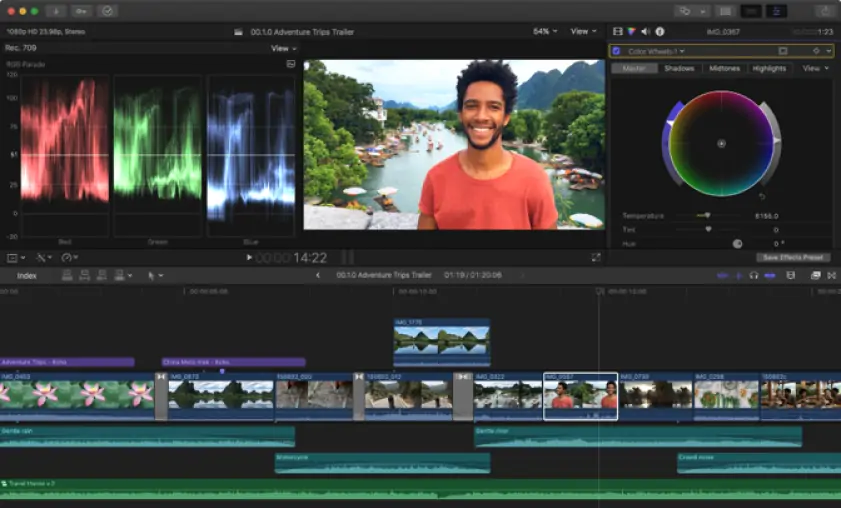
Final Cut Pro
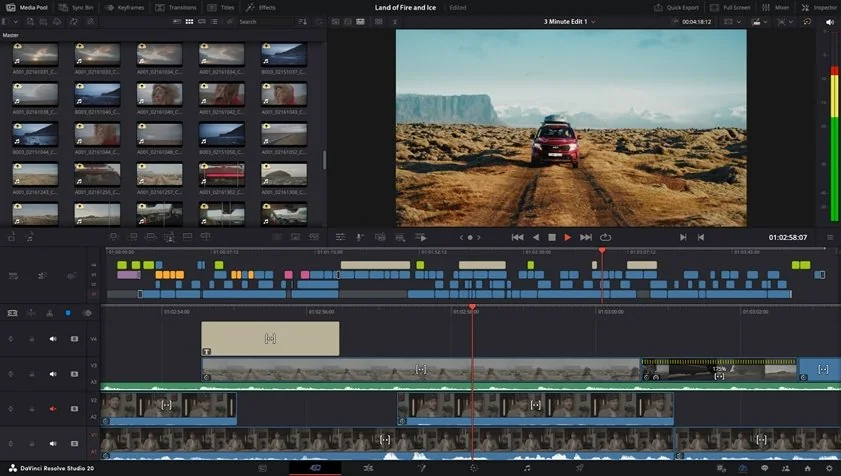
DaVinci Resolve
When I decided to compare Final Cut Pro vs. Davinci Resolve, the first few minutes inside both editors felt like two very different introductions. Final Cut Pro immediately gave me that “sit down and start creating” feeling, with a clean interface and a workflow that stayed out of my way, while DaVinci Resolve opened like a control room packed with buttons, tabs, and entire sections dedicated to different parts of post-production. During my tests, Final Cut Pro felt easier to understand and more natural to learn, while Resolve took more time before everything started clicking into place.
Winner: for onboarding, interface usability, and overall ease of learning, Final Cut Pro felt smoother and easier to grow into.
The Davinci Resolve vs. Final Cut Pro feature battle changed tone pretty quickly once I moved beyond basic cuts and started pushing both editors harder. Final Cut Pro felt fast and comfortable with timeline editing, multicam work, and codec handling, especially on Mac, while its magnetic timeline kept everything moving with very little effort. DaVinci Resolve, though, started opening more doors the deeper I went: advanced color grading, the built-in Fairlight audio suite, Fusion for motion graphics and VFX, and workflows that felt designed for larger productions rather than just editing sessions. During testing, Final Cut Pro felt like a very efficient editor, but Resolve felt like an editing room, color studio, audio suite, and effects workspace sharing the same address.
Winner: For overall feature depth and advanced workflows, DaVinci Resolve pulls ahead once projects start demanding more than cutting and exporting.
I started noticing the performance difference long before I reached the export button. Final Cut Pro kept playback smooth, timeline navigation quick, and rendering surprisingly fast, especially on a Mac where the optimization with Apple hardware seemed to remove a lot of friction from the process. I could move through edits, stack clips, and make changes without constantly thinking about what was happening in the background. DaVinci Resolve handled larger and more demanding projects well too, but I could see it relying much more on GPU power and stronger hardware once color grading, effects, and heavier timelines entered the picture. On powerful systems, Resolve has plenty of room to stretch, but Final Cut Pro stayed lighter and more effortless during everyday use.
Winner: for rendering speed, hardware efficiency, and smoother day-to-day performance, Final Cut Pro comes out ahead.
Pricing of Davinci Resolve and Final Cut Pro felt less like a close fight and more like two completely different philosophies meeting in the same room. Final Cut Pro asks for a one-time payment and unlocks everything immediately, while DaVinci Resolve walks in with a surprisingly powerful free version that already feels like a complete editor rather than a trial in disguise. During my tests, I kept expecting the usual catch with Resolve, but there was no watermark suddenly appearing and no aggressive feature wall blocking basic work.
Winner: DaVinci Resolve offers a free version that actually feels usable in the real world.
Platform compatibility felt a bit like comparing a beautifully designed apartment to an entire city. Final Cut Pro lives entirely inside Apple’s world, and during my tests on Mac it felt deeply at home, with smooth performance and the kind of optimization that makes everything seem lighter and faster. DaVinci Resolve takes a wider approach and runs on macOS, Windows, and Linux, which makes it much easier to move between different machines or work across mixed environments. If your workflow never leaves a Mac, Final Cut Pro feels perfectly comfortable, but Resolve clearly gives you more room to move.
AI features felt less like hidden background features and more like little editing assistants quietly jumping into the workflow. During my tests, Final Cut Pro focused on speed-driven AI tools such as automatic captions, AI-powered object isolation with Magnetic Mask, smart reframing, and machine-learning enhancements that made everyday editing feel smoother. DaVinci Resolve took a broader approach and kept handing me more advanced tools, from AI tracking and voice isolation to transcription-based editing and intelligent audio features that started to feel closer to post-production automation.
Final Cut Pro
Extremely fast and well-optimized on a Mac, especially on Apple Silicon
Clean interface that feels easy to learn and navigate
Magnetic Timeline keeps editing fluid and surprisingly fast
One-time purchase with no subscription
Strong multicam editing and ProRes workflow support
AI tools like Magnetic Mask and automatic captions speed up routine tasks
macOS only, no Windows or Linux support
Color grading tools are good, but not as deep as Resolve
Fewer advanced post-production tools built in
Smaller ecosystem for VFX and high-end finishing workflows
No fully featured free version
DaVinci Resolve
Powerful free version with no export watermark
Industry-level color grading tools
Built-in editing, audio, VFX, and post-production workflow in one app
Advanced AI tools including voice isolation and smart tracking
Available on macOS, Windows, and Linux
Excellent for large and professional projects
Steeper learning curve
Interface can feel overwhelming at first
More demanding on hardware during complex projects
Some AI tools and advanced features require the Studio version
Can feel like “too much software” for quick edits or simple projects
The use-case comparison felt a bit like watching two people walk into the same room carrying completely different toolkits. During my tests, Final Cut Pro naturally kept pulling me toward YouTube videos, TikTok clips, social content, quick edits, and everyday creator work because everything moved fast and rarely interrupted the rhythm. I could drop footage onto the timeline, rearrange clips, make quick changes, and stay focused on the actual content rather than on the software itself. For beginners and casual editors, that ease became noticeable pretty quickly because there was less friction between “I have an idea” and “I have a finished video.”
DaVinci Resolve started becoming more interesting the moment projects developed bigger ambitions. The deeper I moved into color grading, audio adjustments, effects work, and more detailed editing decisions, the more Resolve felt like it was opening extra doors. Business productions, professional work, documentaries, and projects with heavier post-production demands felt much more at home there. For professional workflows, Resolve constantly gave me the feeling that there was always another layer of control waiting somewhere inside the software.
After trying both across different projects, I kept coming back to the idea that these editors are trying to solve different problems. Final Cut Pro felt like momentum in software form because everything moved quickly, the interface stayed out of my way, and I could go from raw footage to a finished video without breaking the rhythm. DaVinci Resolve had a different personality and kept rewarding me the more time I invested, especially once color grading, audio work, and more advanced editing started entering the picture. Neither one felt like it was trying to imitate the other, and that actually made the comparison more interesting. If I wanted to edit fast and stay focused on creating, I’d open Final Cut Pro; if I wanted more control and a deeper production toolkit, I’d head straight to DaVinci Resolve.
If neither Final Cut Pro nor DaVinci Resolve feels like the right fit, I’d put Movavi Video Editor right in the middle of the conversation. It felt like the editor that quietly avoids the extremes because it doesn’t throw a wall of professional controls at you, but it also doesn’t feel stripped down or overly basic. The interface stayed clean, drag-and-drop editing felt natural, and I never had that moment of staring at the screen wondering where a feature had disappeared. It also packs in useful extras like effects, transitions, AI-assisted tools, subtitles, and quick export options without making the workflow feel crowded. For users who think Final Cut Pro moves too much around Apple’s ecosystem or who find DaVinci Resolve a little too deep for everyday editing, Movavi Video Editor feels like a comfortable middle lane rather than a compromise.

I had that question before testing it, because Final Cut Pro often gets labeled as a “YouTuber editor.” After spending time with multicam projects and larger timelines, that label started feeling too small. It absolutely handles professional work, it just approaches it with speed and simplicity instead of overwhelming you with complexity.
I noticed pretty quickly that Resolve becomes much happier when stronger hardware enters the room. Basic editing ran fine, but once I started layering effects, color work, and heavier footage, my machine suddenly had a lot more to think about. Resolve can run on modest systems, but it definitely appreciates extra horsepower.
This one surprised me less than I expected. During my work, Final Cut Pro often felt like it was one step ahead of me, with smooth timeline playback and fast responses that made editing feel almost invisible. Resolve felt powerful, but Final Cut Pro felt lighter on its feet.



1.5M+ users already subscribed to our newsletter