
DaVinci Resolve vs. Premiere® Pro: Features, Pricing, Performance Compared

Edited by
Ben Jacklin
10,529

Many people today manage multiple social media accounts, concocting videos and chasing viral content. Because everyone needs to push out high-quality files constantly, finding the right software turns into a daily priority. Both tools are well-loved in the editing community and hold massive market shares. Let's weigh DaVinci Resolve vs. Premiere® Pro and compare the two giants side by side to see how they handle your timeline tasks.

Comparison parameter

DaVinci Resolve

Adobe® Premiere® Pro

Who it's for

Filmmakers, professional colorists, and studio editors

Video editors, content creators, and broadcast journalists

Supported platforms

Windows, macOS, Linux, iPadOS

Windows, macOS

Ease of use

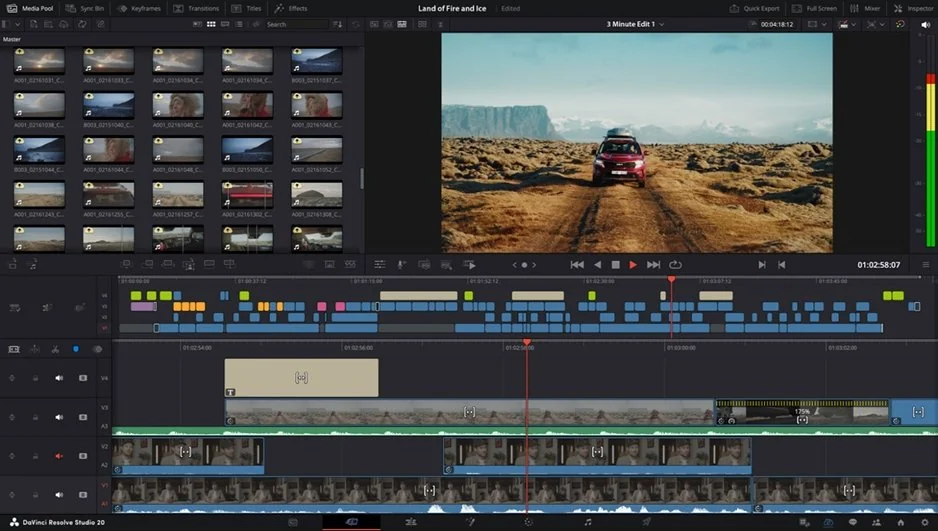
Dense multi-pane interface with specialized panels

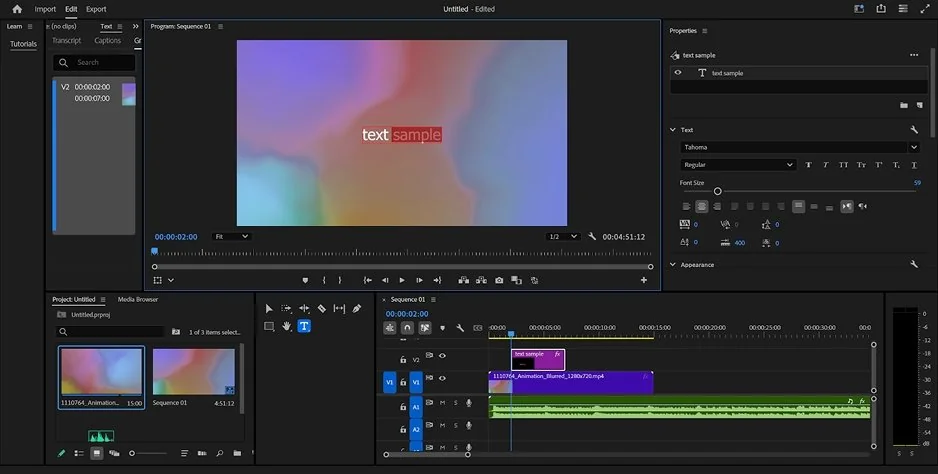
Traditional track-based layout with adjustable workspaces

Quick summary

Best for professional workflows: Adobe® Premiere® Pro. It instantly links to other creative apps and lets you chop timelines via text transcripts.

Best for color grading: DaVinci Resolve. The specialized node setup gives you total manual control over individual pixel tones.

Best for advanced editing: DaVinci Resolve. You get your timeline, visual effects, and audio mixing boards inside one single app.

Best overall performance: DaVinci Resolve. The software splits heavy graphic math across multiple video cards to prevent timeline lag.

Ease of use

Adobe® Premiere® Pro

DaVinci Resolve

Adobe® Premiere® Pro focuses on a traditional timeline workflow that most creators understand quickly. Users can drag clips onto layered tracks, rearrange media freely, and cut scenes without configuring complicated node systems or production pages. The workspace uses flexible panels that can be moved across multiple monitors, which makes the editing process feel familiar even for beginners. In the DaVinci Resolve vs. Premiere® Pro comparison, Premiere® Pro offers a much softer learning curve because creators do not need to understand technical data mapping or visual node structures before starting basic edits.

DaVinci Resolve is built for filmmakers and professional post-production teams who want maximum manual control over every visual and audio element. The software separates editing, color grading, sound mixing, and visual effects into dedicated pages. This structure gives professionals incredible depth, but it also creates a steep learning curve for beginners. New users often struggle with node-based workflows and complex interface navigation, especially when switching between Fusion, Fairlight, and Color pages.

Winner: Adobe® Premiere® Pro wins for ease of use because its traditional layer-based timeline requires far less technical onboarding for basic editing tasks.

Features

Adobe® Premiere® Pro focuses on flexible editing workflows and compatibility with mainstream creative pipelines. The software handles mixed frame rates and multiple resolutions smoothly on the same timeline without requiring complex project setup. It also includes AI-powered text-based editing, allowing creators to remove sections of video simply by deleting words from an automatically generated transcript. Motion graphic creators also benefit from direct integration with After Effects® and access to a massive extension ecosystem.

DaVinci Resolve delivers one of the deepest post-production toolsets available today. The software combines advanced editing, HDR color grading, professional Fairlight audio mixing, and Fusion visual effects inside one application. Users can manipulate RAW camera footage, build 3D camera tracking compositions, and create complex node-based effects without relying on external software. The DaVinci Neural Engine also automates tedious tasks like Magic Mask object tracking, scene color matching, and voice isolation.

Winner: DaVinci Resolve wins because it integrates professional cinema-grade color correction, visual effects, and audio production tools natively inside one platform.

Performance

Adobe® Premiere® Pro spreads rendering tasks across system memory and the central processor. While the editor handles standard projects efficiently, large 4K timelines and background rendering can sometimes lead to playback stuttering or unexpected crashes on weaker systems. However, Premiere® Pro remains highly flexible when mixing formats, frame rates, and resolutions inside one project timeline.

DaVinci Resolve relies heavily on GPU acceleration and performs exceptionally well on modern workstation systems. The software handles RAW cinema footage, high-resolution timelines, and advanced effects with impressive stability when paired with strong hardware. Multi-GPU acceleration and optimized rendering pipelines allow Resolve to process demanding projects with fewer crashes and smoother playback than many competing editors.

Winner: DaVinci Resolve wins for performance because its GPU-focused rendering engine delivers more stable playback and stronger reliability during heavy professional workflows.

Pricing

Adobe® Premiere® Pro follows Adobe’s subscription-based pricing model. Users only receive a short seven-day free trial before paying monthly fees ranging from approximately $22.99 to $34.99 depending on the plan. While the subscription includes continuous updates and Adobe ecosystem integration, the ongoing costs become expensive over time.

DaVinci Resolve offers one of the strongest free versions in professional editing. Users can export clean 4K videos without watermarks and access nearly all major editing tools without paying. The Studio edition costs a one-time fee of $295 and includes lifetime updates, advanced AI functions, noise reduction, and stereoscopic features without recurring subscriptions.

Winner: When exploring DaVinci Resolve and Premiere® Pro pricing options, DaVinci Resolve wins because its one-time purchase model and generous free version provide significantly better long-term value.

Platform compatibility

Adobe® Premiere® Pro works on Windows and macOS systems but completely excludes Linux users. Adobe focuses primarily on mainstream desktop environments and creative cloud integration instead of broad operating system support.

DaVinci Resolve supports Windows, macOS, Linux, and high-end iPads. This broad compatibility makes it especially popular in professional studios that rely on Linux workstations and advanced hardware configurations. The software also integrates well into dedicated studio environments with external storage systems and collaborative cloud databases.

Winner: DaVinci Resolve wins because it supports Linux alongside traditional desktop and tablet platforms, giving studios much greater flexibility.

AI tools

Adobe® Premiere® Pro excels at AI-assisted voice and transcript workflows. The text-based editing system allows creators to trim videos by editing text transcripts directly, making dialogue-heavy content much easier to manage. The software also includes automatic transcription and translation features that benefit vloggers, interview editors, and media agencies.

DaVinci Resolve uses the DaVinci Neural Engine to automate advanced technical tasks. Features like Magic Mask object tracking, facial recognition, scene color matching, and studio-grade voice isolation help professionals speed up complex post-production work while maintaining maximum precision.

Winner: In the Premiere® Pro vs. DaVinci Resolve AI debate, DaVinci Resolve wins overall because its AI engine automates highly technical visual and audio corrections with exceptional accuracy.

Pros & cons

DaVinci Resolve
Pros:
  • Advanced color precision nodes

  • Unwatermarked 4K free export

  • Subscription-free upgrade

  • Studio sound desk

Cons:
  • Demands high-end computer hardware

  • Complex multi-pane interface

  • Lacks ready-made social style templates

Adobe® Premiere® Pro
Pros:
  • Flexible workspace layouts

  • Instant text-based timeline editing

  • Industry standard compatibility

  • Vast third-party plugin market

Cons:
  • Enforces ongoing monthly fees

  • Lacks high-end internal grading nodes

  • No permanent free software version

Best use cases

  • YouTube production: DaVinci Resolve serves multi-camera layouts and long-form vlogs. Adobe® Premiere® Pro builds rapid, punchy video essays.
  • TikTok & social content: Adobe® Premiere® Pro delivers auto-reframe tools and quick text properties. It cuts vertical layouts on standard computer monitors.
  • Beginner editors: Adobe® Premiere® Pro cuts clips using familiar track layers. First-time creators skip complex node charts and grading paths.
  • Professional film workers: DaVinci Resolve supplies advanced tracking parameters and depth maps. Cinema distribution requires these precise tools.
  • Business & marketing promos: Adobe® Premiere® Pro builds corporate announcements and commercial ads quickly. Teams use native dynamic links to share assets with After Effects.
  • Casual everyday editing: Adobe® Premiere® Pro runs well on standard laptop configurations. Anyone can piece together personal travel files without massive GPU rigs.

Final verdict

Here you've got a full comparison of these video editing platforms. Adobe® Premiere® Pro remains a popular industry standard due to its flexible track layout, swift text-based workflow, and broad collaborative review options. However, a final look at the DaVinci Resolve vs. Premiere® Pro divide shows that DaVinci Resolve takes the lead for detailed filmmaking projects, granting editors absolute manual control over color values, visual effect trees, and multi-channel sound design.

Alternative: Movavi Video Editor
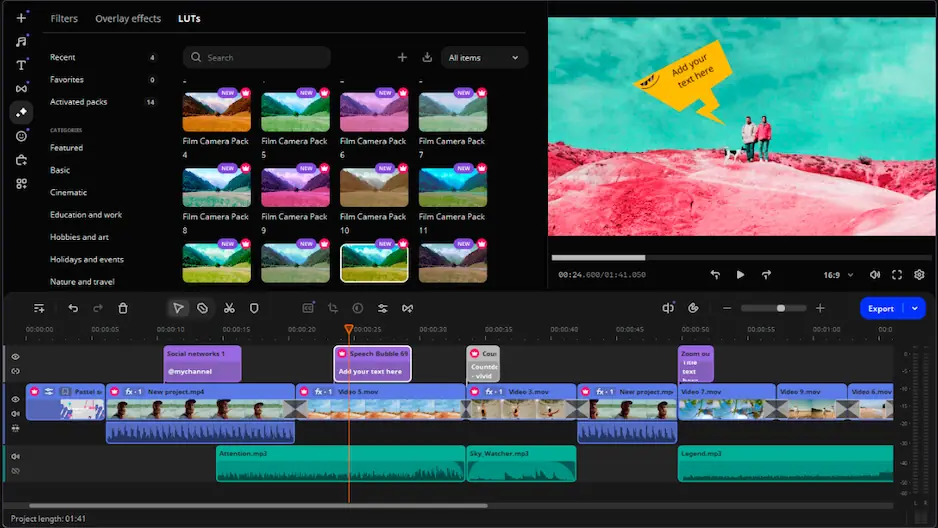
So, you have it: the fullest Premiere® Pro and DaVinci Resolve comparison. If you do not like either product, here is Movavi Video Editor. It sidesteps the dense multi-pane clutter of the cinema platform while keeping a cleaner timeline structure than the subscription application.

The software comes equipped with automated subtitles, background removal, smart stabilization, and AI enhancement tools. It gives you a clean workspace for immediate results. You do not have to watch long instruction videos or pay for endless monthly tiers. It runs smoothly on standard laptops, organizing creative assets clearly so you can finish video tracks without technical friction.


Frequently asked questions

Premiere® Pro or DaVinci Resolve: Which app is ultimately the best?

Your specific production goal dictates the winner. Adobe® Premiere® Pro wins for fast narrative assembly, collaborative client reviews, and text-based timeline clipping. DaVinci Resolve excels at long-form cinema, precise node color grading, and studio audio design.

Can I use DaVinci Resolve and Adobe® Premiere® Pro for free without watermarks?

DaVinci Resolve offers a highly capable free version that leaves your regular project exports completely clean up to 4K resolution. Adobe® Premiere® Pro does not provide a permanent free tier. It offers a short trial window before locking the interface behind a payroll screen.

What is a decent alternative if neither program fits my needs?

Movavi Video Editor serves as a great middle ground. This alternative skips the dense multi-pane interface of DaVinci Resolve and the complex track nestings of Adobe® Premiere® Pro. It includes automated subtitles, background removal, and smart tools that run light on basic laptops.

Have questions?
If you can’t find the answer to your question, please feel free to contact our Support Team.
Join us for discounts, editing tips, and content ideas

1.5M+ users already subscribed to our newsletter

By signing up, I agree to receive marketing emails from Movavi and agree to Movavi's Privacy Policy.