
DaVinci Resolve vs. After Effects®: Features, Pricing, Performance Compared

Edited by
Ben Jacklin
9,974

Social media drives the demand for video content. Creators who monetize their work need solid desktop applications to handle client projects. This DaVinci Resolve vs. After Effects® breakdown compares two different systems built for separate editing tasks. We will analyze the core facts to help you find the right software for your workstation.

Comparison parameter

DaVinci Resolve

After Effects®

Who it's for

Hollywood film crews, commercial editors, and multi-track audio mixers

Hardcore motion designers, vector animators, and commercial graphic editors

Supported platforms

Windows, macOS, and Linux

Windows and macOS

Ease of use

Intimidating interface with multiple highly specialized internal pages

Straightforward layer stack that feels familiar to Photoshop® graphics users

Quick summary

Best for professional workflows: Adobe® After Effects® wins when your creative business relies entirely on standalone graphic assets, animated brand logos, and intricate vector shape layers.

Best for color grading: DaVinci Resolve dominates the entire industry with its elite color page wheels, advanced HDR adjustments, and raw cinema file processing.

Best for advanced editing: DaVinci Resolve provides an unmatched multi-track cutting experience by placing a full non-linear editor, a node compositor, and a sound studio inside one interface.

Best for overall performance: DaVinci Resolve takes the lead because the code utilizes raw GPU hardware scaling to guarantee smooth timeline playback without constant RAM preview caching.

Ease of use

DaVinci Resolve

After Effects®

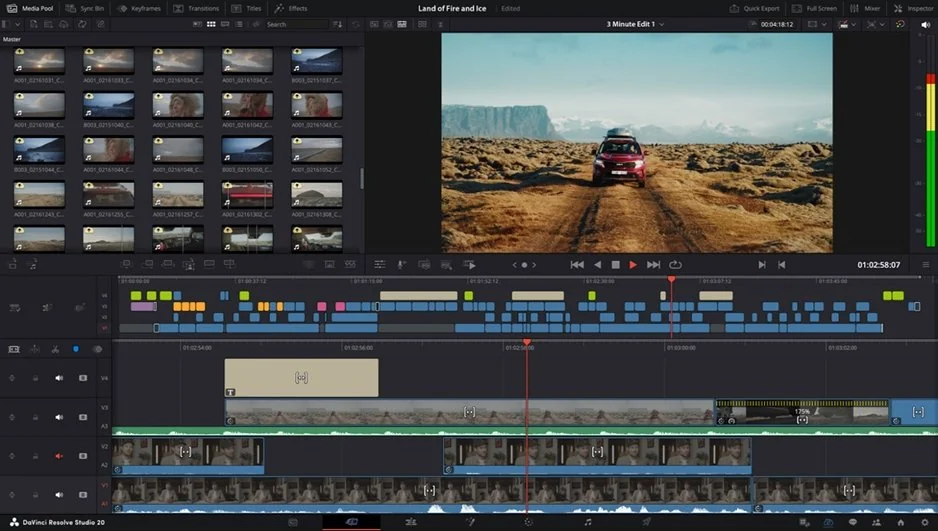
DaVinci Resolve is designed for professional studio environments and advanced post-production workflows. The interface combines editing, color grading, sound design, and visual effects inside one platform, but the layout feels dense and technical for new users. Beginners often need several days of training before basic navigation becomes comfortable. Specialized tabs like Fusion and Color require understanding node-based workflows and advanced editing concepts, making the learning curve much steeper than most consumer editing tools.

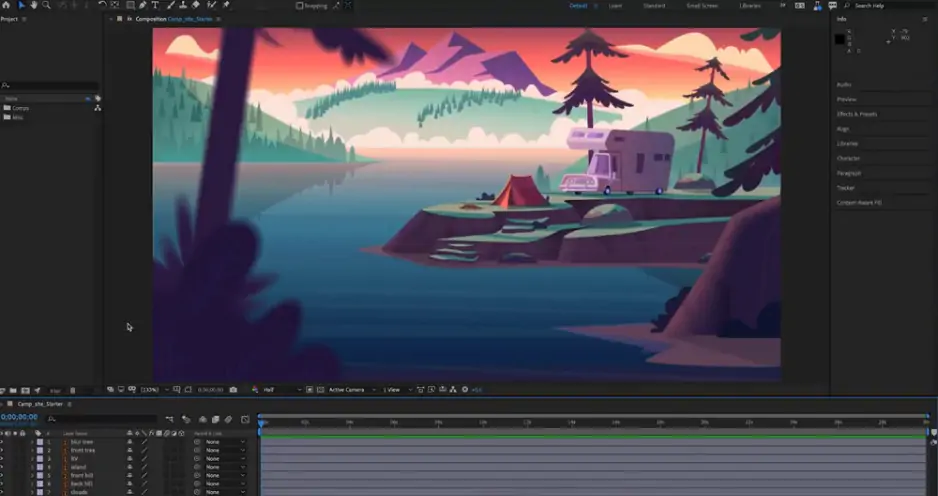
Adobe® After Effects® uses a more familiar layer-based timeline system that feels approachable for users coming from Photoshop or other Adobe applications. Motion designers and commercial editors can start animating titles, transitions, and effects relatively quickly thanks to built-in presets and a classic panel structure. While massive compositions can eventually become complicated, the early onboarding experience is much smoother than in DaVinci Resolve.

Winner: in this After Effects® and DaVinci Resolve comparison, After Effects® wins for ease of use because its traditional layer-based interface feels more intuitive and beginner-friendly during the first stages of learning.

Features

DaVinci Resolve combines advanced editing, professional HDR color grading, multi-camera synchronization, Fairlight audio production, and Fusion visual effects inside one application. Professional editors use it for RAW video processing, cinematic color correction, multi-channel sound mixing, and advanced VFX workflows. The Fusion page introduces node-based 3D tracking and compositing systems that deliver extremely deep technical control for film production.

After Effects® focuses heavily on motion graphics, visual effects, and animated compositions rather than full-scale video editing. The software includes advanced typography tools, custom vector animation, 3D lighting environments, particle systems, and more than 1300 built-in textures. Editors can also create reusable motion templates for Adobe® Premiere® Pro workflows. However, After Effects® lacks traditional multi-track video editing and professional sound production tools.

Winner: DaVinci Resolve wins because it offers a much broader set of editing, grading, sound, and post-production features inside one platform.

Performance

DaVinci Resolve is heavily optimized for GPU acceleration and performs extremely well on professional workstations. The software handles RAW 4K footage, HDR timelines, and large cinematic projects efficiently when paired with strong graphics hardware. Timeline scrubbing and rendering remain smooth even with demanding video formats, making Resolve highly reliable for professional production pipelines.

After Effects® relies heavily on RAM and disk caching to manage complex compositions and layered animations. Large projects with many nested effects can become slow without high-end hardware configurations. Motion graphics workflows remain powerful, but playback lag and long rendering times become common on weaker systems.

Winner: DaVinci Resolve wins because its GPU-focused optimization processes heavy RAW and 4K video files more efficiently and with greater stability.

Pricing

DaVinci Resolve offers one of the strongest free versions available in professional video production. Users can export clean Ultra HD 4K videos without watermarks and access most core editing tools completely free. The Studio version costs a single one-time payment of $295 and includes lifetime updates without recurring subscriptions.

After Effects® only provides a short seven-day free trial before requiring a monthly Adobe subscription. Users typically pay $22.99 per month for the standalone application or more for full Creative Cloud® bundles. Without an active subscription, exporting projects without restrictions is impossible.

Winner: DaVinci Resolve wins because it eliminates ongoing subscription costs and provides a highly capable free version.

Platform compatibility

DaVinci Resolve supports Windows, macOS, and Linux systems, making it highly flexible for professional studios and technical production environments. Linux compatibility especially benefits high-end VFX studios and enterprise workflows that depend on customized workstation setups.

Adobe® After Effects® runs only on Windows and macOS. Adobe focuses mainly on mainstream creative professionals rather than broader operating system flexibility.

Winner: DaVinci Resolve wins because it supports a wider range of operating systems, including Linux-based production setups.

AI tools

DaVinci Resolve uses the DaVinci Neural Engine to automate advanced technical tasks. Features like Magic Mask object tracking, smart reframing, facial recognition, voice isolation, and automatic transcription significantly reduce manual editing time while maintaining professional precision.

Adobe® After Effects® relies on Adobe Sensei AI technologies. The AI Object Matte feature allows creators to isolate moving subjects quickly, while Content-Aware Fill automatically removes unwanted background elements. These tools are extremely useful for motion graphics and compositing workflows.

Winner: DaVinci Resolve wins because its Neural Engine automates a broader range of technically demanding tasks with faster and more precise results.

Pros & cons

DaVinci Resolve
Pros:
  • Elite color correction

  • Lots of powerful editing tools

  • Comprehensive free version

  • Fast GPU rendering

Cons:
  • Overwhelming sub-menus

  • High hardware demands

After Effects®

Pros:
  • Easy to use

  • Superior kinetic typography

  • Massive script ecosystem

  • Quick Premiere® links

Cons:
  • Monthly subscription costs

  • Zero multi-track audio mixing

  • Slow preview generation

Best use cases

DaVinci serves professionals who shoot raw cinema footage, full-length documentaries, and high-tier YouTube productions that require deep color grading. It also easily appeals to business editors who need a complete audio and video pipeline to finalize commercial client work in one seat.

After Effects® is different. It targets specialized motion designers who create short-form TikTok graphics, animated logos, kinetic typography, and complex intro sequences. It handles multi-layered visual compositions perfectly but fails at casual storytelling or basic video stitching.

Final verdict

Here is your ultimate comparison for the DaVinci Resolve and After Effects® matchup. It clearly shows where each product stands in the current After Effects® vs. DaVinci Resolve opposition. If you want an entire post-production studio with no monthly fees, choose Resolve. But, grab After Effects® if you need complex vector shapes and kinetic text. Both programs demand powerful computers, cost serious money, and require months of practice.

Alternative: Movavi Video Editor
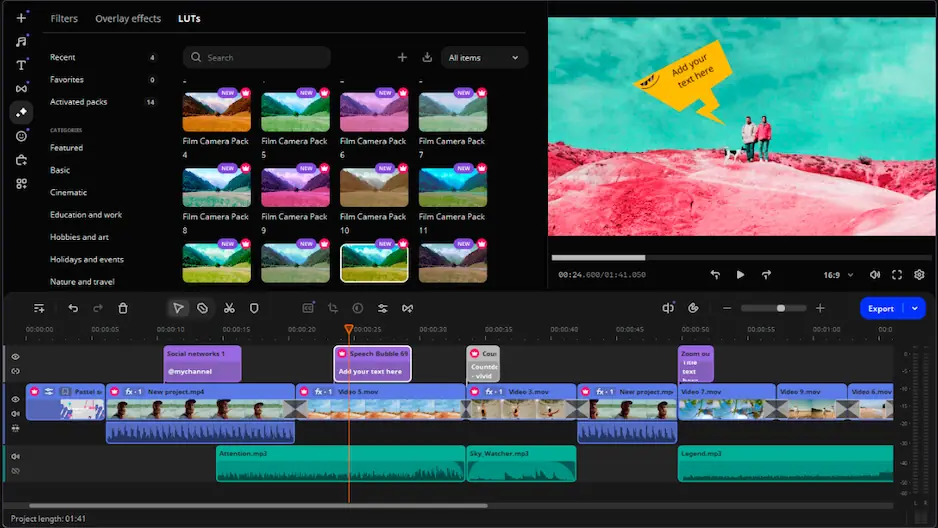
If neither of these software editors catches your fancy, look at Movavi Video Editor to cut out the technical strain entirely. Movavi Video Editor drops the complex node networks and messy layers for a clean timeline that you master in five minutes. It operates on modest laptops without heavy GPU upgrades or massive RAM configurations.

You get instant access to built-in audio tracks, trendy stickers, and rapid stabilization tools. The interface is understandable without specific training, so you’re saved from reading dense manuals. The software exports clean files directly to social media channels with a single click. It functions as a straightforward tool for creators who want results without the tough learning lesson.


Frequently asked questions

DaVinci Resolve vs. After Effects®: which app is ultimately the best?

Different video tasks require different instruments. DaVinci Resolve takes the lead if your workflow requires multi-cam trimming, multi-track audio mixing, and meticulous color tuning. After Effects® claims the spot when you build text transitions, puppet graphics, or raw vector math from scratch. Blackmagic speeds up standard media timelines, whereas Adobe stays the default choice for dedicated kinetic animators. This core division centers the DaVinci Resolve vs. After Effects® industry debate.

What is a decent alternative?

Movavi Video Editor bypasses dense textbooks and multi-layered submenus by offering an unbloated cutting track. It skips node graphs entirely to give you basic cutters, audio tracks, and tracking markers. Your standard office laptop handles the processing without stuttering, eliminating any need for workstation graphics chips. You import clips, click twice to balance the shake, and push your file to the web. It provides a quick way out for creators who want to dodge the DaVinci Resolve and After Effects® technical tax.

Can I use both products for free?

Blackmagic ships a surprisingly uncrippled free tier that renders clean 4K files without slap-on watermarks. It unlocks the editing tracks, audio mix suites, and primary color tools without holding your files hostage. Adobe runs on a seven-day clock, letting you test the layout for exactly one week. Once that timer expires, the app locks down until you authorize a monthly billing agreement.

Have questions?
If you can’t find the answer to your question, please feel free to contact our Support Team.
Join us for discounts, editing tips, and content ideas

1.5M+ users already subscribed to our newsletter

By signing up, I agree to receive marketing emails from Movavi and agree to Movavi's Privacy Policy.