
Clipchamp vs. iMovie: Features, Pricing, Performance Compared

Edited by
Ben Jacklin
10,971

Everyone concocts clips today and makes money through blogging, which creates a massive need for great video editors. The ultimate question often comes down to Clipchamp vs. iMovie, but picking the right option is not as obvious as it seems. One side offers platform freedom, while the other relies on pure hardware optimization. Take a close look at our direct breakdown below to see which tool fits your specific workflow.

Comparison parameter

Clipchamp

iMovie

Who it's for

Social media managers, beginners, office teams

iPhone shooters, Mac hobbyists, casual creators

Supported platforms

Windows 10/11, Google Chrome, Microsoft Edge

macOS, iOS, iPadOS

Ease of use

High (browser drag-and-drop workspace)

High (clean layout, magnetic timeline)

Quick summary

Best for professional workflows: Clipchamp takes this spot. It connects straight to your company's Teams and OneDrive accounts, so your videos stay secure inside the office network.

Best for color grading: iMovie wins here. You get actual sliders to adjust temperature, exposure, and saturation. Clipchamp forces you to use pre-made creative filters instead.

Best for advanced editing: iMovie handles this best. The timeline accepts heavy, high-bitrate Apple ProRes footage without locking up, while Clipchamp struggles with raw files.

Best overall performance: iMovie crushes this category. The code communicates directly with Apple silicon chips to scrub 4K footage instantly and export files faster than a browser tab.

Ease of use

Clipchamp

iMovie

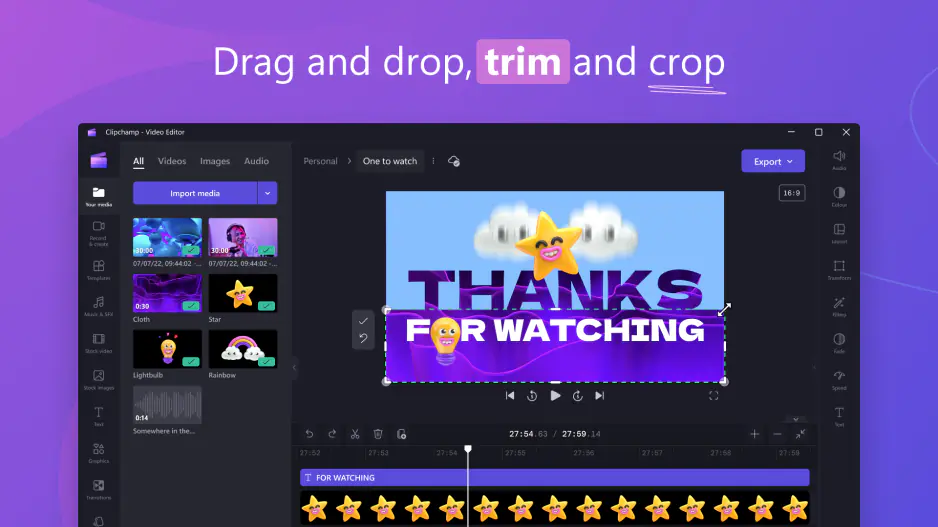
Clipchamp is designed for people who want to edit videos quickly without learning complicated software. The interface works directly inside Chrome or Edge and uses a simple drag-and-drop workflow that feels instantly familiar. Users can throw clips onto the timeline, add text, trim scenes, and export content without touching advanced settings or reading tutorials. The browser-based layout removes most technical friction and makes the entire editing process feel lightweight and accessible.

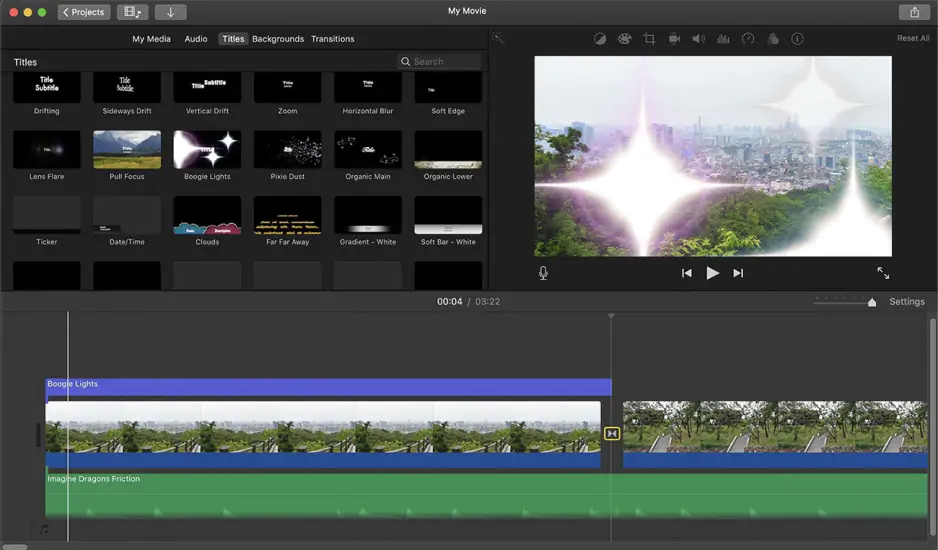
iMovie offers a polished editing experience, but Apple’s magnetic timeline behaves differently from traditional video editors. Clips automatically stick together and rearrange themselves while editing, which can confuse users expecting manual track control. While the interface remains clean and beginner-friendly overall, adapting to Apple’s editing logic takes some practice for first-time users.

Winner: Clipchamp wins because its browser-based drag-and-drop workflow allows users to start editing immediately with virtually no onboarding.

Features

Clipchamp focuses on fast social content and simple business editing workflows. The software includes multiple video tracks, text overlays, stock media integration, basic filters, subtitle generation, and direct publishing to TikTok, YouTube, and Dropbox. Microsoft 365 users also gain access to Copilot AI for generating rough presentation-style videos from prompts. However, Clipchamp lacks advanced professional tools like multi-camera syncing and high-end color grading systems.

iMovie takes a more traditional editing approach optimized for Apple users. The software supports clean timeline editing, standard color grading, basic green-screen effects, audio noise reduction, cinematic trailer templates, and native Apple ProRes workflows. While the editing tools feel refined and stable, the software limits users to only two video tracks, making complex layered projects much harder to build.

Winner: this category is essentially a tie. Clipchamp offers stronger flexibility for social media and cloud-connected workflows, while iMovie provides smoother ProRes support and cleaner traditional editing tools.

Performance

Clipchamp processes footage locally on your computer instead of forcing users to upload files to remote cloud servers. This significantly speeds up small and medium editing projects. However, because everything runs inside a browser environment, massive high-bitrate files and complex timelines can still create lag during editing and playback.

iMovie performs exceptionally well because Apple optimized the software specifically for macOS and Apple silicon chips. Timeline playback feels smooth even with large 4K files, and exports finish remarkably fast thanks to full hardware acceleration integration. Apple’s ecosystem control gives iMovie a major technical advantage in raw playback speed and rendering efficiency.

Winner: iMovie wins comfortably because its deep hardware optimization delivers faster rendering and smoother playback on Apple devices.

Pricing

Clipchamp offers a free version that supports standard 1080p exports and basic editing features. Premium features like 4K exports and advanced stock assets require a monthly subscription costing around $11.99. However, many Microsoft 365 subscribers already receive premium access as part of their existing plan.

iMovie is completely free for Apple users. There are no subscriptions, hidden export restrictions, or watermarks. Users can create and export full-resolution projects immediately without paying extra fees or purchasing upgrades.

Winner: iMovie wins because it provides all core features entirely free with no recurring subscription costs.

Platform compatibility

Clipchamp runs on Windows systems directly through standard browsers like Chrome and Edge, and users can also install it as a standalone app from the Microsoft Store. Because the software is browser-based, it remains highly accessible across a wide range of everyday computers.

iMovie is locked entirely inside Apple’s ecosystem. The software works only on Macs, MacBooks, iPhones, and iPads. Apple does not provide browser versions or Windows support, making the platform inaccessible for non-Apple users.

Winner: Clipchamp wins because it works on standard Windows devices through any compatible browser without requiring expensive hardware ecosystems.

AI tools

Clipchamp includes several modern AI-powered tools designed to speed up content creation. Users get automatic subtitle generation, text-to-speech voiceovers, audio cleanup, and Copilot-powered draft generation from text prompts. These tools help creators and office workers produce videos quickly under tight deadlines.

iMovie includes only very basic automated features like simple color correction and stabilization. The software completely lacks modern AI-powered generation systems, automatic scripting, smart voice tools, or advanced automation workflows.

Winner: Clipchamp wins easily because its Copilot integration and AI-powered editing tools dramatically reduce manual editing work compared to iMovie’s largely traditional workflow.

Pros & cons

Clipchamp

Pros:
  • Works directly in browsers

  • Uses automated Copilot AI

  • Links directly to TikTok and YouTube layouts

Cons:
  • Lags with large files

  • Locks premium items behind paywalls

  • Requires internet

iMovie

Pros:
  • Provides fast timeline rendering on Mac hardware

  • Available for free

  • Supports professional Apple ProRes video files

Cons:
  • Restricted to Apple devices

  • Limits users to two tracks

  • Lacks automated tools

Best use cases

Clipchamp fits social media channels, absolute beginners, and office teams. The timeline handles vertical formats and links directly to TikTok and YouTube shorts. You open a basic web window and drop footage on screen without desktop installations. The work tier connects straight to corporate Teams and OneDrive storage.

But, iMovie satisfies widescreen creators and Mac users who prefer offline file management. The system processes heavy 4K camera tracks smoothly without an active internet connection. However, the layout lacks mobile publishing options, auto-transcription tools, and shared corporate network pipelines.

Final verdict

Choosing between Clipchamp and iMovie mostly comes down to editing depth versus accessibility. Clipchamp suits social media creators and business teams who need quick web tools and automated AI layouts. iMovie remains the better option for Mac owners who require fast performance and free ProRes file exports.

Alternative: Movavi Video Editor
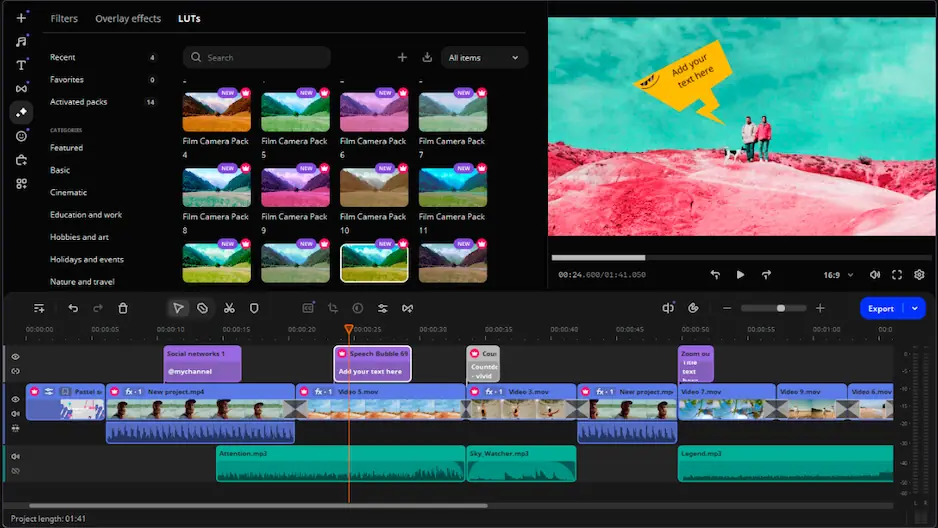
If nothing conquers you, look at Movavi Video Editor. This software outperforms both tools because it runs on both Windows and Mac. You do not suffer through the slow browser lag of Clipchamp. You do not face the strict Mac limits of iMovie. It gives you fast desktop editing, extra video tracks, and deep audio controls.

The built-in neural network automatically removes annoying background noise and isolates vocals in one click. You also get a massive store of animated intros, stickers, and cinematic titles to dress up your timeline. It simply offers total freedom on your computer.


Frequently asked questions

Clipchamp vs. iMovie: which app is ultimately the best?

Evaluating iMovie vs. Clipchamp immediately exposes the rigid ecosystem divide and the answer depends on your computer’s type. iMovie is best for speed if you own a Mac. Clipchamp is best if you want quick browser edits and automated AI tools.

What is a decent alternative if neither fits?

Movavi Video Editor is your best choice. It gives you full timelines, plenty of effects, and fast offline editing on Windows and Mac computers.

Do iMovie and Clipchamp have a free product and how do they deal with a watermark?

iMovie is free and never adds a watermark. Clipchamp has a free version with clean 1080p exports, but stock files cost extra. Movavi offers a free trial but puts a large watermark on your video until you buy it.

Have questions?
If you can’t find the answer to your question, please feel free to contact our Support Team.
Join us for discounts, editing tips, and content ideas

1.5M+ users already subscribed to our newsletter

By signing up, I agree to receive marketing emails from Movavi and agree to Movavi's Privacy Policy.