CapCut vs. Davinci Resolve: Features, Pricing, Performance Compared

Edited by
Ben Jacklin
5,765

Modern creators are absolutely obsessed with clip production and social video feeds. Because of this craze, choosing the right editing software is what content makers are peeved about. Since CapCut and DaVinci Resolve are both iconic names in the creative community, it makes perfect sense to weigh them side by side. Below is your comprehensive DaVinci Resolve and CapCut comparison where we leave no stone unturned and show you exactly what each app does best. Let’s get into it.

Comparison parameter

CapCut

DaVinci Resolve

Who it's for

Vloggers, TikTokers, and casual social media creators

Filmmakers, professional colorists, and studio editors

Supported platforms

Android, iOS, Windows, macOS, Web browsers

Windows, macOS, Linux, iPadOS

Ease of use

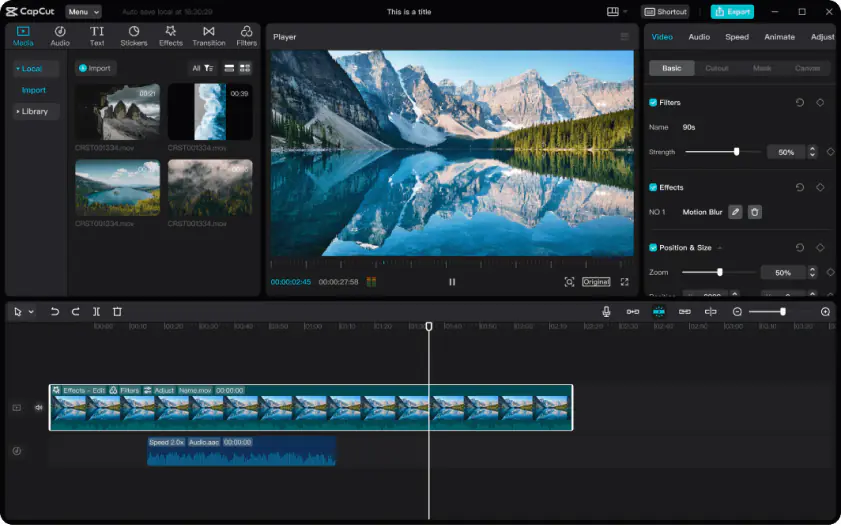
Straightforward drag-and-drop layout with clear buttons

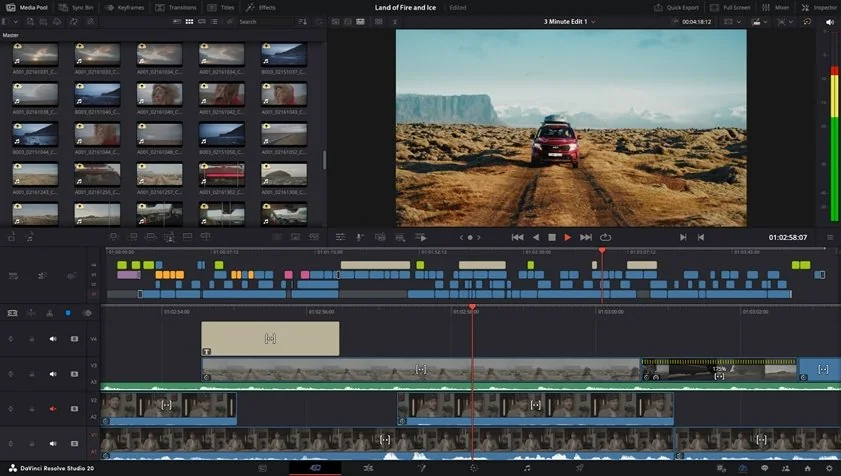
Dense multi-pane interface with specialized panels

Quick summary

  • Best for TikTok: CapCut wins due to its instant vertical layouts, direct profile publishing, and native integration with trending audio tracks.
  • Best for beginners: CapCut claims the prize because the interface requires no prior training, allowing users to cut clips immediately.
  • Best mobile workflow: CapCut dominates this space by syncing active project timelines seamlessly across mobile phones, tablets, and desktops.
  • Best free option: DaVinci Resolve outperforms the market by giving users unrestricted access to professional tools without watermarks or hidden trial limits.

Ease of use

CapCut

DaVinci Resolve

CapCut is designed for people who want to start editing immediately without spending hours learning professional software. The interface uses a drag-and-drop layout with clear buttons and trendy templates placed directly on the main screen. Even complete beginners can understand how to trim clips, add effects, or sync music without opening tutorials or manuals. The app avoids complex editing terminology and hides advanced mechanics behind simple automation. Because of this approach, many creators on TikTok, Reels, and Shorts use CapCut daily for quick content production.

DaVinci Resolve takes the opposite approach. The software is built for professional editors, colorists, and post-production teams working on movies, commercials, and advanced YouTube productions. The interface contains multiple production pages like Fusion and Fairlight, which can feel overwhelming for new users. Even basic actions often require navigating through specialized sub-menus and node systems. Beginners usually need several days just to feel comfortable with the layout. However, experienced editors gain much deeper control over every visual and audio element once they master the workflow.

Winner: CapCut wins in terms of ease of use because it removes onboarding barriers and allows creators to edit content almost instantly.

Features

CapCut focuses heavily on social media content creation and rapid publishing. When comparing CapCut vs. DaVinci Resolve, the former strikes with its automation. The platform includes thousands of ready-made templates, trendy filters, automatic subtitles, beat synchronization, speed ramping, and one-click transitions. Users can instantly prepare vertical videos optimized for TikTok, Instagram Reels, and YouTube Shorts. The app also includes useful AI-based automation such as background isolation and auto-reframing, helping creators produce content faster without technical editing knowledge.

DaVinci Resolve is built for advanced post-production rather than viral trends. Instead of social media templates, the software offers professional-grade tools like Fusion visual effects, 3D camera tracking, multi-layer audio editing in Fairlight, and industry-leading color grading controls. Resolve supports cinema-oriented export formats including ProRes, DNxHR, IMF, DCP, H.264, and H.265. Professional creators use these tools for documentaries, music videos, feature films, and high-end commercial projects where technical precision matters more than speed.

Winner: CapCut works better for social media creators and fast publishing, while DaVinci Resolve dominates in cinematic production and technical depth.

Performance

CapCut runs smoothly on almost any device, including Android phones, iPhones, budget laptops, and web browsers. The software compresses media efficiently, allowing quick exports and stable editing performance even on weaker hardware. This accessibility makes it ideal for creators who edit videos on the go or switch between devices frequently. However, extremely large 4K projects can slow down playback and timeline responsiveness.

DaVinci Resolve demands far more hardware power. The software relies heavily on GPU acceleration and large amounts of RAM, especially when working with RAW footage, advanced color grading, or visual effects. On weak systems, playback and rendering can become frustratingly slow. But on professional workstations, Resolve delivers excellent stability, flawless rendering precision, and smooth handling of complex timelines with massive media files.

Winner: DaVinci Resolve wins for professional workstation stability and rendering precision, while CapCut wins for accessibility and smooth performance on everyday devices.

Pricing

CapCut offers a generous free version with many filters, effects, and export options available without payment. Standard exports usually remain watermark-free, although some premium templates add branding unless users upgrade to Pro. The paid version uses a monthly subscription model that unlocks additional AI credits, cloud storage, and premium assets.

DaVinci Resolve includes one of the strongest free plans in the video editing market. Users can export Ultra HD 4K videos without watermarks and access most professional editing tools at no cost. The Studio version requires a single payment of $295 instead of an ongoing subscription. This one-time purchase unlocks advanced AI features, noise reduction, stereoscopic tools, and enhanced rendering performance.

Winner: DaVinci Resolve provides better long-term value because its Studio version avoids recurring subscription fees while still offering professional-level functionality.

Platform compatibility

CapCut supports nearly every modern platform, including Android, iPhone, Windows, Mac, and web browsers. One of its biggest strengths is cloud synchronization. Users can start editing on a smartphone and continue working later on a desktop without manually transferring files. This flexibility perfectly fits modern social media workflows.

DaVinci Resolve mainly targets desktop production environments. It works on Windows, macOS, and Linux systems, with a dedicated version available for high-end iPads. Unlike CapCut, Resolve does not support standard mobile phones or browser-based editing. Most assets stay tied to local storage or Blackmagic Cloud collaboration systems built for studio workflows.

Winner: in the DaVinci Resolve and CapCut comparison CapCut clearly wins for multi-device flexibility and seamless cloud synchronization.

AI tools

AI tools play a huge role in the CapCut and DaVinci Resolve debate and AI automation is one of CapCut’s biggest strengths. The software automatically generates subtitles, isolates backgrounds, synchronizes clips to music beats, and reframes videos for vertical formats with almost no manual work. These tools are designed to help creators produce viral-style content quickly and efficiently. When you put DaVinci Resolve vs. CapCut, CapCut targets rapid AI trend-chasing.

DaVinci Resolve approaches AI differently. The DaVinci Neural Engine focuses on professional precision rather than speed alone. It supports advanced facial recognition, Magic Mask object tracking, intelligent scene color matching, studio-level vocal isolation, and advanced audio cleanup. These features help professionals save time while maintaining maximum technical quality.

Winner: CapCut wins for fast automation and beginner convenience, while DaVinci Resolve delivers more advanced AI precision for professional post-production workflows.

Pros & Cons

CapCut
Pros:
  • Instant onboarding

  • Mobile sync

  • Built-in viral sounds

  • Automatic captions

Cons:
  • Lacks advanced raw grading

  • Limited audio mixing tools

  • Monthly subscription model

DaVinci Resolve
Pros:
  • Elite industry color wheels

  • No watermarks

  • One-time payment

  • Advanced VFX nodes

Cons:
  • High hardware demands

  • Difficult interface layout

  • Zero built-in social templates

Best use cases

  • YouTube production: DaVinci Resolve serves multi-camera layouts and long-form vlogs. CapCut builds rapid, punchy video essays.
  • TikTok & social content: CapCut delivers trending sound effects and vertical layouts. It builds short-form virality directly on mobile devices.
  • Beginner editors: CapCut cuts clips instantly. First-time creators skip complex handbooks and training videos.
  • Professional film workers: DaVinci Resolve supplies advanced tracking parameters and depth maps. Cinema distribution requires these precise tools.
  • Business & marketing promos: CapCut builds corporate announcements and commercial ads quickly. Teams use built-in text templates and stock assets.
  • Casual everyday editing: CapCut runs well on low-end computer hardware. Anyone can compile holiday travel clips in minutes.

Final verdict

Here you've got a full comparison of both world-class video tools, CapCut vs. DaVinci Resolve. CapCut dominates the fast-paced realm of vertical social clips through immediate automated effects and easy multi-device access. DaVinci remains the undisputed choice for film projects, giving editors total manual authority over color grading and studio sound design.

Alternative: Movavi Video Editor

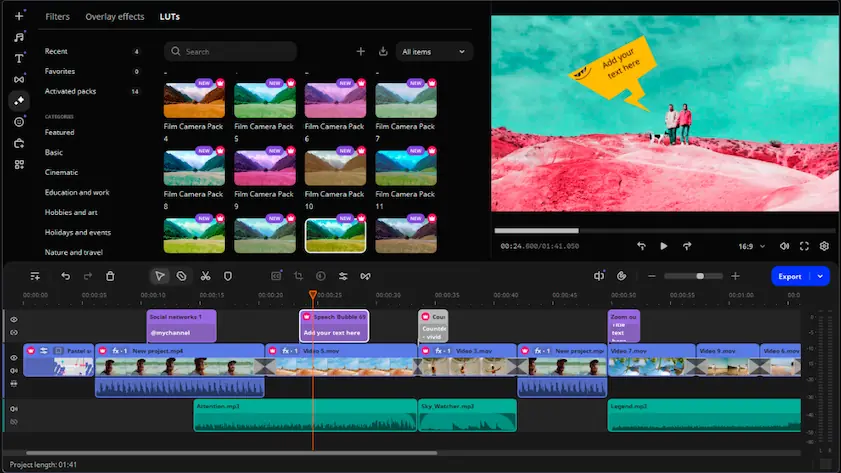
If neither application hits the mark for your workflow, Movavi Video Editor fills the gap. It walks a fine line between the two products, dropping the complex tabs of Resolve while providing cleaner timeline tracking than CapCut.

The software includes automated subtitles, clean background removal, smart stabilization, and automated audio tools. It skips the dense menus of studio platforms to deliver clean results without demanding hours of tutorial viewing. It sits in a sweet spot, running light on standard laptops while offering specialized creative tools that just make editing feel simpler.

Frequently asked questions

CapCut vs. DaVinci Resolve: Which software is ultimately the best?

Your specific production goal dictates the winner. CapCut wins for rapid social media content, vertical layouts, and automated subtitle generation. DaVinci Resolve is favored for long-form cinema, precise node color grading, and studio audio design. CapCut delivers speed, while DaVinci Resolve targets absolute creative control.

Can I use CapCut and DaVinci Resolve for free without watermarks?

Yes, both products offer highly capable free tiers. Regular exports stay completely clean in both programs. However, a close feature analysis reveals a minor difference in templates. CapCut applies a watermark to specific pre-made automated styles unless you buy a subscription, while DaVinci Resolve never puts watermarks on standard clips up to 4K resolution.

What is a decent alternative if neither program fits my needs?

Movavi Video Editor serves as a great middle ground. Some users need a simpler desktop tool that avoids heavy installation processes. Movavi Video Editor skips the dense multi-pane interface of DaVinci Resolve but provides a cleaner timeline than CapCut. It includes automated subtitles, background removal, and smart tools that run light on basic laptops.

Have questions?
If you can’t find the answer to your question, please feel free to contact our Support Team.
Join us for discounts, editing tips, and content ideas

1.5M+ users already subscribed to our newsletter

By signing up, I agree to receive marketing emails from Movavi and agree to Movavi's Privacy Policy.