
Alight Motion vs. CapCut: Features, Pricing, Performance Compared

Edited by
Ben Jacklin
6,415

Alight Motion and CapCut split along one clear line: animation depth versus everyday editing speed. Alight Motion focuses on motion graphics, keyframe animation, and visual effects, appealing to creators who want detailed mobile edits. CapCut stays fast and beginner-friendly, with templates, auto-captions, and social-ready effects. Alight Motion suits animators, while CapCut fits short-form, social-first editors. 

Comparison parameter

Alight Motion

CapCut

Who it's for

Motion designers, animators, mobile VFX creators

Beginners, social creators, short-form editors

Supported platforms

iOS, Android, Windows, macOS

iOS, Android, Windows, macOS, web

Ease of use

Layer-based interface with more manual control

Simple, guided workflow

Quick summary

Best for TikTok: CapCut wins here, with built-in trending templates, auto-captions, and export presets tuned for vertical, short-form uploads.

Best for beginners: CapCut keeps the workflow guided and approachable, so first-time editors can assemble a finished clip without much setup.

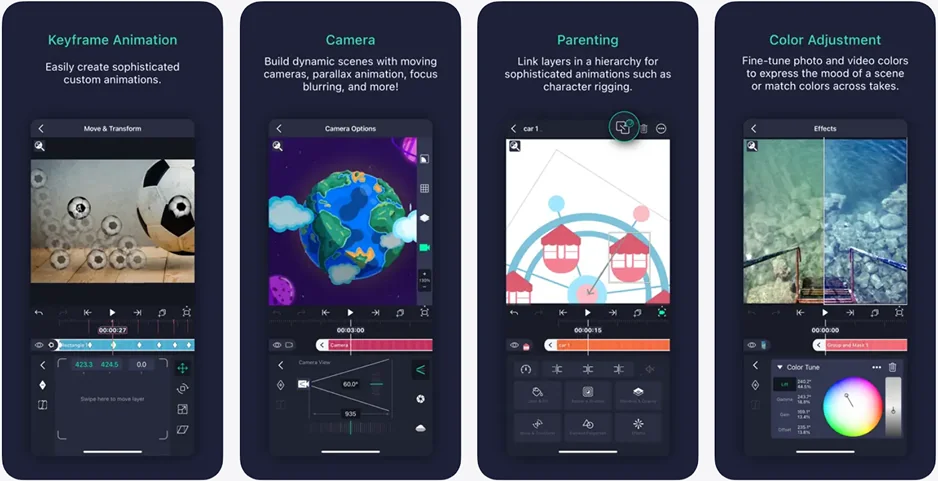
Best mobile workflow: Alight Motion goes further on phones and tablets, offering keyframe animation and vector tools that most mobile editors leave out.

Best free option: Both are free to start, but CapCut unlocks more usable features upfront, while Alight Motion applies tighter limits and a watermark.

Ease of use

Alight Motion

CapCut

CapCut is built around getting people editing quickly. Opening a project drops you straight onto a single timeline, where trimming, adding text, and applying effects happen in the same view without hunting through menus. Onboarding leans on ready-made templates and clearly labeled tools, so someone editing their first video rarely has to guess what a button does. The layout stays clean even as clips and audio tracks pile up, which keeps short projects moving.

Alight Motion asks for a bit more patience. Its layer-based structure, keyframe controls, and animation panels give creators far more precision, but that depth means more panels to learn and more manual decisions before a clip comes together. Once the interface clicks, it feels powerful, though the early sessions take longer to settle into than CapCut's more guided approach.

Winner: CapCut, for smoother onboarding and a workflow that feels easier to learn during everyday editing.

Features

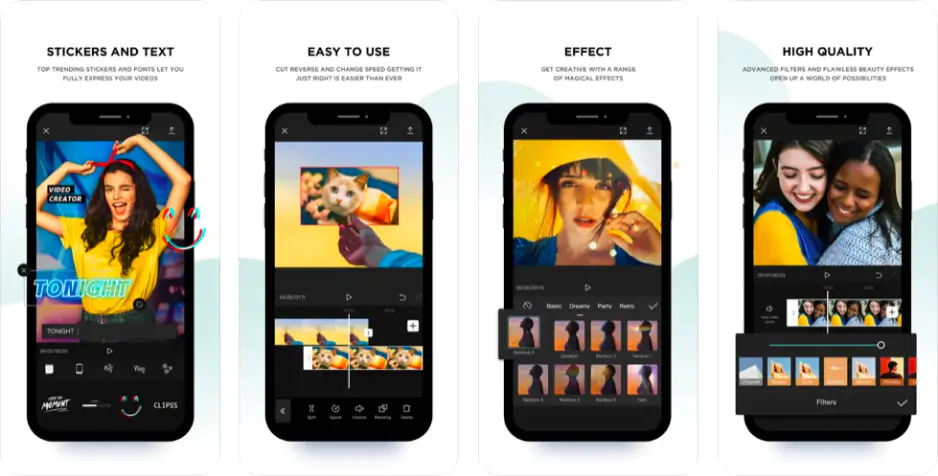
The Alight Motion vs. CapCut feature comparison splits along a familiar line: one app is built for animation, the other for fast social output. CapCut leans heavily on ready-made templates that sync clips to trending audio automatically, which turns a folder of raw footage into a finished Reel or Short in minutes. Its auto-captions transcribe speech into editable subtitles with a few taps, and there is a large library of animated text styles, stickers, and effects tuned for vertical formats. Transitions are equally plug-and-play, with beat-matched cuts and swipe effects that drop straight onto the timeline.

Alight Motion approaches the same tasks from a designer's angle. Instead of templates that assemble a video for you, it offers keyframe animation, vector graphics, blend modes, and effect layers that let creators build custom intros, motion titles, and visual effects from scratch. Subtitles and captions are possible but more manual, since the app expects you to place and animate text yourself rather than generate it automatically. That trade-off rewards precision over speed.

For TikTok, Shorts, and Reels specifically, both export clean vertical video, but their export presets reflect their priorities. CapCut includes platform-ready aspect ratios and quick sharing, while Alight Motion supports MP4, GIF, and PNG sequences for creators layering animation into other projects.

Winner: CapCut, for template-driven captions, effects, and transitions that make short-form publishing faster.

Performance

On phones, CapCut generally feels quick. Exports render fast for standard short-form clips, and the app stays stable through routine trimming, captioning, and effect work on most mid-range devices. Its free version is unusually generous, though some templates, effects, and premium sound tracks sit behind a Pro tier, and certain exported elements can carry branding tied to those extras. Heavier projects with stacked effects can slow playback, but everyday social edits rarely push the app that far.

Alight Motion asks more of the hardware because animation and keyframe processing are demanding by nature. On capable devices it runs smoothly, but older phones may stutter once several effect layers and vector elements stack up. The free version applies tighter limits and adds a watermark to exports, which the subscription removes. Both apps stay within mobile constraints on storage and resolution, though CapCut's lighter workload keeps it feeling more responsive during quick edits.

Winner: CapCut, for faster exports and steadier performance during lightweight mobile editing.

Pricing

Both CapCut and Alight Motion are free to download, but their paid tiers differ in feel. CapCut lets most creators edit, caption, and export without paying, reserving premium templates, effects, and some audio for its Pro subscription. Alight Motion also offers a free tier, though it is more restrictive and stamps exports with a watermark; a subscription starting around $4.99 per month removes it and unlocks the full effect library, with an annual option lowering the monthly cost. For everyday editing, CapCut simply hands over more usable features before asking for money.

Winner: CapCut, for offering more without a subscription or watermark on standard exports.

Platform compatibility

In the CapCut vs. Alight Motion platform comparison, both editors reach well beyond a single device. Alight Motion runs on iOS and Android devices, with desktop versions for Windows and macOS, keeping its animation workflow consistent across phones, tablets, and computers. CapCut covers the same mobile and desktop systems and adds a browser-based web editor, so projects can move between a phone and a laptop with little friction. For creators who bounce between devices during a single edit, CapCut's extra web access offers slightly more flexibility, though both handle cross-platform mobile editing comfortably.

AI tools

CapCut leans on AI to speed up the parts of editing that usually eat the most time. Auto-captions transcribe speech into synced subtitles, background removal isolates a subject without a green screen, and there are AI-driven effects, style filters, and text-to-speech voices aimed at social content. These tools are built for output: point them at a clip and they produce a shareable result quickly, which fits CapCut's fast-turnaround audience.

Alight Motion takes a narrower approach to AI. It includes automatic cutout and a handful of assistive features, but its strength still lies in manual animation rather than one-tap automation. Where CapCut hands you a finished effect, Alight Motion expects you to shape it yourself through keyframes and layers.

Pros & cons

CapCut

Pros:
  • Free to use, with most core editing tools available without a subscription

  • Beginner-friendly workflow that gets first-time editors to a finished clip fast

  • Large library of trending templates, effects, and transitions

  • Strong AI features like auto-captions, background removal, and text-to-speech

  • Works across iOS, Android, Windows, macOS, and a browser-based web editor

  • Export presets tuned for TikTok, Shorts, and Reels

Cons:
  • Premium templates, effects, and some audio require a Pro plan

  • Limited depth for detailed animation or motion graphics

  • Heavier projects with stacked effects can slow playback

  • Less manual control for creators who want to build effects from scratch

Alight Motion

Pros:
  • Advanced keyframe animation, vector graphics, and effect layers on mobile

  • Precise, layer-based control suited to custom motion titles and VFX

  • Available on iOS, Android, Windows, and macOS

  • Flexible export options including MP4, GIF, and PNG sequences

  • Affordable subscription plans

Cons:
  • Free version applies a watermark and tighter feature limits

  • Steeper learning curve before the interface feels comfortable

  • More demanding on hardware, so older devices may stutter

  • Captions and subtitles are largely manual rather than automated

  • Fewer ready-made templates for quick social edits

Best use cases

Both apps handle everyday video, but the editing experience shifts depending on the project.

YouTube: CapCut suits vlogs, tutorials, and talking-head videos where quick captions and simple cuts matter most. Alight Motion earns its place when a channel needs animated intros, motion titles, or custom graphic overlays.

TikTok and social content: CapCut fits naturally, with trending templates and vertical presets that keep short-form uploads moving. Alight Motion becomes useful once a clip relies on hand-built animation or effect-driven visuals.

Beginner editing: CapCut asks for less setup, so newcomers can import, trim, and export with little guidance. Alight Motion takes longer to learn but rewards the effort with deeper control.

Professional editing: Alight Motion offers more creative precision for motion designers, while CapCut covers polished but simpler professional clips.

Business projects: CapCut handles product demos, promos, and internal videos quickly, whereas Alight Motion adds branded animation when presentation quality matters.

Casual editing: CapCut feels effortless for personal clips and social posts, while Alight Motion is better saved for creators who enjoy experimenting with animation.

Final verdict

The choice really comes down to what kind of editing you enjoy. CapCut is the faster, friendlier tool, built to turn raw footage into polished social clips with minimal effort, which makes it the natural pick for beginners, TikTok creators, and anyone on a tight upload schedule. Alight Motion trades that speed for depth, giving animators and motion designers precise keyframe control that no template can replace. Pick CapCut for quick, everyday social video, and reach for Alight Motion when a project depends on custom animation and hand-built visual effects.

Alternative: Movavi Video Editor

If neither app feels quite right, try Movavi Video Editor. It avoids the steep animation learning curve of Alight Motion while offering more editing room than CapCut's template-driven approach. The interface stays clean and drag-and-drop simple, so importing clips, adding transitions, and exporting a finished video rarely requires much preparation. For creators who want to edit on a computer rather than a phone, it runs on both Windows and Mac.

Movavi Video Editor also packs in practical extras like effects, filters, titles, AI-assisted tools, and subtitle options without crowding the workflow. It handles YouTube videos, tutorials, presentations, and casual social clips well. For everyday editing that values balance over extremes, it is worth a look.


Frequently asked questions

Is CapCut better than Alight Motion for beginners?

For most first-time editors, yes. CapCut keeps everything on a single timeline and leans on templates, auto-captions, and clearly labeled tools, so a finished video rarely takes much setup. Alight Motion is capable too, but its layer-based animation workflow takes longer to learn before editing feels natural. Beginners who mainly want quick social clips will usually find CapCut more approachable.

Can Alight Motion replace a desktop animation program?

Not entirely, but it comes closer than most mobile apps. Alight Motion offers keyframe animation, vector graphics, blend modes, and effect layers that let creators build custom motion titles and visual effects on a phone or tablet. It works well for short animated pieces and graphic overlays, though large or highly complex projects are still easier to manage in dedicated desktop software.

Which app is better for TikTok and Reels?

CapCut fits short-form platforms most naturally. Its trending templates, beat-matched transitions, and vertical export presets are designed for TikTok, Shorts, and Reels, letting creators publish quickly. Alight Motion is the stronger choice only when a clip depends on hand-built animation or effect-driven visuals rather than fast, template-based editing. For routine social uploads, CapCut keeps the process faster and simpler.

Have questions?
If you can’t find the answer to your question, please feel free to contact our Support Team.
Join us for discounts, editing tips, and content ideas

1.5M+ users already subscribed to our newsletter

By signing up, I agree to receive marketing emails from Movavi and agree to Movavi's Privacy Policy.